

To backup a self hosted CRM database safely, take a consistent dump with the database's own tool (pg_dump for PostgreSQL, mysqldump for MySQL), pair it with a copy of your uploaded files and config, and send both to a second location you have actually restored from. Dump versus copy is the distinction that matters. Copying live database files or syncing a folder can produce a backup that looks complete and fails on restore.
TL;DR:
- Use the database's own dump tool (pg_dump or mysqldump with –single-transaction), because copying live data files can give you a backup that will not restore.
- Back up uploaded files, config and the app's secret key along with the database, or your restored records will point at missing attachments and unreadable fields.
- Follow 3-2-1: three copies, two kinds of storage, one offsite and encrypted, with at least one copy the CRM server cannot overwrite.
- Pick your recovery point first. A nightly dump means you can lose up to 24 hours of leads, calls and signed documents.
- Restore into a scratch database every month, compare row counts, and re-apply any customer deletion requests after a real restore.
Table of Contents
- Back Up a Self-Hosted CRM Database: Why the Job Is Yours Now
- What to Back Up: The Database Is Only Half of Your CRM
- Four Ways to Back Up a Self-Hosted CRM Database, Compared
- A Working Backup Script You Can Adapt Today
- Using GitHub Backup Scripts Without Inheriting Their Mistakes
- Restoring a Self-Hosted CRM Backup Without Making Things Worse
- How Often to Back Up, and How Long to Keep Copies
- Get a Self-Hosted CRM You Can Back Up With Ordinary Tools
- Frequently Asked Questions
- Sources
Back Up a Self-Hosted CRM Database: Why the Job Is Yours Now
When you rent a SaaS CRM, someone else worries about disk failure. When you run the CRM yourself, that worry moves to you, and it stays invisible until the day you need the data.
Four things destroy CRM data in practice: a failed disk, a bulk delete run against the wrong filter, a bad upgrade, and ransomware. Only the first is a hardware problem. The other three happen on a healthy server, so a RAID array or a provider's "redundant storage" is not a backup. CISA's #StopRansomware Guide tells organizations to keep offline, encrypted backups and to test regularly that those backups can be restored. That advice fits a five-person company as well as it fits a hospital.
This article covers the mechanics: what to copy, which tool to use, a script, and how to restore. For schedules and ownership, read Backup Strategy for a Self-Hosted CRM That Survives a Crash.
What to Back Up: The Database Is Only Half of Your CRM
Most backup tutorials stop at the database. A CRM that stores chats, tickets, e-signed documents and call recordings keeps a lot outside it.
| Component | Where it usually lives | How to back it up | What breaks if you skip it |
|---|---|---|---|
| Database | PostgreSQL or MySQL/MariaDB | Logical dump (pg_dump, mysqldump) | Everything: contacts, deals, history |
| Uploaded files | App storage directory or object storage | Archive or sync the folder | Records show, attachments and signed PDFs are gone |
| Config and secrets | .env file, config directory | Encrypted copy, stored separately | App will not start, or encrypted fields cannot be read |
| Integration settings | Database or config | Included above, but note API keys | Email, calling and chat connections need re-authorizing |
People miss secrets most often. Many applications encrypt some fields with a key held in a config file. If your database dump is perfect and that key is lost, the restored data can be unreadable. Keep the key in a password manager as well as in the backup.
Timing is the second miss. A dump taken at 2:00 and a files archive taken at 2:40 can disagree about which attachments exist. Run them back to back in one script.
Four Ways to Back Up a Self-Hosted CRM Database, Compared

| Method | Worst-case data loss | Restore effort | Main risk |
|---|---|---|---|
| Logical dump (pg_dump / mysqldump) | Time since last dump | Low, one command | Loss window equals your schedule |
| Base backup plus WAL/binlog archiving | Seconds to minutes | Medium, needs point-in-time steps | Setup mistakes go unnoticed |
| VM or volume snapshot | Time since snapshot | Low | Can capture a database mid-write |
| File sync (rsync, cloud folder) | Varies | Unpredictable | Sync copies deletions and corruption |
My pick for a small business is a logical dump every few hours, shipped offsite. It is boring, portable across server moves and easy to restore. PostgreSQL's documentation says pg_dump produces consistent backups even while the database is in use, without blocking other users. For MySQL, the --single-transaction option in mysqldump gives the same consistent view for InnoDB tables.
Add continuous archiving only when losing a few hours of activity would cost you real money, such as a call center logging hundreds of interactions a day. It is powerful, and it is also the method most likely to be configured wrong and never tested.
Use file sync as a transport only. If someone deletes 4,000 contacts at noon, a synced folder deletes them everywhere by 12:05.
A Working Backup Script You Can Adapt Today
This version assumes PostgreSQL, a database named crm_db, and uploads in /var/www/crm/storage. Change the names to match your install. Put the database password in ~/.pgpass so it never appears in the script.
#!/usr/bin/env bash
set -euo pipefail

STAMP=$(date +%Y%m%d-%H%M%S)
DEST=/var/backups/crm
mkdir -p "$DEST"

# 1. Consistent, compressed database dump
pg_dump -Fc -U crm_user crm_db > "$DEST/db-$STAMP.dump"

# 2. Uploaded files and config, taken immediately after
tar -czf "$DEST/files-$STAMP.tar.gz" /var/www/crm/storage /etc/crm

# 3. Encrypted, deduplicated offsite copy
export RESTIC_REPOSITORY="s3:s3.amazonaws.com/your-bucket/crm"
export RESTIC_PASSWORD_FILE=/root/.restic-pass
restic backup "$DEST"
restic forget --keep-daily 7 --keep-weekly 4 --keep-monthly 6 --prune

# 4. Clear local copies older than 3 days
find "$DEST" -type f -mtime +3 -delete
For MySQL or MariaDB, replace step 1 with mysqldump --single-transaction --routines --triggers crm_db | gzip > "$DEST/db-$STAMP.sql.gz".
restic encrypts every snapshot before it leaves the server and deduplicates, so keeping six months of history costs far less than six months of full copies. Schedule the script with cron or a systemd timer, and send its output to something that emails you on failure. A backup job that fails silently is the most common way people discover they have no backups.
Using GitHub Backup Scripts Without Inheriting Their Mistakes
Searching GitHub for CRM backup scripts turns up plenty of ready-made ones. They are a fine starting point if you read them first.
- Check what they dump. Some scripts back up only the database and skip the uploads folder.
- Pin a version. Use a tagged release or a commit hash. A script that pulls "latest" on every run can change behavior without telling you.
- Look for destructive commands. Search for
rm,DROPand--cleanbefore it runs on a production box. - Keep your own copy private. Store your adapted script in a private repository, and keep passwords, bucket names and keys out of it.
Restoring a Self-Hosted CRM Backup Without Making Things Worse
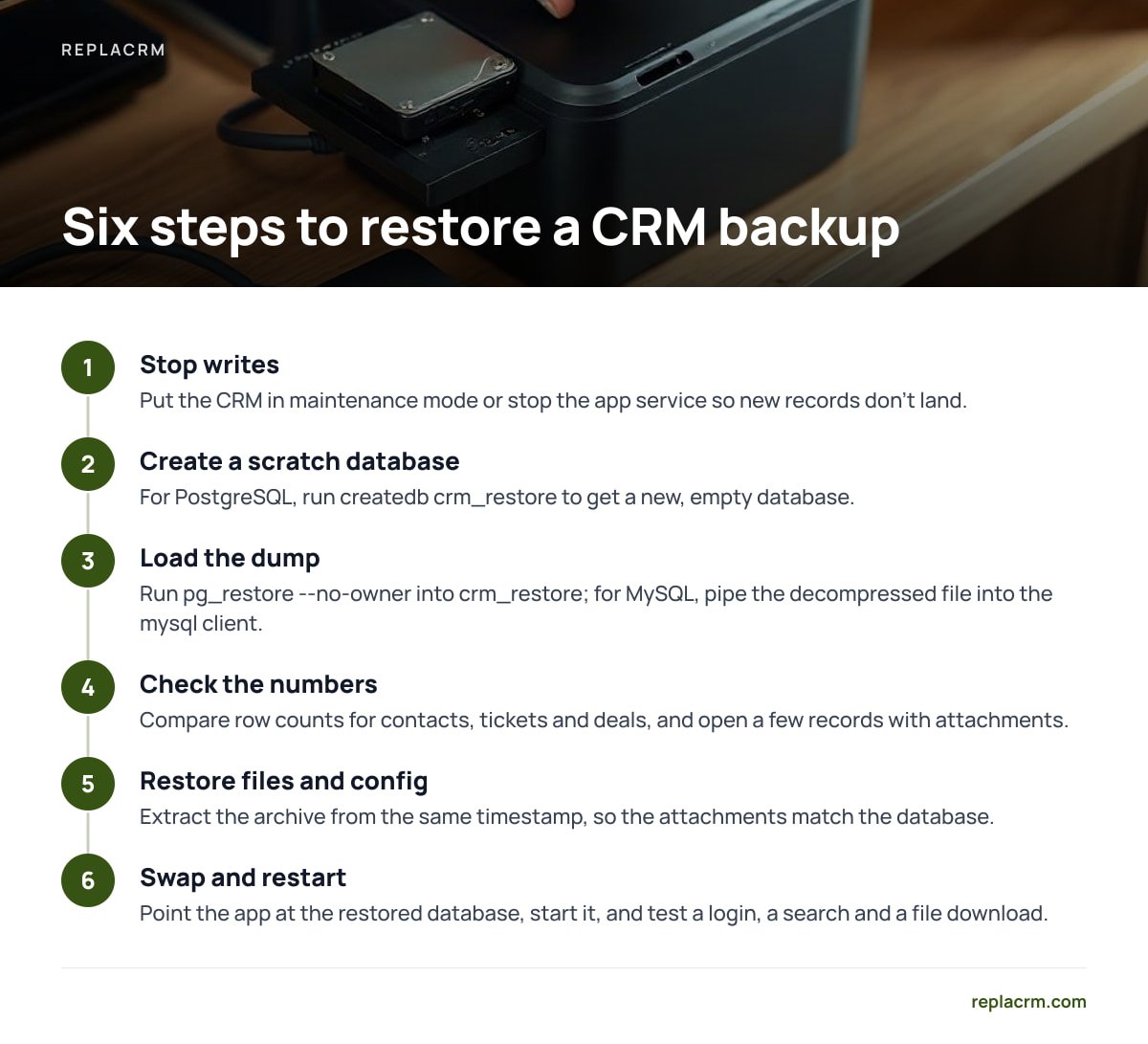
Restore into a new, empty database first, even when the real one is on fire. This keeps the damaged data available for comparison and lets you check the backup before you swap it in.
- Stop writes. Put the CRM in maintenance mode or stop the app service so new records do not land in a database you are about to replace.
- Create a scratch database. For PostgreSQL:
createdb crm_restore. - Load the dump.
pg_restore --no-owner -d crm_restore db-20250101-020000.dump. For MySQL, pipe the decompressed file into themysqlclient. - Check the numbers. Compare row counts for contacts, tickets and deals against what you expect. Open a few records that have attachments.
- Restore files and config. Extract the archive from the same timestamp, so the attachments match the database.
- Swap and restart. Point the app at the restored database, start it, and test a login, a search and a file download.
pg_dump does not include roles or tablespaces. Those belong to pg_dumpall, and a restore that skips them can fail on permissions that only existed on the old server.
That line comes straight from how the tool is documented by PostgreSQL, and it explains many restores that "worked" but left the app unable to connect. Dump roles once with pg_dumpall --roles-only and store the file with your config.
If your brands share one database, restoring a single brand after an accidental deletion means loading the full dump into the scratch database, then copying only that brand's rows back. Practice this before you need it. It takes about an hour the first time and ten minutes the third.
Pro Tip: Automate a monthly restore test that runs on a different machine from the CRM. Have the script restore the latest dump into a scratch database, count rows in your three biggest tables, and compare them to yesterday's production counts within a tolerance you choose, say 2 percent. A restore that fails on a second machine reveals hidden dependencies, such as a missing database extension or a hard-coded path, that a restore on the original server never would.
How Often to Back Up, and How Long to Keep Copies
Start with how much work you can afford to redo. Count what your team logs in a day: new leads, tickets answered, deals moved, documents signed.
A nightly dump puts your worst-case data loss at 24 hours. If your team records 40 interactions a day, that is 40 records to rebuild from memory and email threads.
Most small businesses are comfortable with a dump every 4 to 6 hours during working time and one overnight. If that still feels too loose, add WAL or binary log archiving later.
For retention, 7 daily, 4 weekly and 6 monthly copies, which is what the script above keeps, covers both a fast mistake and a slow one. Slow mistakes are easy to underestimate: a bad import that corrupts records may not be noticed for three weeks.
Retention has a legal side. Under GDPR Article 32, organizations must be able to restore the availability and access to personal data in a timely way after an incident, so tested backups support compliance. Backups also keep deleted customers alive until they expire. Keep a simple log of erasure requests and re-apply them after any restore, so someone who asked to be removed does not quietly return. If your CRM is reachable from outside, also review remote access without exposing the server, because a breached server is the most likely reason you will need these backups.
Get a Self-Hosted CRM You Can Back Up With Ordinary Tools
Replacrm is a self-hosted CRM you buy once, from $1,495, and run on your own server. It has no per-user fees, and it holds your unified inbox of chats, tickets, forms, email and calls, plus the sales board, bookings and e-signing, on infrastructure you control. Because the data lives on your server, you can use the tools in this article, and you decide where the copies go and how long they live. Several brands sit under one login with their customers kept separate, so one tested backup routine covers all of them.
The backups are yours to schedule, store and test, and the license does not run them for you. The commands above are generic, so check your install documentation and spec sheet for the database type, upload directory and config paths before you adapt the script. Set up the schedule on day one and restore once before you import real customers, and you will have the safety net a subscription used to hide from you.
Frequently Asked Questions
What is the safest way to back up a self-hosted CRM database?
Use the database's own dump tool, such as pg_dump for PostgreSQL or mysqldump with –single-transaction for MySQL, so the backup is consistent while the CRM is running. Then copy the dump, uploaded files and config to an encrypted offsite location. Test a restore regularly.
Can I just copy the database folder or take a server snapshot?
Copying live database files while the server is running can capture them mid-write, and the result may not start or may hide corruption. A snapshot taken with the database stopped, or one coordinated with the database, is safer. A logical dump is the simplest option for a small business.
How often should I back up my CRM database?
Decide how much data you can afford to lose. For most small teams, a dump every 4 to 6 hours during working time plus one overnight is reasonable, and a single nightly dump leaves up to 24 hours at risk.
Do database backups include attachments and call recordings?
Usually not. Files such as attachments, signed documents and recordings are often stored in a separate directory or object storage, so back them up in the same script as the database and keep the timestamps matched.
How do I know my backup actually works?
Restore it into a scratch database on a different machine, then compare row counts and open records with attachments. Do this monthly and after any CRM upgrade that changes the database structure.
Can I restore just one brand or customer from a full backup?
Yes, but not directly from the dump file. Load the full backup into a scratch database, then copy the specific rows back into production. Practice it before an emergency.
Sources
- pg_dump documentation | PostgreSQL Global Development Group
- Backup and Restore | PostgreSQL Global Development Group
- mysqldump: A Database Backup Program | Oracle MySQL Documentation
- #StopRansomware Guide | CISA
- Article 32 GDPR: Security of processing | GDPR-Info.eu
- restic documentation | restic project
Leave a Reply