
No. HubSpot is not self hosted, and there is no version you can install on your own server. It runs only as a cloud service, so your customer records live on infrastructure the vendor controls and you pay by subscription. The real decision is not how to self-host it. It is whether you keep renting a hosted CRM or move to software you install, own, and run yourself.
TL;DR:
- HubSpot has no on-premise or self-hosted edition. It is cloud-only software you subscribe to.
- Picking a hosting region, exporting CSVs, or using the API is not self-hosting. None of them moves the live system onto your server.
- Self-hosting gives you control of the database, the pricing model, and data residency. In return you take on servers, backups, patching, and security.
- Per-seat pricing grows with every hire and every brand. A one-time license stays flat.
- If you switch, export activity history and record IDs, not just contacts, and test a restore before you cancel anything.
Table of Contents
- Is HubSpot Self Hosted? What "Cloud-Only" Means for Your Data
- Regions, Exports, and APIs: Three Things That Look Like Self-Hosting but Aren't
- What Self-Hosting Gives You, and What It Costs You
- The Seat Math: When Renting Stops Making Sense
- Running It Yourself: The Five Jobs You Take On
- Moving Your Data Out Without Losing the History
- Which Option We'd Pick, and When to Stay Put
- Own Your Customer Records Outright for a One-Time $1,495
- Frequently Asked Questions
- Sources
Is HubSpot Self Hosted? What "Cloud-Only" Means for Your Data
HubSpot is sold as software-as-a-service. You log in through a browser, the vendor runs the servers, and you pay for access. There is no installer, no on-premise license, and no private-server edition you can buy. If your contract ends, your access ends.
That model has a precise meaning. The U.S. National Institute of Standards and Technology's definition of cloud computing (SP 800-145) describes SaaS as a model where the customer uses the provider's applications but does not manage or control the underlying infrastructure. The only exception it allows is limited, user-specific configuration settings.
Under NIST SP 800-145, a SaaS customer does not control the network, servers, operating systems, or storage. That is the whole difference between renting a CRM and running one.
For most small teams, that trade is fine at first. You get no setup and no maintenance. The trouble starts later, when you need something only the infrastructure owner can grant: a copy of the live database, a fixed price, or a guarantee about exactly where records sit.
Regions, Exports, and APIs: Three Things That Look Like Self-Hosting but Aren't
People searching for a self-hosted version usually want one of three things. Each has a cloud workaround that sounds close but stops short.
Choosing a data-hosting region
Some hosted CRMs let certain accounts pick where their data is stored. That answers a residency question. It does not answer a control question. The data still sits on the vendor's servers, under the vendor's access rules, and only for as long as you keep paying.
Exporting your records
You can export contacts, companies, and deals as spreadsheet files. That is a backup snapshot, not a running system. Flat exports tend to lose the relationships between records, such as which contact belongs to which deal and which email belongs to which ticket. Those links are what make a CRM useful.
Syncing through the API
You can pull data into your own database through the API. Now you are maintaining a sync job against someone else's rate limits and schema changes, and you are still paying the subscription. You get a second copy to run on top of the first. You have not taken ownership.
None of these is bad. But if what you want is "my server, my database, my price," none of them gets you there.
What Self-Hosting Gives You, and What It Costs You
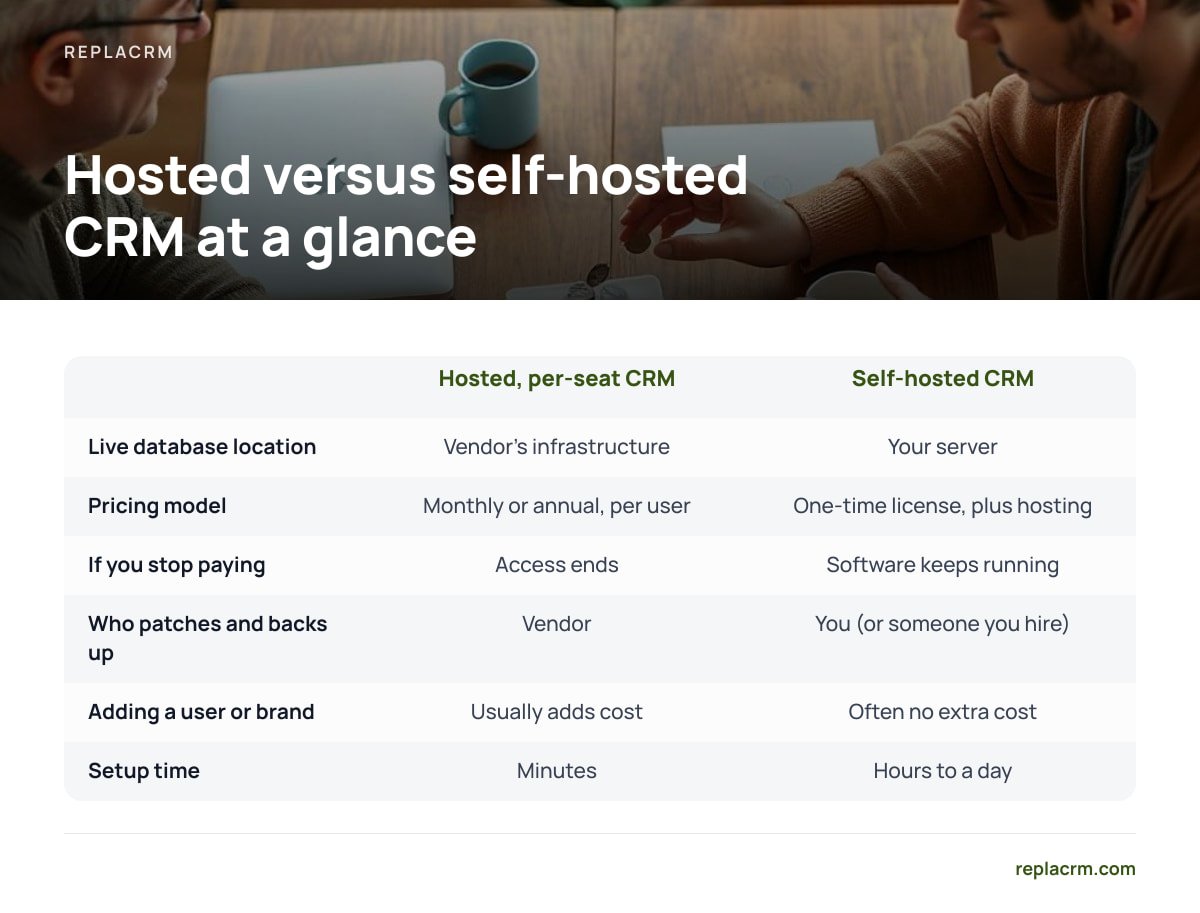
Self-hosting means the CRM application and its database run on a server you control. That might be a box in your office or a virtual server you rent. Our explainer on what a self-hosted CRM costs and what you run covers this in depth. Here is the short version.
| Question | Hosted, per-seat CRM | Self-hosted CRM |
|---|---|---|
| Where the live database sits | Vendor's infrastructure | Your server |
| Pricing model | Monthly or annual, usually per user | Typically a one-time license, plus your hosting |
| What happens if you stop paying | Access ends; export what you can | Software keeps running |
| Who patches and backs up | Vendor | You (or someone you hire) |
| Adding a user or a brand | Usually adds cost | Depends on license; often no extra cost |
| Uptime responsibility | Vendor | You |
| Setup time | Minutes | Hours to a day for a competent admin |
The table cuts both ways. Self-hosting is not free of work. It swaps a recurring bill for a recurring responsibility. Whether that trade suits you depends on two numbers: how many seats you pay for, and how many hours a month you or a contractor can spend on upkeep.
The Seat Math: When Renting Stops Making Sense

Per-seat pricing feels small when you start. It compounds as you grow. Every new salesperson, support agent, or part-time bookkeeper who needs to see a customer record adds to the bill. Owners who run several brands often pay for overlapping tools or higher tiers just to keep each brand's customers apart.
Run your own numbers with a simple formula:
- Annual rental cost. Seats × monthly price per seat × 12, plus any add-ons you rely on.
- Self-hosted first-year cost. License + server rental for 12 months + your admin time at a realistic hourly rate.
- Self-hosted later years. Server rental + admin time + any optional update or support fees.
Here is an illustration with round numbers, not any vendor's actual pricing. Ten seats at $50 a month comes to $6,000 a year. A $1,500 license plus a $40-a-month server and two hours of admin a month at $75 an hour comes to about $3,780 in year one. After that it is roughly $2,280 a year. The gap widens with every person you add.
Rented software costs you again every month you use it. Owned software costs you once, plus the electricity and the attention.
If you have two or three users and no plans to grow, the math may not favor switching. Be honest about that before you move anything.
Running It Yourself: The Five Jobs You Take On

The real price of self-hosting is these five jobs. List them out before you commit, and decide who does each one.
- Hosting. A small virtual server is enough for most small-business CRMs. Pick a provider in the country where you want the data to live. That choice is your residency answer.
- Encryption in transit. Every login and record should travel over HTTPS. Let's Encrypt issues free, automatically renewable TLS certificates, so cost is no excuse for skipping it.
- Patching. Web applications are a common attack target. The OWASP Top 10 lists the most critical web application security risks, and outdated components appear on it. Apply operating system and application updates on a schedule, not when you remember.
- Backups. Back up the database and any uploaded files every night to a second location. Keep several days of history so a bad import doesn't overwrite your only copy.
- Access control. Give people the least access they need. Remove ex-staff the day they leave. Turn on two-factor login if the software supports it.
Pro Tip: A backup you have never restored is a hope, not a backup. Once a quarter, spin up a throwaway server, restore last night's backup to it, and log in. If you can't find a recent deal and its email history in under ten minutes, your backup process has a gap. Find it now, not during an outage.
Self-hosting also simplifies one compliance question. Under GDPR Article 28, a business that hands personal data to a processor must use one that provides sufficient guarantees, under a written contract. When the CRM runs on your own server, the CRM vendor never handles your customer data. You still need an agreement with your hosting provider if you rent a server, but you have one fewer processor to vet. For a fuller look at the trade-offs, see our guide to on-premise CRM for small business.
Moving Your Data Out Without Losing the History

Most migration pain comes from exporting the wrong things, or from exporting in the wrong order. Use this checklist.
- Export record IDs, not just names. Keep each record's original ID as a field in the new system. It is the only reliable way to rebuild links between contacts, companies, deals, and tickets afterward.
- Export activity separately. Notes, emails, calls, and meeting logs often export separately from the core records, or not with them at all. The activity is the history your team actually uses.
- Pull attachments early. Files linked to records may need a separate download. Do this before you change plans, while you still have full access.
- Map custom fields first. Create matching fields in the new CRM before importing, so nothing lands in a catch-all notes box.
- Run both systems for two weeks. Import a test batch, check it against the source, and only then do the full move.
Your own customers have portability rights too. GDPR Article 20 gives individuals the right to receive their personal data in a structured, commonly used, machine-readable format. Requests like that are much easier to answer when the database is yours to query directly.
Which Option We'd Pick, and When to Stay Put
Here is our position. If you run one or more brands, pay for five or more seats, and want to keep customer data for years, self-host. The savings are real, the control is real, and the upkeep is manageable once it is routine.
Stay on a hosted CRM if no one on your team, and no contractor you trust, can own the five jobs above. A neglected self-hosted server is worse than a well-run rented one. Also stay if your marketing depends heavily on built-in automation you have no plan to replace.
If you are still weighing software options, our breakdown of self-hosted open source CRM explains what you own and what you maintain with free, community-run tools versus licensed ones.
Own Your Customer Records Outright for a One-Time $1,495
If the seat math and the control question point you toward self-hosting, Replacrm is built for that move. You pay once, from $1,495, and install it on your own server. There are no per-user fees, and you get unlimited users, brands, and customers. Chats, support tickets, form submissions, email, and calls land on one customer record. Each of your businesses keeps its customers separate under a single login. A sales board tracks deals, customers can book their own appointments, and e-signing and calling or texting are built in. It also connects with ReplaChat and ReplaTicket if you use them.
The honest caveat: this is self-hosted software, so the five jobs above are yours. Someone has to run the server, apply updates, and test the backups. Check the server requirements on our spec sheet against your hosting plan before you buy, the same way you'd check any vendor's.
Frequently Asked Questions
Can HubSpot be installed on my own server?
No. HubSpot is offered only as a cloud service, and there is no on-premise or self-hosted edition. If you need the CRM and its database on your own server, you need a different product built for self-hosting.
Does choosing a data-hosting region count as self-hosting?
No. A hosting region controls where the vendor stores your data, but the vendor still runs the servers and controls access. Self-hosting means the application and database run on a server you control.
Is a self-hosted CRM cheaper than a per-seat subscription?
It usually is once you pass a handful of users, because a one-time license does not grow with headcount. You still pay for hosting and for someone's time to patch and back it up. Include both in your comparison before deciding.
What data should I export before leaving a hosted CRM?
Export core records with their original IDs, then activity history, custom field definitions, and attachments. Record IDs let you rebuild the links between contacts, deals, and tickets in the new system. Do all of this before you downgrade or cancel.
Do I need technical skills to self-host a CRM?
You need someone who can manage a basic Linux server, set up HTTPS, schedule backups, and apply updates. That can be you, a staff member, or a contractor on a small monthly retainer. If no one can own those tasks, a hosted CRM is the safer choice.
Sources
- SP 800-145: The NIST Definition of Cloud Computing | National Institute of Standards and Technology
- Art. 28 GDPR: Processor | gdpr-info.eu
- Art. 20 GDPR: Right to data portability | gdpr-info.eu
- OWASP Top Ten | OWASP Foundation
- Let's Encrypt | Internet Security Research Group
Leave a Reply