

An e-signature for a booking confirmation in your CRM is legally binding when it shows four things: the customer intended to sign, agreed to do business electronically, signed a specific record, and you can reproduce that record later. For most bookings, a logged checkbox meets that test. Save the full signature step for deposits, waivers and non-refundable terms, where a dispute would cost you real money.
TL;DR:
- A logged checkbox with a timestamp is already an electronic signature under the US ESIGN Act, so most routine bookings do not need a drawn signature.
- A valid e-signature needs four things: intent to sign, consent to electronic dealing, association with the record, and retention of that record.
- The three legal types are simple, advanced and qualified (under EU eIDAS). Bookings almost never need qualified.
- Your CRM should store the exact terms text the customer saw, a SHA-256 hash of the signed document, a UTC timestamp, the IP address and the booking ID.
- The best platform signs inside the booking flow and writes the result to the customer record. Length of feature list matters less.
Table of Contents
- E-Signature for Booking Confirmation in a CRM: When a Click Is Enough, and When It Isn't
- The Four Requirements for a Valid Electronic Signature
- The Three Types of Electronic Signature, and Which One a Booking Needs
- What Your CRM Must Log So the Signature Holds Up Later
- An E-Signature Template for Booking Confirmations You Can Adapt
- Online and App Signing: Why a Mobile Browser Beats an App
- Best E-Signature Platform for Bookings: How to Choose
- Sign, Store and Prove Bookings on Your Own Server
- Frequently Asked Questions
- Sources
E-Signature for Booking Confirmation in a CRM: When a Click Is Enough, and When It Isn't
A booking confirmation is a short contract. The customer picked a time, a price and terms, and you agreed. Whether that needs a drawn signature depends on what you would lose if the customer disputed it later.
The law is more relaxed than most vendors admit. The US ESIGN Act says a signature, contract or record cannot be denied legal effect solely because it is in electronic form. A checkbox that reads "I agree to the cancellation policy," logged with a timestamp, is already an electronic signature in the legal sense. This guide covers only the signing step. If you also need the scheduling layer that feeds these confirmations, see our guide to a self-hosted Calendly alternative.
My rule is to match the friction to the dispute risk:
| Booking situation | What to collect | Why |
|---|---|---|
| Standard appointment, refundable, under about $200 | Logged checkbox on the confirmation page | A dispute costs less than the lost bookings a signing step would cause |
| Deposit or non-refundable fee | Checkbox plus typed or drawn name | Chargebacks are the usual dispute, and a name strengthens intent |
| Liability waiver or physical activity | Full signature with audit trail | You need proof the person saw the waiver text |
| Venue hire or multi-day event | Signature from each signer, countersigned by you | Several parties, high value |
| Recurring service contract | Full signature stored with the contract term | The agreement lasts for months or years |
The $200 line is my judgment, not a legal threshold. Move it up or down based on your average booking value and how often customers dispute charges.
The Four Requirements for a Valid Electronic Signature
Most guides trace the four requirements to the ESIGN Act and its state-level twin, the Uniform Electronic Transactions Act (UETA). Both are written around the same ideas:
- Intent to sign. The customer must do something that shows they mean to sign. Clicking a button labeled "Confirm and sign booking" does. Merely landing on a page does not.
- Consent to do business electronically. ESIGN requires affirmative consent from consumers when a law demands that information be provided to them in writing. Even where it does not apply, one line such as "I agree to sign and receive this booking electronically" removes the argument.
- Association of the signature with the record. The signature must be tied to the specific document. A name typed in a free-floating form field, with no link to the terms shown, fails this test.
- Record retention. You must be able to reproduce the signed record accurately for as long as the law lets someone sue over it.
Some practitioners add a fifth item, attribution: you can show who signed. UETA is built on that idea. It has been adopted by 49 states and the District of Columbia, according to the Uniform Law Commission, and New York has its own statute with the same effect.
Outside the US the position is similar. The Law Commission of England and Wales concluded in 2019 that an electronic signature is capable of meeting a legal requirement for a signature. A few categories are carved out. ESIGN excludes wills, most family-law documents and certain notices such as eviction or utility termination notices. A booking confirmation rarely touches those, but check before you bundle anything unusual into one.
The Three Types of Electronic Signature, and Which One a Booking Needs
The three types come from the EU's eIDAS Regulation, the clearest tiered framework in use. The US and UK have no formal tiers, but the same ideas apply in practice.
| Type | What it proves | Typical method | Fit for bookings |
|---|---|---|---|
| Simple | Someone indicated agreement | Checkbox, typed name, drawn mark | Right for most bookings |
| Advanced | The signer is uniquely identified and any later change to the document is detectable | Signing link tied to a verified email or SMS code, plus a tamper-evident record | Right for deposits, waivers and contracts |
| Qualified | Advanced, plus a certificate from a qualified trust service provider | Certified hardware or remote signing service | Rarely needed, mostly for regulated contracts |
Other guides list "click-to-sign, typed and drawn" as the three types. Those are input methods. They describe how the customer marks the page, not how much legal weight the result carries. A drawn squiggle on a page with no audit trail is weaker than a checkbox backed by a verified email and a tamper-evident log.
Under eIDAS, an electronic signature cannot be denied legal effect solely because it is electronic, and a qualified signature carries the same effect as a handwritten one. Many other countries base their laws on the UNCITRAL model laws on electronic commerce and signatures, which turn on whether the method is reliable for its purpose. My pick for a booking business is advanced where money or risk is involved and simple everywhere else. Qualified signatures add cost and customer friction that a haircut, a tour or a consultation will never repay.
What Your CRM Must Log So the Signature Holds Up Later
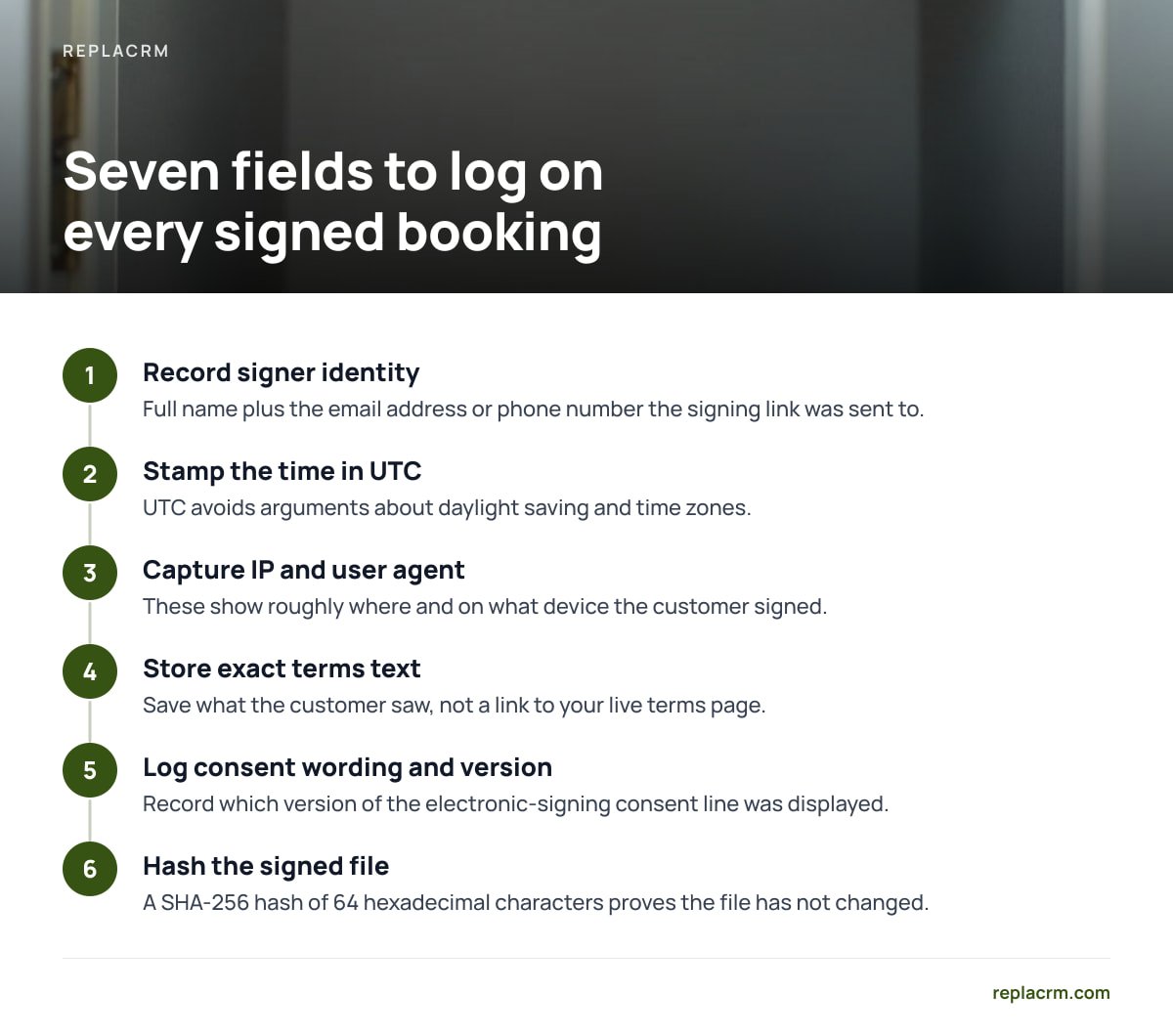
A signature is only as good as the evidence you can produce a year after the fact. Log these fields on every signed booking:
- Signer identity. Full name and the email address or phone number the signing link was sent to.
- Timestamp in UTC. Local time creates arguments about daylight saving and time zones. UTC does not.
- IP address and user agent. These show roughly where and on what device the customer signed.
- Exact terms text. Store what the customer saw, not a link to your live terms page.
- Consent wording and version. Record which version of the "I agree to sign electronically" line was displayed.
- Document hash. A SHA-256 hash of the final signed file, 64 hexadecimal characters, that proves the file has not changed.
- Booking ID. This ties the signature to the service, date and price in the CRM.
Change one comma in a signed PDF and its SHA-256 hash comes out completely different. That is how you prove nobody edited the booking after the customer signed.
Pro Tip: Freeze a copy of the terms at the moment of booking. Most disputes involve terms that have since changed, because you edited your cancellation policy in March and the customer booked in January. A link to the live page proves nothing. A stored copy of the January text, with its hash, settles the argument.
Retention matters as much as capture. In England and Wales, the Limitation Act 1980 gives claimants six years to bring a simple contract claim. US limitation periods for written contracts vary by state, so check yours and keep signed bookings at least that long. Evidence on a server with no tested restore is not evidence, so a proper backup strategy for a self-hosted CRM belongs in your signing plan.
An E-Signature Template for Booking Confirmations You Can Adapt
You do not need a legal document for a routine booking. You need five short blocks on the confirmation page, in this order:
- Summary block. Service, date, time, location, total price and deposit amount.
- Terms line. One sentence on what matters most, such as "Cancellations within 48 hours forfeit the deposit." Link the full terms below it.
- Consent line. "I agree to sign and receive this booking confirmation electronically."
- Intent line. "By typing my name and selecting Confirm Booking, I am signing this agreement."
- Copy line. "A signed copy has been emailed to you." Then send it, immediately.
Have a lawyer in your jurisdiction review the final wording once, especially the cancellation and liability language. Keep the template in your CRM as a versioned object, so every signed booking points to the exact version used.
Online and App Signing: Why a Mobile Browser Beats an App
Most customers sign on a phone, usually from the confirmation email or text message. A signing link that opens in the mobile browser is the right default. Asking the customer to install an app adds a step where they can walk away.
Build the signing page for a thumb. The full terms should be readable without pinching and zooming. Offer a typed-name option next to drawn signature, since a drawn signature on a small screen is hard to do well and typing is accessible to more people. Send the signed copy by email right after signing and attach it to the customer's record, so the confirmation sits next to the chat and ticket history in your unified customer inbox.
For online bookings, send the signing link inside the same flow as payment. If you send it as a separate email after the booking, a share of customers will not sign, and you will chase them by hand.
Best E-Signature Platform for Bookings: How to Choose
There is no single best e-signature platform or best software for e-signatures. For bookings, the best one signs inside the booking flow and writes the result to the customer record. A standalone signing service makes you export, upload, send and re-attach, and each handoff is a place for the audit trail to break.
Judge any option on these points:
- Where the signed file lives. If it lives only on the vendor's servers, you depend on their retention policy and their pricing for as long as you need it.
- Pricing shape. Many standalone tools charge per sender seat or per document. At booking volume, that cost grows with every customer.
- Audit trail completeness. Check that it captures every field listed above, not just a final PDF.
- Signing without an account. Customers should sign from a link, with no login.
- Reminder and expiry rules. Unsigned bookings should nudge automatically and release the slot after a set time.
A standalone service makes sense if you send a handful of high-value contracts a month and already pay for it. If you confirm dozens or hundreds of bookings, signing built into the CRM is cheaper and keeps the evidence next to the customer. Our piece on reducing CRM costs beyond the monthly subscription walks through how per-seat and per-document fees add up.
Sign, Store and Prove Bookings on Your Own Server
Evidence often ends up scattered across tools: the booking in one system, the signature in another, the customer chat in a third. Replacrm puts customer self-booking and e-signing in the same CRM, so a signed confirmation attaches to the customer record along with their chats, tickets, emails and calls. It runs on your own server, with no per-user fees and unlimited brands, users and customers. Each brand's customers stay separate under one login. It is a one-time payment starting at $1,495.
Replacrm is not a qualified trust service provider, so it cannot issue qualified signatures under eIDAS. If your contracts need that tier, use a certified provider for those documents. Check the spec sheet to confirm which audit fields our e-signing records. Because the data sits on your server, you also own the backups and the accuracy of your server clock, and both matter if a signature is ever challenged.
Frequently Asked Questions
What is the best e-signature platform?
The best platform for booking confirmations is the one that signs inside your booking flow and stores the result on the customer record. Standalone services work for a few high-value contracts a month, but per-seat or per-document pricing adds up at booking volume. Judge options on audit trail detail, where the signed file is stored and whether customers can sign without an account.
What are the four requirements for an electronic signature to be valid?
Under the US ESIGN Act and UETA, the four requirements are intent to sign, consent to do business electronically, association of the signature with the record, and retention of the record so it can be reproduced accurately. Some practitioners add attribution, meaning you can show who signed. A logged checkbox with a timestamp can satisfy all of them.
What are the three types of electronic signatures?
Under the EU eIDAS Regulation they are simple, advanced and qualified. A simple signature is any electronic indication of agreement, an advanced one uniquely identifies the signer and makes later changes detectable, and a qualified one adds a certificate from a qualified trust service provider. Most bookings need simple or advanced.
What is the best software for e-signatures?
No single product wins for every business. For bookings, choose software that captures a full audit trail, lets customers sign from a link with no account, and stores the signed file where you control it. If it sits inside your CRM, you avoid exporting and re-attaching documents.
Is a typed name a valid e-signature on a booking confirmation?
Yes, in the US, UK and EU a typed name can be a valid electronic signature if the customer clearly intended to sign and the record is tied to the document. Pair it with a consent line and a logged timestamp so you can prove intent later.
Sources
- 15 U.S. Code Chapter 96, Electronic Signatures in Global and National Commerce (ESIGN Act) | Cornell Law School Legal Information Institute
- Uniform Electronic Transactions Act | Uniform Law Commission
- Regulation (EU) No 910/2014 (eIDAS) | EUR-Lex, European Union
- Electronic execution of documents | Law Commission of England and Wales
- UNCITRAL Texts on Electronic Commerce | United Nations Commission on International Trade Law
Leave a Reply