
A self-hosted CRM is customer relationship software that you install and run on a server you control, so your customer records live on your infrastructure instead of the vendor's. Hosting and pricing are two separate questions. "Self-hosted" tells you who runs the software and holds the data. It does not tell you whether you pay once or pay per seat every month. When you compare options, judge where the data lives and how you pay as two separate decisions.
TL;DR:
- A self-hosted CRM runs on a server you control, either your own hardware or a rented VPS, and your customer data stays there.
- Hosting model and pricing model are separate. Some self-hosted CRMs still charge per seat, so check the license, not just the install method.
- At around 8 or more users, a one-time license usually costs less than per-seat SaaS within one to three years.
- Self-hosting moves the work of updates, backups, TLS certificates and access control onto you. Budget for that time or pay someone to do it.
- Under GDPR you are still responsible for your customer data wherever it sits. Self-hosting gives you more control over it, not less responsibility.
Table of Contents
- What a Self-Hosted CRM Actually Means, and What It Doesn't
- Self-Hosted vs SaaS CRM: The Trade-Offs Side by Side
- The Cost Math: When a One-Time License Beats Per-Seat Billing
- What You Take On When You Run Your Own CRM
- Data Ownership, Privacy Law, and Where Your Customer Records Live
- Who Should Self-Host a CRM, and Who Should Not
- Setting Up a Self-Hosted CRM Without Regretting It
- Get a CRM You Pay For Once and Run on Your Own Server
- Frequently Asked Questions
- Sources
What a Self-Hosted CRM Actually Means, and What It Doesn't
A self-hosted CRM is software you install on a machine you control. That machine might be a server in your office. More often it is a virtual private server (VPS) you rent from a hosting provider. Either way, you hold the database, you decide when to update, and you decide who gets access.
Self-hosting does not mean "free." It does not mean "open source," and it does not guarantee you escape per-seat pricing. Some vendors sell self-hosted editions and still bill monthly per user. Others sell a one-time license. Open-source options cost nothing to license but put all of the setup and support on you. If you want the full breakdown of what open source does and doesn't include, see what you own and what you run with a self-hosted open source CRM.
Physical location is not the point either. A CRM on a rented VPS in a data center is still self-hosted. You have root access, you control the software, and the vendor of the CRM never touches your records. What matters is control of the software and the data. Whose building the server sits in matters much less.
If you are new to the idea, our overview of what a self-hosted CRM is and why it beats per-seat pricing covers the basics. This article focuses on the trade-offs that decide whether you should do it.
Self-Hosted vs SaaS CRM: The Trade-Offs Side by Side
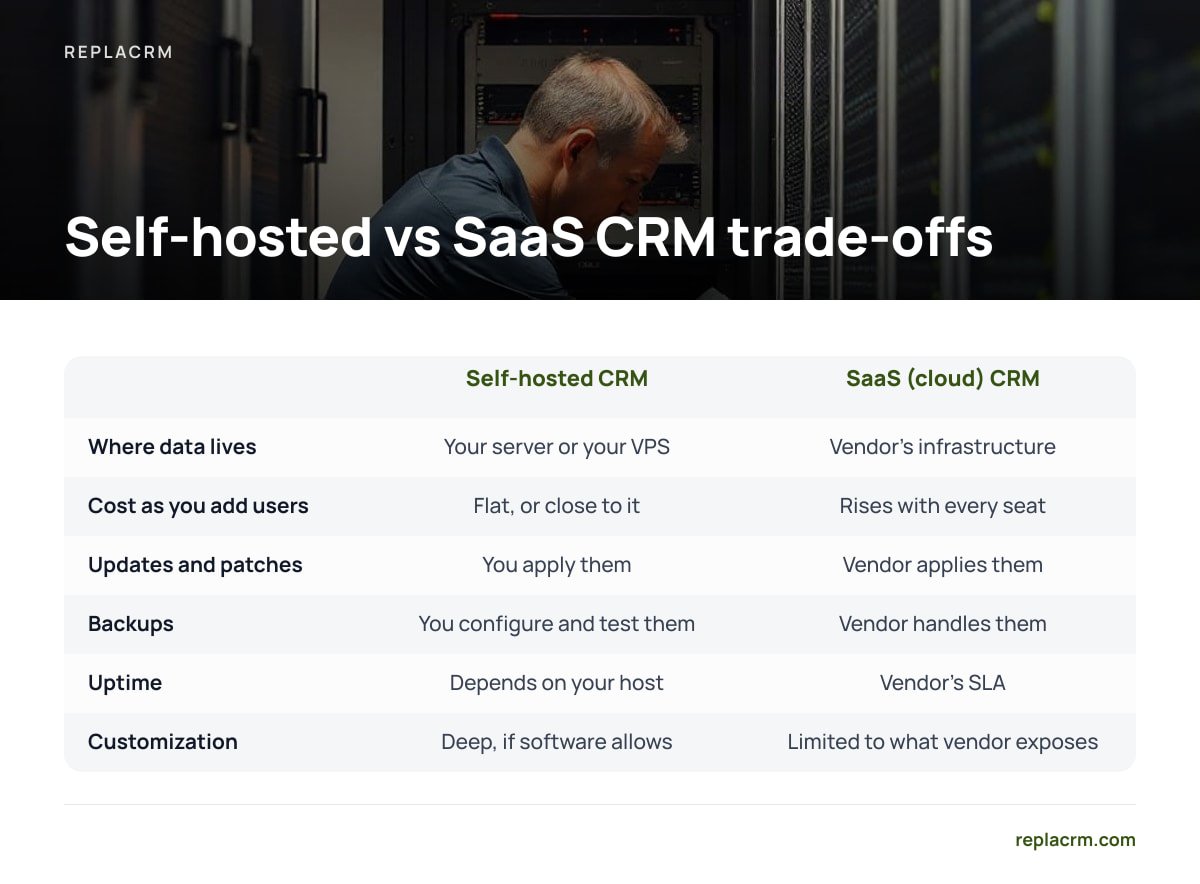
The choice is not "good vs bad." You are choosing between two sets of responsibilities. Here is how they compare on the things that matter to a small business owner.
| Factor | Self-hosted CRM | SaaS (cloud) CRM |
|---|---|---|
| Where data lives | Your server or your VPS | Vendor's infrastructure |
| Pricing pattern | Often one-time license, sometimes per seat | Almost always monthly or annual, per seat |
| Cost as you add users | Flat, or close to it | Rises with every seat |
| Updates and patches | You apply them | Vendor applies them |
| Backups | You configure and test them | Vendor handles them; export options vary |
| Uptime | Depends on your host and setup | Vendor's SLA |
| Leaving the product | Your data is already in your database | Depends on the vendor's export tools |
| Customization | Deep, if the software allows it | Limited to what the vendor exposes |
Our position: if you have fewer than five users, no technical help, and no plans to grow, SaaS is usually the simpler call. If you have a growing team, several brands, or customer data you would rather not rent back from a vendor, self-hosting wins on cost and control, provided you take maintenance seriously.
The Cost Math: When a One-Time License Beats Per-Seat Billing
Per-seat pricing looks cheap at signup and expensive at year three. The math is simple, so run it with your own numbers.
Take a hypothetical team of 8 users on a SaaS plan at $50 per user per month. That is $400 a month, or $4,800 a year. Over three years you pay $14,400, and you own nothing at the end. Hire two more people and the bill climbs again.
At $50 a seat, an 8-person team pays $14,400 over three years for a CRM it will never own, and every new hire raises the bill.
Now set that against a self-hosted CRM with a one-time license. Add the recurring costs you take on:
- The license. A one-time payment, typically in the low thousands for commercial self-hosted products.
- Server costs. A small VPS suitable for a small team commonly runs $10–$40 a month, depending on provider and specs.
- Your time or a contractor's. Updates, backups and monitoring. Budget a few hours a month, or a modest retainer if you outsource it.
For most teams of 8 or more, the self-hosted total crosses below the SaaS total somewhere between year one and year three. After that the gap widens every year. Below about five users, the savings shrink, and the maintenance burden can outweigh them.
Pro Tip: When you compare, count seats you will need in 24 months, not seats you need today. Then count every person who needs only occasional access, such as a bookkeeper or a part-time assistant. Per-seat pricing charges full price for light users, and those occasional seats are where SaaS bills quietly inflate.
What You Take On When You Run Your Own CRM

Self-hosting moves operational work from the vendor to you. None of it is exotic, but none of it is optional.
Security updates
A CRM is a web application that holds names, emails, phone numbers and deal history. That makes it a target. The OWASP Top Ten lists the most common web application risks, including broken access control and injection. A well-built CRM defends against these, but only the version you are running. Apply security updates to the CRM, the operating system and the database promptly. CISA's Known Exploited Vulnerabilities Catalog is a useful reality check. It lists flaws attackers are actively using, and old web server and framework bugs show up there regularly.
Backups you have actually tested
Follow the 3-2-1 rule. Keep three copies of your data, on two different types of storage, with one copy off-site. Automate nightly database dumps. Then restore one to a test server at least once a quarter. A backup you have never restored is a guess, not a backup.
Encryption in transit
Your CRM should only be reachable over HTTPS. Let's Encrypt issues free TLS certificates that renew automatically. There is no reason for a customer database to travel over plain HTTP.
Access control
Use individual accounts for every user. Never share logins. Turn on two-factor authentication if the CRM supports it. Remove access the day someone leaves. Lock SSH to key-based login and close every port you are not using.
Pro Tip: Don't run your CRM on the same server as your marketing website. A vulnerable website plugin is one of the most common ways small businesses get breached. If the website and CRM share a server, a compromised website plugin can put your entire customer database at risk. A separate small VPS costs little and keeps the two apart.
Data Ownership, Privacy Law, and Where Your Customer Records Live
Owning your data is the main reason most people self-host. Be clear about what ownership does and doesn't change.
Under the EU's General Data Protection Regulation, you are the controller of your customers' personal data whether it sits in a SaaS CRM or on your own server. GDPR Article 32 requires "appropriate technical and organisational measures" to secure that data. With a SaaS CRM, the vendor carries much of the technical work under a processing agreement. With a self-hosted CRM, more of it is yours.
Seventy-two hours. That is how long GDPR Article 33 gives you to notify your supervisory authority after you become aware of a personal data breach, and on a self-hosted CRM, nobody else is watching that clock for you.
If you rent a VPS, your hosting provider may still count as a processor, because the provider hosts the personal data on your behalf. Check that your provider offers a data processing agreement. Choose the data center region deliberately if your customers are in the EU or another region with data residency expectations.
For a practical security structure, the NIST Cybersecurity Framework organizes the work into six functions: Govern, Identify, Protect, Detect, Respond and Recover. You don't need to adopt it formally. Walking through those six words once a year is a solid check on whether your CRM setup has gaps.
The upside is real. Your records sit in a database you can query, export and back up on your own terms. No vendor can change its export policy, raise its prices or shut down and take your customer history with it.
Who Should Self-Host a CRM, and Who Should Not
Here is where we land.
- Self-host if you run more than one brand. Multiple businesses on per-seat SaaS often means multiple subscriptions, or customers from different brands mixed in one account. A self-hosted CRM built for multiple brands keeps them separate under one install.
- Self-host if your team is growing. Every new hire on SaaS is a new monthly charge. On a flat license, the tenth user costs the same as the second.
- Self-host if your customer data is sensitive or regulated. Control over location, retention and access is easier to prove when you hold the keys.
- Stay on SaaS if no one will maintain it. If nobody on your team will apply updates and nobody will pay a contractor to, a self-hosted CRM will slowly become a liability.
- Stay on SaaS if you are a team of one or two with simple needs. The savings are small and the maintenance is not.
For a closer look at the small business case specifically, read our guide to on-premise CRM for small business.
Setting Up a Self-Hosted CRM Without Regretting It

Most self-hosting regret comes from skipped steps in the first week. Do these before you import a single customer.
- Size the server for 2x your current team. Migrating servers later is more painful than paying a few extra dollars a month now.
- Point a dedicated subdomain at it, such as crm.yourdomain.com, and secure it with HTTPS from day one.
- Set up automated backups before you import data. Then run a test restore.
- Create named accounts and roles. Decide who sees which brand, which pipelines and which customers.
- Import a small sample first. Check that fields, tags and contact history map correctly before you move everything.
- Write down your update routine. Note who checks for updates, how often, and where the rollback backup lives.
Get a CRM You Pay For Once and Run on Your Own Server
If the per-seat math above looks like your bill, Replacrm is built for exactly that problem. It is a self-hosted CRM sold for a one-time payment, from $1,495, with no per-user fees and unlimited brands, users and customers. Chats, support tickets, form submissions, email and calls land on a single customer record. Each of your businesses keeps its customers separate under one login. A sales board tracks deals, customers can book their own appointments, and e-signing plus calling and texting are built in. It also connects with ReplaChat and ReplaTicket.
The honest caveat: self-hosted means you run it. Everything in the maintenance section above still applies, from updates and backups to HTTPS and access control. Before you buy, check what the license includes for updates and support, the same way you would with any vendor. If nobody on your team will maintain a server, budget for someone who will.
Frequently Asked Questions
Is a self-hosted CRM the same as an open-source CRM?
No. Self-hosted describes where the software runs and who controls it. Open source describes the license on the code. Some open-source CRMs are offered as hosted services, and many self-hosted CRMs are commercial products sold under a paid license.
Can I self-host a CRM on a rented VPS, or do I need my own hardware?
A rented VPS counts as self-hosting, and it is the most common setup for small businesses. You get root access and full control of the software and database without buying or maintaining physical hardware. Choose a provider that offers a data processing agreement if you hold EU customer data.
How much does it cost to run a self-hosted CRM?
Expect a license cost, which may be one-time or recurring depending on the vendor, plus server costs that commonly run $10–$40 a month for a small team. Add time for updates and backups, or a contractor's fee. For teams of around eight or more users, this usually costs less than per-seat SaaS within one to three years.
Is a self-hosted CRM less secure than a cloud CRM?
It depends on how well you maintain it. A patched, backed-up, HTTPS-only server with individual accounts and two-factor authentication can be very secure. An unpatched one sharing a server with a vulnerable website is a real risk, so security comes down to maintenance, not the hosting model itself.
Does self-hosting my CRM make me GDPR compliant?
Not on its own. You remain the controller of your customers' personal data either way, and GDPR Article 32 still requires appropriate security measures. Self-hosting gives you more direct control over location, access and retention, which can make compliance easier to demonstrate.
Sources
- Regulation (EU) 2016/679 (General Data Protection Regulation) | EUR-Lex
- OWASP Top Ten | OWASP Foundation
- Known Exploited Vulnerabilities Catalog | Cybersecurity and Infrastructure Security Agency (CISA)
- Cybersecurity Framework | National Institute of Standards and Technology (NIST)
- Let's Encrypt | Internet Security Research Group
Leave a Reply