
A self-hosted Calendly alternative is a booking tool you run on your own server. Your appointments, customer details and calendar links stay in a database you control, not a vendor's. The choice that matters most is not open source versus paid. It is whether bookings land in a separate tool or on the same customer record as your emails, chats and deals. A standalone scheduler gives you another silo to sync. Booking built into a self-hosted CRM removes that silo.
TL;DR:
- Self-hosting a booking tool moves your appointment data onto your server and makes you responsible for its security, backups and updates.
- There are three kinds of self-hosted scheduler: a standalone app, a website plugin, and booking built into a self-hosted CRM.
- If you sell or support customers, pick booking inside your CRM, because a booking that lives in a separate database is a customer record you have to reconcile later.
- Calendar sync runs on open standards (iCalendar and CalDAV), so check which ones a tool supports before you trust it with live appointments.
- Running several brands means you need separate booking pages, availability and customer lists per brand, and most standalone schedulers handle that poorly.
Table of Contents
- What "Self-Hosted" Means for a Booking Tool, and What It Doesn't
- Three Kinds of Self-Hosted Calendly Alternative, and Which One to Pick
- The Real Cost: Seats, Servers and Your Time
- Calendar Sync Without a Cloud Middleman: iCalendar and CalDAV
- The Privacy and Security Duties You Take On When You Self-Host
- What Multi-Brand Owners Should Demand From a Booking Tool
- How to Switch Booking Tools Without Losing a Single Appointment
- Get Bookings That Land on the Customer Record, Paid For Once
- Frequently Asked Questions
- Sources
What "Self-Hosted" Means for a Booking Tool, and What It Doesn't
Self-hosted means the software and its database run on a server you control. That could be a rented virtual machine, a box in your office, or a managed host where you hold the root password. The booking page your customers see may look the same as a hosted one. The difference is where every name, email, phone number and appointment note ends up.
Self-hosted does not mean free, and it does not mean open source. Some self-hosted tools carry a license fee. Some open-source tools are mostly sold as a hosted subscription. The one property worth paying attention to is this: can you take the database, move it to a new server, and keep running without asking anyone's permission?
Self-hosted also means the work moves to you. Uptime, TLS certificates, operating system patches, backups and app updates are now your job or your contractor's job. For a booking page that's acceptable, because a scheduler is a light workload. For a team with no technical help at all, budget a few hours a month or a small managed-hosting fee. If you're weighing that trade-off across your whole stack, what a self-hosted CRM is and why it beats per-seat pricing covers the same question at a larger scale.
Three Kinds of Self-Hosted Calendly Alternative, and Which One to Pick
Every self-hosted scheduler falls into one of three architectures. The architecture decides more about your daily life than any feature list does.
Standalone open-source scheduler
This is a dedicated booking app with its own database, its own user accounts and its own admin panel. It's usually the most polished option for scheduling alone: routing forms, team round-robin, payment collection. The cost is that it knows nothing about your customers beyond what they typed into the form. Every booking creates a contact you then have to match, by hand or by integration, to the person already in your CRM.
Website or CMS plugin
This is a booking module that installs into the content management system already running your website. It's cheap and quick to set up if you have one site and one brand. It inherits your CMS's security posture, though, including every other plugin on that install. It also tends to fall apart when you need separate availability and staff for a second brand on a second domain.
Booking built into a self-hosted CRM
Here the booking page writes straight to the customer record. When someone books, you see their past emails, open support tickets and current deal stage on the same screen as the appointment. The scheduling features may be leaner than a dedicated app's. In exchange, you never run a sync job or merge duplicates.
| Standalone scheduler | CMS plugin | Built into self-hosted CRM | |
|---|---|---|---|
| Where booking data lives | Its own database | Your website database | Your CRM database |
| Links to customer history | Only via integration | Rarely | Native, same record |
| Multi-brand handling | Varies; often one workspace per brand | Usually one per site | Separate brands under one login, if the CRM supports it |
| Extra things to patch | The app and its dependencies | Every plugin on the site | Nothing beyond the CRM |
| Best for | Booking-only teams with dev help | One small site, one brand | Teams that sell or support after the booking |
My recommendation: if a booking is the start of a sales conversation or a support case, choose booking inside your CRM. A standalone scheduler is the right pick only when booking is the whole job, as with a meeting-room tool or a clinic front desk that hands off to another system.
The Real Cost: Seats, Servers and Your Time
Hosted schedulers usually charge per seat per month. The math is simple and it compounds. Take an illustrative $15 per seat. A ten-person team pays $1,800 a year, every year, and the bill rises each time you hire. Self-hosting swaps that recurring fee for three different costs:
- Server. A small virtual server is enough to run a scheduler or CRM for most small businesses. It's a fixed monthly cost that doesn't change with headcount.
- License. This is zero for open-source tools and a one-time fee for commercial self-hosted software. Check whether "one-time" includes updates, or whether updates are sold yearly.
- Time. Updates, backups and the occasional broken calendar sync take real hours. Price them honestly at your own or a contractor's hourly rate.
The cost that teams forget is the integration layer. If your scheduler and CRM are separate, you'll pay for an automation service or developer time to keep them in step. Either can cost more over three years than the scheduler itself.
Pro Tip: Before you compare prices, export three months of bookings from your current tool and count how many came from people already in your CRM. If it's more than half, a standalone scheduler will create duplicates on most bookings. That number alone usually settles the decision.
Calendar Sync Without a Cloud Middleman: iCalendar and CalDAV
A booking tool is only useful if it reads your real availability and writes confirmed appointments back to the calendar your staff actually check. Two open standards do most of this work.
- iCalendar (.ics). IETF RFC 5545 defines the iCalendar format, including events and recurrence rules. It's what an "add to calendar" attachment in a confirmation email uses. Nearly every calendar app can read it.
- CalDAV. IETF RFC 4791 defines CalDAV, an extension of WebDAV that lets a client read and write events on a calendar server. CalDAV is what gives you true two-way sync with a self-hosted calendar server, rather than a one-way feed.
Many teams still keep their main calendars with a large hosted provider. In that case, your self-hosted booking tool will talk to that provider's own API rather than CalDAV. That's fine. Just know that one connection still runs through a third party, and that an expired authorization token is the most common reason a "fully booked" calendar suddenly shows open slots.
Time zones break more booking tools than anything else. Most systems rely on the IANA Time Zone Database, which is updated whenever governments change daylight-saving rules. If you self-host, keep your server's tz data current. A stale copy can shift appointments by an hour for customers in an affected region.
The Privacy and Security Duties You Take On When You Self-Host
When bookings live on your server, you're no longer handing customer data to a scheduling vendor. If you serve people in the EU, that matters. The GDPR requires a written contract with any processor handling personal data for you under Article 28. Removing a processor removes one contract and one party that could leak your data.
It does not remove your own obligations. You are still the controller. Storage limitation under Article 5 means you shouldn't keep old booking records forever, so set a retention period and delete on schedule. Breach notification still applies to you.
72 hours. That's how long GDPR Article 33 gives you to notify your supervisory authority after becoming aware of a personal data breach, and self-hosting means nobody else is watching the logs for you.
A public booking page is an internet-facing form, and it gets probed like one. Check it against the OWASP Top Ten, the standard reference list of web application risks. In practice, focus on four things:
- Access control. One customer must never be able to view or change another customer's booking by editing a URL.
- Rate limiting. Bots will try to fill your calendar with fake appointments.
- TLS everywhere. Every page that collects personal data needs HTTPS.
- Fast patching. Apply security updates as soon as they're released.
What Multi-Brand Owners Should Demand From a Booking Tool
If you run two or three businesses, most schedulers will make you choose between one messy shared account and several separate accounts you pay for separately. Neither works well. Look for these five things:
- Per-brand booking pages. Each brand gets its own domain or path, logo, colors and confirmation emails. A customer booking a dental cleaning should never see your landscaping company's name.
- Shared staff, separate availability. The same person may take calls for two brands. Their availability needs to block across both, while customers only ever see the brand they booked.
- Separate customer lists. A booking for Brand A must not create or merge into a contact owned by Brand B. Keeping brands apart is a data-hygiene rule, and in some industries a compliance one.
- Buffers and minimum notice per service. A 15-minute call and a 2-hour site visit need different gaps and different lead times.
- One login for you. You should be able to see all brands' bookings in one place without logging out and back in.
The tool type matters most here. Plugins usually fail the multi-brand test, and standalone schedulers often pass it only with workarounds. A CRM built around brand separation handles it by default. For more on how running your own stack plays out for a small team, see on-premise CRM for small business.
How to Switch Booking Tools Without Losing a Single Appointment
Switching schedulers is low-risk if you overlap the two systems instead of cutting over in one step.
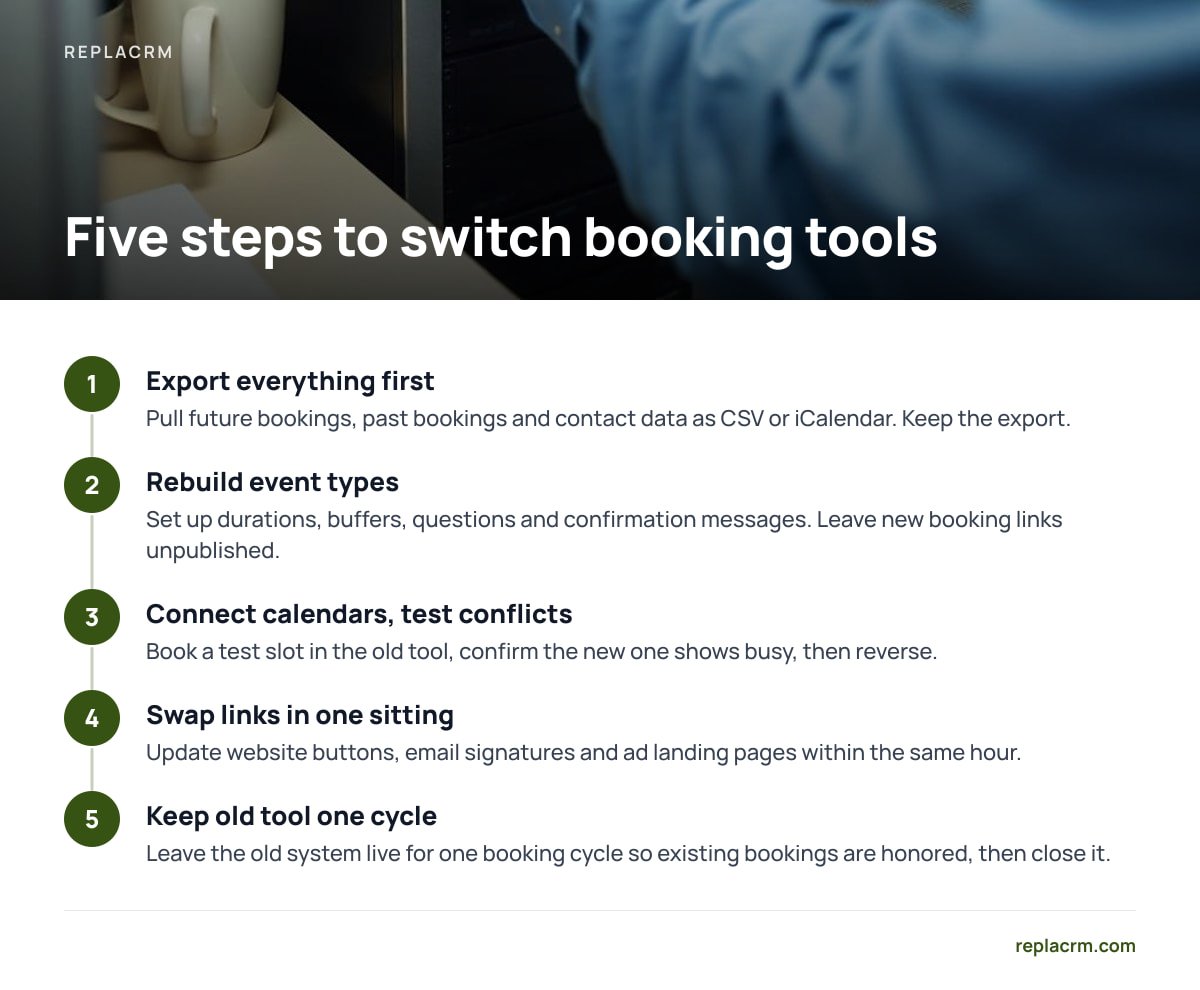
- Export everything first. Pull future bookings, past bookings and contact data as CSV or iCalendar. Keep the export even after you've migrated.
- Rebuild event types in the new tool. Set up durations, buffers, questions and confirmation messages. Leave the new booking links unpublished for now.
- Connect calendars and test conflicts. Book a test slot in the old tool and confirm the new one shows it as busy. Then reverse the test.
- Swap links in one sitting. Update website buttons, email signatures and ad landing pages within the same hour.
- Leave the old tool running for one booking cycle. If customers usually book two weeks out, keep the old system live for two weeks so existing bookings are honored, then close it.
If you're moving off an open-source scheduler specifically, check what the license lets you keep and modify first. Self-hosted open source CRM: what you own and what you run walks through that distinction.
Get Bookings That Land on the Customer Record, Paid For Once
ReplaCRM puts customer self-booking inside the same self-hosted CRM that already holds each customer's chats, support tickets, form submissions, email and calls. When someone books, the appointment appears on their record next to their deal on the sales board. There's no sync job and no duplicate contact. Each brand keeps its own customers separate, and you see all of them under one login. It integrates with ReplaChat and ReplaTicket, and adds e-signing and calling/texting, so a booked call can end in a signed agreement in the same system.
It's a one-time license from $1,495, with no per-user fees and unlimited brands, users and customers. The honest limit: you run it on your own server, so updates and backups are yours to handle. If you need routing logic as deep as a dedicated scheduler's, or a specific calendar provider's two-way sync, check our spec sheet before you cancel anything.
Frequently Asked Questions
Is a self-hosted booking tool more secure than a hosted one?
Not automatically. Self-hosting removes a third party from your data flow, but the security of your server, patches and backups becomes your job. A well-maintained self-hosted tool is very secure, while a neglected one is a liability.
Can a self-hosted scheduler sync with my existing calendar?
Usually yes. Most self-hosted tools support iCalendar files for confirmations and either CalDAV or a calendar provider's API for two-way availability sync. Check exactly which providers a tool supports before relying on it for live bookings.
Do I still need GDPR compliance if I self-host my booking tool?
Yes. Self-hosting means one fewer processor contract under Article 28, but you remain the data controller. Storage limitation, security and the 72-hour breach notification rule all still apply to you.
What server do I need to run a self-hosted booking tool?
A small virtual server is enough for most small businesses, because booking is a light workload. What matters more is that the server is patched, backed up and running HTTPS. A managed host is a sensible option if you have no technical staff.
Should I use a standalone scheduler or booking built into my CRM?
If bookings lead to sales conversations or support cases, booking inside your CRM is the better choice, because it avoids duplicate contacts and sync jobs. A standalone scheduler makes sense only when booking is the entire workflow and nothing happens to the customer afterward.
Sources
- RFC 5545: Internet Calendaring and Scheduling Core Object Specification (iCalendar) | IETF
- RFC 4791: Calendaring Extensions to WebDAV (CalDAV) | IETF
- Regulation (EU) 2016/679 (General Data Protection Regulation) | EUR-Lex, Publications Office of the European Union
- OWASP Top Ten | OWASP Foundation
- Time Zone Database | IANA
Recommended
- On-Premise CRM for Small Business: Own Your Data, Skip Seat Fees
- Self-Hosted Open Source CRM: What You Own and What You Run
- What a Self-Hosted CRM Is — and Why It Beats Per-Seat Pricing
- E-Signature for Booking Confirmation CRM: Make It Binding
- CRM E-Signature Compliance Checklist: 8 Checks Before You Send
- Automated Appointment Reminder Setup in a CRM: A Working Plan
Leave a Reply