
The true cost of Salesforce add-ons is roughly the same as your license bill, and sometimes more. Published list prices run from about $25 to $550 per user per month, but support plans, marketplace apps, extra storage and admin time are all priced separately. In the 10-user model below, add-ons and services add $20,400 a year to $21,000 in licenses. Budget for double the list price, then replace my assumptions with your own quotes.
TL;DR:
- Salesforce's published pricing starts around $25 per user per month and climbs to $550, and the edition with the features most teams need sits in the middle of that range.
- The license is the visible part. Support plans, marketplace apps, extra storage, sandboxes and admin or consultant time are separate lines.
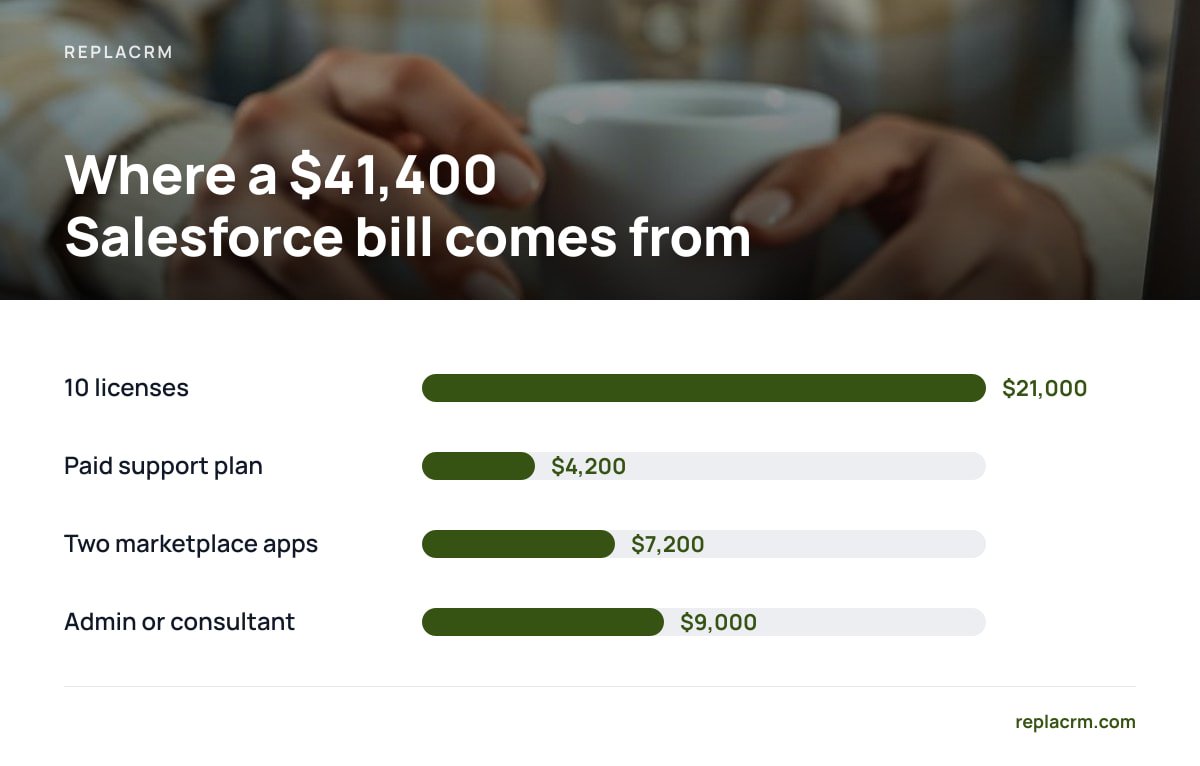
- In a 10-user model with labeled assumptions, a $21,000 license bill becomes about $41,400 a year, nearly double.
- Data storage is capped per org, roughly 10 GB plus a small per-user amount on common editions, and extra capacity is a paid add-on.
- For a small team, the cheaper comparison is a flat one-time license you host yourself, which has no per-user meter for add-ons to attach to.
Table of Contents
- What Salesforce Costs Before Add-Ons, and Why List Price Misleads
- The True Cost of Salesforce Add-Ons, by Category
- A 10-User Example: From $21,000 to $41,400 a Year
- Data Storage Limits in Salesforce, and What Happens When You Hit Them
- How Much a CRM Costs Per Month, by Pricing Model
- Who Is Salesforce's Biggest Competitor? It Depends on Your Size
- Pricing a Salesforce Quote Before You Sign
- Get a CRM With No Add-On Meter, and Your Data on Your Own Server
- Frequently Asked Questions
- Sources
What Salesforce Costs Before Add-Ons, and Why List Price Misleads
The cost of Salesforce starts with a per-user, per-month license. Salesforce's own pricing page lists sales editions from roughly $25 per user per month at the entry level to $550 at the top. Plans in the middle sit around $100 to $175. Prices change, so confirm the current figure on that page before you build a budget.
Annual billing is the norm for the published prices, and every seat counts, including the part-timer who logs in twice a month. Ten users on a $175 edition is $1,750 a month, or $21,000 a year, before anything else is added.
The entry editions are cheap because they leave things out. Automation limits, reporting depth and customization push most teams up a tier, and each step up multiplies across every seat. If you are weighing flat-fee options against this model, the real math on a cheaper HubSpot alternative uses the same per-seat logic. For the broader question of which self-hosted or open-source route to take, see what to actually compare in an open source HubSpot alternative.
The True Cost of Salesforce Add-Ons, by Category

Add-ons come in six forms, and a quote that shows only licenses leaves all of them out. Here is where the money goes.
| Add-on category | How it is priced | Why teams end up buying it |
|---|---|---|
| Support plan | Percentage of license spend | Standard support is limited; faster response and admin help cost extra |
| Marketplace apps | Often per user per month | E-signature, dialers, document tools and quoting are rarely built in |
| Extra data and file storage | Sold in blocks above the included allowance | Email, attachments and imported history fill the allowance |
| Sandboxes | Included in small numbers by edition, extra copies cost more | You need a safe place to test changes |
| Admin or consultant time | Hourly or retainer | Someone has to build and maintain flows, fields and reports |
| Marketing, AI and data products | Separate subscriptions | Sold as separate products, not as part of the CRM license |
Here is what to keep in mind for each.
Support plans
Salesforce prices its paid support tiers as a share of your license spend, so the plan grows every time you add a seat or move up an edition. Ask for the current percentage in writing. I use 20% in the model below as a placeholder, not a quote.
Marketplace apps
The AppExchange is a large catalog, and most paid apps charge per user. A $30 app on 10 seats is $3,600 a year. Two of them is $7,200. This is where the add-on bill grows fastest, because each app fills one gap and none of them talks to the others for free.
Admin and consultant time
Most quotes hide this line because Salesforce does not charge for it. It is still a cost of Salesforce. A small team without an admin pays someone else by the hour.
A 10-User Example: From $21,000 to $41,400 a Year
The table below is a model, not a quote. Every assumption is labeled so you can swap in your own numbers.
| Line item | Assumption | Annual cost |
|---|---|---|
| 10 licenses | $175 per user per month | $21,000 |
| Paid support plan | 20% of license spend | $4,200 |
| Two marketplace apps | $30 per user per month each | $7,200 |
| Admin or consultant | 5 hours a month at $150 | $9,000 |
| Total | $41,400 |
In this model, add-ons and services cost $20,400 a year on top of $21,000 in licenses, so the real bill is 1.97 times the list price.
Over three years that is $124,200 for a ten-person team. Hire two more people and every per-user line rises, including the support plan, which is a percentage. The model also leaves out implementation, training and any data migration, so treat $41,400 as a floor.
A one-time license from $1,495 plus a server at an assumed $30 a month comes to $2,575 over three years. The two products do not do identical things, which I cover near the end, but the gap is large enough that the comparison is worth running with your own numbers.
Data Storage Limits in Salesforce, and What Happens When You Hit Them
Salesforce caps storage per org, not only per user. According to Salesforce's help documentation, common editions such as Enterprise include 10 GB of data storage plus 20 MB per user license, with file storage counted separately. Check your edition's exact allowance, because it varies.
For 10 users that is about 10.2 GB of data storage. Salesforce counts most records as 2 KB each, so 10.2 GB holds roughly 5 million records. For a small business with a clean contact list, that is plenty.
Storage fills up faster than record counts suggest, for these reasons.
- Attachments and email. Files and synced email count against file storage, and a few years of PDF quotes and signed contracts add up.
- Duplicate records. Imports from forms and spreadsheets create duplicates that count in full.
- Backups and sandboxes. Full-copy sandboxes need matching capacity, which pushes you toward a bigger plan.
When you pass the allowance, you buy more in blocks. The price per gigabyte is far above commodity cloud storage, so ask for the current rate before you plan a big import. On a self-hosted CRM, storage is whatever your server disk holds, and expanding it costs a few dollars a month.
How Much a CRM Costs Per Month, by Pricing Model
A CRM costs anywhere from $0 to $550 per user per month, depending on the model. For most small teams the realistic range is $25 to $175 per user, which is $250 to $1,750 a month for ten people.
| Pricing model | Monthly cost for 10 users | What grows the bill |
|---|---|---|
| Entry per-seat plan | About $250 | Hitting feature or automation limits |
| Mid-tier per-seat plan | About $1,000 to $1,750 | Add-ons, support percentage, headcount |
| One-time self-hosted license | About $42 for $1,495 spread over 36 months, plus hosting | Server upgrades |
The per-seat monthly number is always the floor, since add-ons sit on top of it. The one-time license cost does not scale with headcount. Add 10 more people and the second row doubles while the third stays flat. If you run more than one brand, the gap widens, because per-seat tools often want a separate org or separate licenses per business. For the self-hosted side of this, see what to pick in a HubSpot alternative you can host yourself.
Who Is Salesforce's Biggest Competitor? It Depends on Your Size
Salesforce is the largest CRM vendor by revenue, so its direct rivals are other large per-seat suites. I will not rank them here, because for a small business the ranking matters little. A rival with the same per-user meter and the same add-on catalog gives you the same bill with a different logo.
For a business with fewer than 25 people, the competitor that matters is a different pricing model: a flat license you own and run on your own server. The arithmetic in this article changes there, since no per-seat line exists for an app or a support percentage to multiply.
Pricing a Salesforce Quote Before You Sign
Ask for these items in writing, and compare them to the model above.
- Three-year total. Request years one, two and three, including the renewal uplift cap. A quote that shows only year one hides the figure that matters.
- Support percentage. Get the exact rate and what it is applied to.
- Per-app seat counts. Ask whether each marketplace app can be licensed for a subset of users.
- Storage allowance. Confirm data and file storage for your edition and the price of extra blocks.
- Sandbox count. Find out how many are included and what an extra one costs.
Pro Tip: Ask the vendor to quote every per-user add-on at your headcount in year three, not today. A 10-person team that plans to hire 5 people pays for 15 seats on each app, and the support percentage rises with them. Teams that price at today's headcount routinely under-budget by a third in year three.
Salesforce is still the right pick in some cases. If you need deep integrations with a large enterprise stack, a mature partner ecosystem or specialized industry features, the add-on cost buys something real. If your needs are contacts, deals, support threads, bookings and signatures, you are paying for capability you will not use.
Get a CRM With No Add-On Meter, and Your Data on Your Own Server
ReplaCRM removes the meter. It is a self-hosted CRM sold as a one-time license from $1,495, with no per-user fees and unlimited brands, users and customers. Chats, support tickets, form submissions, email and calls land on one customer record. It also includes a sales board, customer self-booking, e-signing and calling and texting, which become separate paid apps elsewhere. Each brand's customers stay separate under one login, and ReplaChat and ReplaTicket integrate directly.
The caveat is that you run the server. You pay for hosting and you own the backups, so read our guide on how to back up a self-hosted CRM database and prove it restores before you commit. ReplaCRM also does not match the enterprise ecosystem of large per-seat suites, so check the spec sheet against your must-have list.
Frequently Asked Questions
What is the cost of Salesforce?
Salesforce's published sales editions run from about $25 to $550 per user per month, billed annually. Most small teams land in the $100 to $175 range, and add-ons such as support plans, apps and admin time can roughly double the total. Confirm current prices on Salesforce's pricing page.
What is the data storage limit in Salesforce?
Limits depend on edition. Enterprise, for example, includes about 10 GB of data storage plus 20 MB per user license, with file storage counted separately. Extra storage is a paid add-on, so check your edition's allowance before a large import.
Who is Salesforce's biggest competitor?
Salesforce is the largest CRM vendor by revenue, so its competitors are other big per-seat suites. For a business under 25 people, the practical alternative is a different pricing model, such as a one-time license you host yourself, because it has no per-user meter for add-ons to attach to.
How much is a CRM per month?
Per-seat CRMs commonly cost $25 to $175 per user per month, which is $250 to $1,750 for a ten-person team. A one-time self-hosted license from $1,495 works out to about $42 a month over three years for the whole company, plus your hosting cost.
Which Salesforce add-ons are hardest to predict?
Marketplace apps and consultant time. Apps usually charge per user, so costs rise with every hire, and consultant hours depend on how much you customize. Ask for the three-year total, not the year-one figure.
Sources
- Salesforce Sales Pricing | Salesforce
- Salesforce Help and Documentation | Salesforce
- Salesforce AppExchange | Salesforce
Leave a Reply