Category: Uncategorized

  • How to Back Up a Self-Hosted CRM Database and Prove It Restores

    How to Back Up a Self-Hosted CRM Database and Prove It Restores

    To backup a self hosted CRM database safely, take a consistent dump with the database's own tool (pg_dump for PostgreSQL, mysqldump for MySQL), pair it with a copy of your uploaded files and config, and send both to a second location you have actually restored from. Dump versus copy is the distinction that matters. Copying live database files or syncing a folder can produce a backup that looks complete and fails on restore.

    TL;DR:

    • Use the database's own dump tool (pg_dump or mysqldump with –single-transaction), because copying live data files can give you a backup that will not restore.
    • Back up uploaded files, config and the app's secret key along with the database, or your restored records will point at missing attachments and unreadable fields.
    • Follow 3-2-1: three copies, two kinds of storage, one offsite and encrypted, with at least one copy the CRM server cannot overwrite.
    • Pick your recovery point first. A nightly dump means you can lose up to 24 hours of leads, calls and signed documents.
    • Restore into a scratch database every month, compare row counts, and re-apply any customer deletion requests after a real restore.

    Table of Contents

    Back Up a Self-Hosted CRM Database: Why the Job Is Yours Now

    When you rent a SaaS CRM, someone else worries about disk failure. When you run the CRM yourself, that worry moves to you, and it stays invisible until the day you need the data.

    Four things destroy CRM data in practice: a failed disk, a bulk delete run against the wrong filter, a bad upgrade, and ransomware. Only the first is a hardware problem. The other three happen on a healthy server, so a RAID array or a provider's "redundant storage" is not a backup. CISA's #StopRansomware Guide tells organizations to keep offline, encrypted backups and to test regularly that those backups can be restored. That advice fits a five-person company as well as it fits a hospital.

    This article covers the mechanics: what to copy, which tool to use, a script, and how to restore. For schedules and ownership, read Backup Strategy for a Self-Hosted CRM That Survives a Crash.

    What to Back Up: The Database Is Only Half of Your CRM

    Most backup tutorials stop at the database. A CRM that stores chats, tickets, e-signed documents and call recordings keeps a lot outside it.

    Component Where it usually lives How to back it up What breaks if you skip it
    Database PostgreSQL or MySQL/MariaDB Logical dump (pg_dump, mysqldump) Everything: contacts, deals, history
    Uploaded files App storage directory or object storage Archive or sync the folder Records show, attachments and signed PDFs are gone
    Config and secrets .env file, config directory Encrypted copy, stored separately App will not start, or encrypted fields cannot be read
    Integration settings Database or config Included above, but note API keys Email, calling and chat connections need re-authorizing

    People miss secrets most often. Many applications encrypt some fields with a key held in a config file. If your database dump is perfect and that key is lost, the restored data can be unreadable. Keep the key in a password manager as well as in the backup.

    Timing is the second miss. A dump taken at 2:00 and a files archive taken at 2:40 can disagree about which attachments exist. Run them back to back in one script.

    Four Ways to Back Up a Self-Hosted CRM Database, Compared

    Two hands plugging an external hard drive into a compact server, with a spare drive sitting next to it.
    Method Worst-case data loss Restore effort Main risk
    Logical dump (pg_dump / mysqldump) Time since last dump Low, one command Loss window equals your schedule
    Base backup plus WAL/binlog archiving Seconds to minutes Medium, needs point-in-time steps Setup mistakes go unnoticed
    VM or volume snapshot Time since snapshot Low Can capture a database mid-write
    File sync (rsync, cloud folder) Varies Unpredictable Sync copies deletions and corruption

    My pick for a small business is a logical dump every few hours, shipped offsite. It is boring, portable across server moves and easy to restore. PostgreSQL's documentation says pg_dump produces consistent backups even while the database is in use, without blocking other users. For MySQL, the --single-transaction option in mysqldump gives the same consistent view for InnoDB tables.

    Add continuous archiving only when losing a few hours of activity would cost you real money, such as a call center logging hundreds of interactions a day. It is powerful, and it is also the method most likely to be configured wrong and never tested.

    Use file sync as a transport only. If someone deletes 4,000 contacts at noon, a synced folder deletes them everywhere by 12:05.

    A Working Backup Script You Can Adapt Today

    This version assumes PostgreSQL, a database named crm_db, and uploads in /var/www/crm/storage. Change the names to match your install. Put the database password in ~/.pgpass so it never appears in the script.

    #!/usr/bin/env bash
    set -euo pipefail
    
    STAMP=$(date +%Y%m%d-%H%M%S)
    DEST=/var/backups/crm
    mkdir -p "$DEST"
    
    # 1. Consistent, compressed database dump
    pg_dump -Fc -U crm_user crm_db > "$DEST/db-$STAMP.dump"
    
    # 2. Uploaded files and config, taken immediately after
    tar -czf "$DEST/files-$STAMP.tar.gz" /var/www/crm/storage /etc/crm
    
    # 3. Encrypted, deduplicated offsite copy
    export RESTIC_REPOSITORY="s3:s3.amazonaws.com/your-bucket/crm"
    export RESTIC_PASSWORD_FILE=/root/.restic-pass
    restic backup "$DEST"
    restic forget --keep-daily 7 --keep-weekly 4 --keep-monthly 6 --prune
    
    # 4. Clear local copies older than 3 days
    find "$DEST" -type f -mtime +3 -delete
    

    For MySQL or MariaDB, replace step 1 with mysqldump --single-transaction --routines --triggers crm_db | gzip > "$DEST/db-$STAMP.sql.gz".

    restic encrypts every snapshot before it leaves the server and deduplicates, so keeping six months of history costs far less than six months of full copies. Schedule the script with cron or a systemd timer, and send its output to something that emails you on failure. A backup job that fails silently is the most common way people discover they have no backups.

    Using GitHub Backup Scripts Without Inheriting Their Mistakes

    Searching GitHub for CRM backup scripts turns up plenty of ready-made ones. They are a fine starting point if you read them first.

    • Check what they dump. Some scripts back up only the database and skip the uploads folder.
    • Pin a version. Use a tagged release or a commit hash. A script that pulls "latest" on every run can change behavior without telling you.
    • Look for destructive commands. Search for rm, DROP and --clean before it runs on a production box.
    • Keep your own copy private. Store your adapted script in a private repository, and keep passwords, bucket names and keys out of it.

    Restoring a Self-Hosted CRM Backup Without Making Things Worse

    Restore into a new, empty database first, even when the real one is on fire. This keeps the damaged data available for comparison and lets you check the backup before you swap it in.

    1. Stop writes. Put the CRM in maintenance mode or stop the app service so new records do not land in a database you are about to replace.
    2. Create a scratch database. For PostgreSQL: createdb crm_restore.
    3. Load the dump. pg_restore --no-owner -d crm_restore db-20250101-020000.dump. For MySQL, pipe the decompressed file into the mysql client.
    4. Check the numbers. Compare row counts for contacts, tickets and deals against what you expect. Open a few records that have attachments.
    5. Restore files and config. Extract the archive from the same timestamp, so the attachments match the database.
    6. Swap and restart. Point the app at the restored database, start it, and test a login, a search and a file download.

    pg_dump does not include roles or tablespaces. Those belong to pg_dumpall, and a restore that skips them can fail on permissions that only existed on the old server.

    That line comes straight from how the tool is documented by PostgreSQL, and it explains many restores that "worked" but left the app unable to connect. Dump roles once with pg_dumpall --roles-only and store the file with your config.

    If your brands share one database, restoring a single brand after an accidental deletion means loading the full dump into the scratch database, then copying only that brand's rows back. Practice this before you need it. It takes about an hour the first time and ten minutes the third.

    Pro Tip: Automate a monthly restore test that runs on a different machine from the CRM. Have the script restore the latest dump into a scratch database, count rows in your three biggest tables, and compare them to yesterday's production counts within a tolerance you choose, say 2 percent. A restore that fails on a second machine reveals hidden dependencies, such as a missing database extension or a hard-coded path, that a restore on the original server never would.
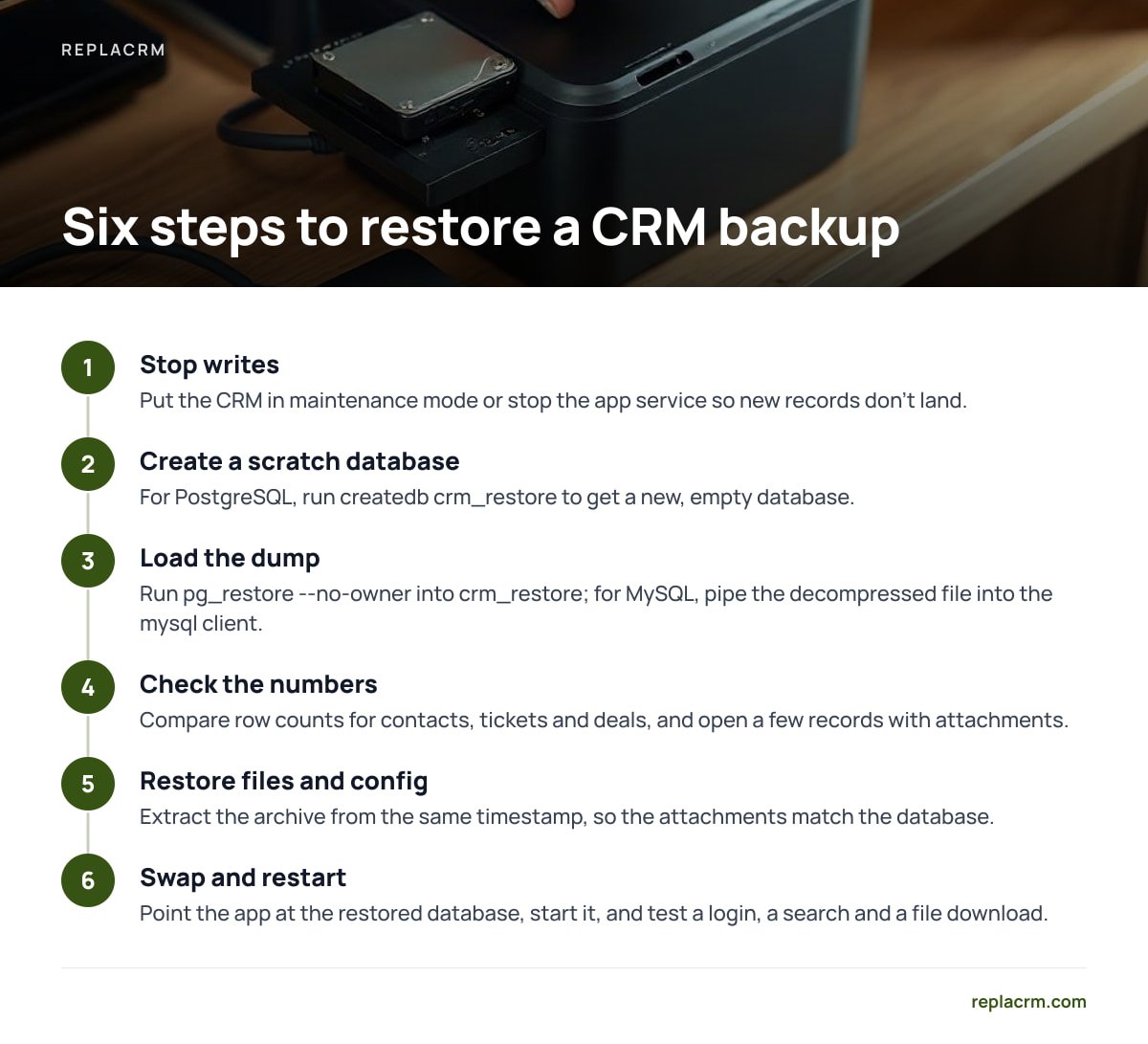
    Six steps to restore a CRM backup: 1. Stop writes; 2. Create a scratch database; 3. Load the dump; 4. Check the numbers; 5. Restore files and config; 6. Swap and restart

    How Often to Back Up, and How Long to Keep Copies

    Start with how much work you can afford to redo. Count what your team logs in a day: new leads, tickets answered, deals moved, documents signed.

    A nightly dump puts your worst-case data loss at 24 hours. If your team records 40 interactions a day, that is 40 records to rebuild from memory and email threads.

    Most small businesses are comfortable with a dump every 4 to 6 hours during working time and one overnight. If that still feels too loose, add WAL or binary log archiving later.

    For retention, 7 daily, 4 weekly and 6 monthly copies, which is what the script above keeps, covers both a fast mistake and a slow one. Slow mistakes are easy to underestimate: a bad import that corrupts records may not be noticed for three weeks.

    Retention has a legal side. Under GDPR Article 32, organizations must be able to restore the availability and access to personal data in a timely way after an incident, so tested backups support compliance. Backups also keep deleted customers alive until they expire. Keep a simple log of erasure requests and re-apply them after any restore, so someone who asked to be removed does not quietly return. If your CRM is reachable from outside, also review remote access without exposing the server, because a breached server is the most likely reason you will need these backups.

    Get a Self-Hosted CRM You Can Back Up With Ordinary Tools

    Replacrm is a self-hosted CRM you buy once, from $1,495, and run on your own server. It has no per-user fees, and it holds your unified inbox of chats, tickets, forms, email and calls, plus the sales board, bookings and e-signing, on infrastructure you control. Because the data lives on your server, you can use the tools in this article, and you decide where the copies go and how long they live. Several brands sit under one login with their customers kept separate, so one tested backup routine covers all of them.

    The backups are yours to schedule, store and test, and the license does not run them for you. The commands above are generic, so check your install documentation and spec sheet for the database type, upload directory and config paths before you adapt the script. Set up the schedule on day one and restore once before you import real customers, and you will have the safety net a subscription used to hide from you.

    Frequently Asked Questions

    What is the safest way to back up a self-hosted CRM database?

    Use the database's own dump tool, such as pg_dump for PostgreSQL or mysqldump with –single-transaction for MySQL, so the backup is consistent while the CRM is running. Then copy the dump, uploaded files and config to an encrypted offsite location. Test a restore regularly.

    Can I just copy the database folder or take a server snapshot?

    Copying live database files while the server is running can capture them mid-write, and the result may not start or may hide corruption. A snapshot taken with the database stopped, or one coordinated with the database, is safer. A logical dump is the simplest option for a small business.

    How often should I back up my CRM database?

    Decide how much data you can afford to lose. For most small teams, a dump every 4 to 6 hours during working time plus one overnight is reasonable, and a single nightly dump leaves up to 24 hours at risk.

    Do database backups include attachments and call recordings?

    Usually not. Files such as attachments, signed documents and recordings are often stored in a separate directory or object storage, so back them up in the same script as the database and keep the timestamps matched.

    How do I know my backup actually works?

    Restore it into a scratch database on a different machine, then compare row counts and open records with attachments. Do this monthly and after any CRM upgrade that changes the database structure.

    Can I restore just one brand or customer from a full backup?

    Yes, but not directly from the dump file. Load the full backup into a scratch database, then copy the specific rows back into production. Practice it before an emergency.

    Sources

  • Which Open Source CRMs Have Active Developer Communities

    Which Open Source CRMs Have Active Developer Communities

    For an open source CRM community support comparison, ignore star counts and read the contribution record: how many different people merged code in the last 90 days, how fast maintainers answer issues, and how often releases ship. The most active developer communities are the ones where outside contributors, not one company's staff, land a meaningful share of the commits. You can measure that for any project in about 20 minutes.

    TL;DR:

    • Star counts measure popularity at one moment. Distinct commit authors over the last 90 days measure whether anyone is actually maintaining the code.
    • Check seven signals on GitHub: contributor count, top-contributor share, issue response time, release cadence, outside pull request handling, security advisories and upgrade documentation.
    • Projects come in four community types: foundation-governed, single-vendor open core, fast-growing newcomer and aging fork. The first two are the safest for customer data.
    • Reddit and forum threads show what running the software feels like. They go stale fast, so check the post date before trusting any recommendation.
    • An active community will not answer your phone at 9 a.m. on a Monday. Budget for your own admin time, backups and upgrades, or pay a vendor to carry them.

    Table of Contents

    Open Source CRM Community Support Comparison: Why a Ranked List Goes Stale

    Most pages on this topic hand you a "top 5" and move on. Those lists age badly. A project that shipped weekly in 2022 can be down to one part-time maintainer by the time you read the list, and a newcomer can double its contributor base in a year. This article names no projects for that reason. It gives you a method that still works next year, and you can run it on every candidate yourself.

    If you are still deciding whether a self-hosted CRM is the right model at all, start with what you own and what you run. This article assumes you have already decided and want a codebase that will still be maintained when your data depends on it.

    Two meanings of "community support" get mixed up in search results. One is the developer community: the people who write, review and merge code. The other is the user community: the people who answer questions in forums and chat. The first decides whether bugs get fixed and security patches ship. The second decides how quickly you get unstuck on a Tuesday. You need both, and they do not always travel together.

    Why Star Counts Mislead and Commit Authors Don't

    Anyone can give a star in a second, and people do it to bookmark a project they never install. A repository with 25,000 stars can be maintained by a single person who merges 90 percent of the commits. A repository with 2,000 stars can have 60 people shipping code every month. The first has a big audience and the second has a big team.

    Ask for the number of distinct people who merged code in the last 90 days. If the answer is under three, you are evaluating a hobby, however many stars it has.

    The CHAOSS project, a Linux Foundation effort that defines metrics for open source community health, treats this as a core concern. It describes an "elephant factor": the smallest number of organizations that account for half of a project's contributions. A factor of one means a single company can stop the project by changing its mind. That is not automatically bad, but you should know it going in.

    Seven Signals You Can Check on GitHub in 20 Minutes

    GitHub's repository activity pages give you most of this without any tooling. Open the Insights tab, then look at Contributors, Commits and Pulse. For the rest, scroll the Issues, Pull requests, Releases and Security tabs. The thresholds below are my own rules of thumb, not an industry standard, but they separate living projects from coasting ones quickly.

    Signal Where to look Healthy Warning
    Distinct commit authors, last 90 days Insights, Contributors 10 or more 1 to 2
    Top contributor's share of commits Contributors graph Under 60% Over 90%
    First response to new issues Last 20 issues opened Within a week A month, or no reply
    Release cadence Releases tab Tagged release in the last 6 months Nothing in 12 months
    Outside pull requests Closed and open PRs from non-members Merged or declined in days to weeks Open for 6+ months
    Security advisories Security tab Published, with fixed versions No policy, no advisories
    Upgrade documentation Docs, changelog Versioned migration notes "Back up and reinstall"

    The OpenSSF Scorecard automates part of this. Its "Maintained" check looks at the last 90 days of commits and issue activity, and you can run it against any public repository. It will not tell you whether the project is good, but it will tell you whether anybody is home.

    The Four Kinds of CRM Communities You Will Run Into

    Once you have checked a few repositories, patterns appear. Almost every open source CRM falls into one of four community types, and each carries a different risk to your customer records.

    Foundation-governed or broadly community-run

    Many companies contribute, decisions happen in public, and no single employer can pull the plug. These projects usually move slower and have more process. Their upgrade notes tend to be the best of the four types. If your CRM will hold years of customer history, this is the type I would pick first.

    Single-vendor open core

    One company employs most of the maintainers and sells hosting, support or paid add-ons. This is the most common healthy model. The commit stream is steady because people are paid to produce it. The risk is that features you want may sit behind the paid tier. Check the license and the feature list before you commit. Our guide on what free open source CRM does and doesn't cover goes through that line in detail.

    Fast-growing newcomer

    Star counts climb quickly, funding announcements land, and the issue tracker moves fast. It looks like the most active community on the list, and by raw commit volume it often is. It also has the shortest track record. Breaking changes between versions are common, and the business model may still be changing. Use one for a side project. Think twice before putting your only copy of customer data in it.

    Aging project or fork

    Releases have thinned out and a few loyal contributors patch things. The user base is real and the forum answers are plentiful, but most describe older versions. Pass on these unless you have a developer who can maintain the code yourself.

    What Reddit and Forum Threads Tell You That GitHub Can't

    Three people talking around a café table with coffee cups and closed laptops, one of them gesturing as they explain something.

    GitHub shows what the maintainers are doing. Reddit threads, especially in admin-focused subreddits, show what running the software feels like: how painful the last upgrade was, whether the mobile app works, which plugin broke after an update. No commit graph will give you that.

    Treat the threads as anecdotes with a shelf life. A glowing recommendation from 2022 describes a version that is several major releases old. Look for the same complaint repeated by different people in the last 12 months. One person's bad upgrade is a story. Five people reporting the same one is a pattern.

    Also note where the community actually lives. A project with a quiet forum and a busy GitHub Discussions page is fine. A project that sends every question to a chat server with no searchable history makes you ask what others already asked.

    A Scoring Method That Fits on an Index Card

    Give each candidate one point for every healthy result in the table above. Seven is the maximum. Here is how I would read the totals:

    • 6 to 7 points. Safe to build on. Pick the one whose license and feature set fits.
    • 4 to 5 points. Usable if you have someone technical on hand, or a paid support contract.
    • 3 or fewer. Treat it as a risk. Do not store customer records you cannot afford to migrate.

    Pro Tip: Open the last ten closed issues that mention "upgrade" or "migration" and read how they ended. A maintainer who replies with a fix, a workaround or a clear "this is by design" is one you can rely on. A bot closing them as stale tells you how your own upgrade problem will go. Upgrade pain is what usually pushes small teams off self-hosted software, and this search takes five minutes.

    An Active Community Doesn't Answer Your Phone

    A busy repository means the code is being maintained. It does not mean someone is responsible for your installation. The Open Source Initiative's definition covers license freedoms: the right to use, study, modify and share the code. It promises no support, uptime or help with your data.

    In practice, you own the server, the updates and the recovery plan. Set up backups that survive a crash before you import your first contact, and put a number on your own time. A free download that takes four hours a month to keep patched is not free. Our piece on reducing CRM costs beyond the monthly subscription shows how to count that honestly.

    A CRM with a perfect Scorecard result and no backup routine will still lose your customer list the first time a disk fails.

    Skip the Community Lottery: Own a CRM With a Vendor Behind It

    Open source support is probabilistic. You are betting that enough strangers keep caring. If you run one or more small brands and just want your customer data on your own server, there is a shorter route.

    Replacrm is a self-hosted CRM sold for a one-time payment, from $1,495, with no per-user fees. It keeps chats, tickets, forms, email and calls on one customer record, keeps each brand's customers separate under one login, and adds a sales board, bookings and e-signing. It connects to ReplaChat and ReplaTicket. A company ships the updates, so you do not need to audit anyone's commit history.

    The caveat: ReplaCRM is a commercial license and not an open source project. You cannot fork it, and there is no public contributor community to join. You also still run the server and own the backups. Check the spec sheet against your hosting setup before you buy.

    Frequently Asked Questions

    Which open source CRM has the most active developer community?

    It changes quarterly, so check the numbers yourself instead of trusting a list. Look for the project with the most distinct commit authors in the last 90 days, a top contributor under 60 percent of commits, and a tagged release in the last six months. Projects meeting all three are usually foundation-run or backed by a company that pays its maintainers.

    Are GitHub stars a good measure of community support?

    No. Stars show interest at the moment someone clicked, and they never expire. A project can hold thousands of stars while one person writes nearly all the code. Distinct commit authors, issue response times and release cadence tell you far more.

    How do I check if an open source CRM is still maintained?

    Open the repository's Insights tab and check Contributors and Pulse for the last 90 days. Then read the dates on the latest release and the last ten issue replies. You can also run the OpenSSF Scorecard's Maintained check, which looks at 90 days of commits and issue activity.

    Is Reddit a reliable place to compare open source CRM community support?

    It is useful for real-world experience such as upgrade pain, plugin breakage and hosting quirks. It is unreliable for current status, because threads from 2022 describe old versions. Trust a complaint only when several different people have repeated it in the last 12 months.

    Does an active open source community mean I get support?

    No. An active community means the code gets maintained and questions often get answered by volunteers. Nobody is obliged to help you with your installation or data. If you need guaranteed response times, pay a vendor for support or buy a licensed product.

    Sources

  • Remote Access to a Self-Hosted CRM, Without Exposing It

    Remote Access to a Self-Hosted CRM, Without Exposing It

    The safest remote access to a self-hosted CRM is a private network layer, usually a WireGuard VPN or an identity-aware tunnel, with multi-factor login on top of the CRM itself. Most small businesses start by putting the staff login on the open internet, and attackers probe that setup constantly. Keep customer-facing pages like booking and forms public. Put everything your team uses behind the tunnel.

    TL;DR:

    • Split your CRM into a public surface (booking pages, forms, chat widget) and a private surface (staff login, admin, API). Only the private surface needs a VPN or tunnel.
    • For a team under about 25 people, a WireGuard VPN with each peer limited to one host and one port is the cheapest setup that holds up.
    • IP allowlists fail for traveling staff because hotel, airport and mobile carrier addresses change constantly.
    • Add MFA at the CRM login even behind a VPN, so one stolen laptop key does not give full access to customer data.
    • Offboarding is where remote access usually fails. Revoke the VPN key the same hour the person leaves.

    Table of Contents

    Remote Access to a Self-Hosted CRM: Four Ways In, Ranked

    Your CRM runs on a server you control, which means nobody else is building the front door. You have four realistic options, and they differ mostly in how much of your server a stranger can see. If you need a refresher on what you own when you self-host, the main guide to self-hosted CRM covers it. Here the question is how your people get in from the road.

    Method Setup effort What the internet can see Best for Weak spot
    Public HTTPS login with MFA Low The login page and every bug behind it Teams with no one to run a VPN Every unpatched flaw is reachable by anyone
    IP allowlist Low Nothing, to non-listed addresses Office-only staff Breaks the moment someone travels
    WireGuard VPN Medium One UDP port on the VPN host Teams of 2 to 25 with a technical owner You manage keys per device
    Identity-aware tunnel or proxy Medium to high Nothing inbound on your server Contractors, larger teams, mixed devices Depends on an external identity provider

    My pick for most small-business owners is the WireGuard VPN. It costs nothing in licensing, runs on the server you already have, and can be explained to staff in one sentence: turn it on, then open the CRM. The public login with MFA is acceptable only as a stopgap, and I would set a date to replace it.

    NIST's telework guidance, SP 800-46 Rev. 2 covers two problems: securing the remote access service and securing the devices that connect to it. A VPN solves only the first. Keep that in mind through the rest of this piece.

    Why Your Booking Pages Change the Answer

    The usual advice is "put the whole CRM behind a VPN." For a self-hosted CRM that also takes bookings, form submissions and chat messages from customers, that advice is wrong. Customers cannot install your VPN.

    So you split the system into two surfaces:

    • Public surface. Booking pages, contact forms, the chat widget endpoint and any e-signing links you send out. These must answer requests from anyone, so keep them minimal and patched.
    • Private surface. The staff login, admin settings, the sales board, the unified inbox, exports and the API. None of these has a reason to be reachable by strangers.

    How you split depends on your reverse proxy. The simplest version uses two hostnames: book.yourbrand.com is public and routes only to the customer-facing paths, while crm.yourbrand.com resolves only inside the VPN. If your CRM runs several brands from one install, repeat the public hostname per brand and keep a single private one for staff. A phishing email that links to your staff login then leads nowhere for outsiders.

    If your software cannot serve the public paths separately from the admin paths, put a reverse proxy in front that blocks everything except those paths for non-VPN traffic. A few lines of proxy configuration do this.

    Setting Up a WireGuard VPN for a Small Team

    WireGuard is a VPN protocol built into the Linux kernel since version 5.6. It uses a public/private key pair per device and no usernames or passwords, which removes the most common way VPNs get broken into.

    The setup, in order:

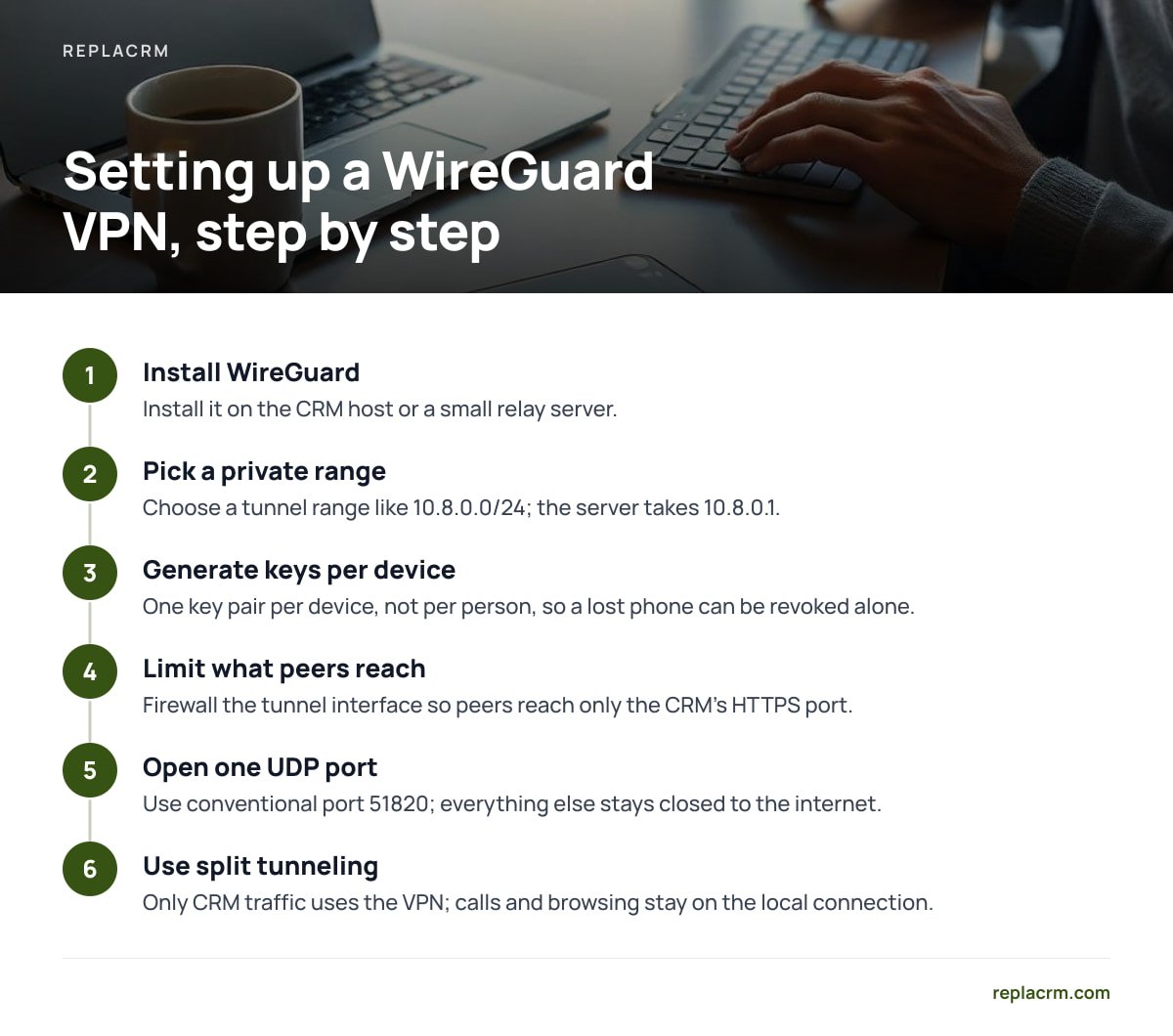
    1. Install WireGuard on the CRM host or a small relay server. If your CRM server already has a public IP, install it there. To keep the VPN endpoint separate, a small virtual server at a few dollars a month works as the relay.
    2. Pick a private range for the tunnel. Something like 10.8.0.0/24. The server takes 10.8.0.1, and each device gets its own address after that.
    3. Generate one key pair per device, not per person. A laptop and a phone are two peers. This lets you revoke a lost phone without touching the laptop.
    4. Limit what each peer can reach. On the server, firewall the tunnel interface so peers can reach only the CRM's HTTPS port. Do not leave the entire server network open.
    5. Open one UDP port. WireGuard's conventional port is 51820. Everything else stays closed to the internet.
    6. Use split tunneling on client devices. Only CRM traffic goes through the VPN. Video calls and general browsing stay on the local connection.

    A VPN peer that can reach one host on one HTTPS port exposes 1 port out of 65,535. A peer with a full-network tunnel exposes all of them.

    The firewall rule in step 4 matters more than the VPN itself. A lot of small-business VPNs hand every connected laptop access to the whole office network, including printers, file shares and the database port. Your CRM database should never be reachable from a traveler's laptop. Only the web front end should be.

    Setting up a WireGuard VPN, step by step: 1. Install WireGuard; 2. Pick a private range; 3. Generate keys per device; 4. Limit what peers reach; 5. Open one UDP port; 6. Use split tunneling

    When a VPN Is the Wrong Pick, and What to Use Instead

    A VPN fits staff who all carry company-managed devices. It fits badly in three situations.

    Contractors and part-timers on personal devices

    Handing a freelancer a VPN key puts a personal laptop of unknown health inside your private network. An identity-aware proxy is better here. It checks who the person is, via your email or single sign-on provider, and passes through only the CRM web app. NIST's zero trust architecture, SP 800-207 describes this model: access is decided per request, and being on the right network earns no implicit trust.

    Teams with no one to maintain a server

    A tunnel service that makes outbound-only connections from your server means you open zero inbound ports. That is a real security gain. The trade-off is that your whole team's access now depends on a third party's uptime and account security. If that account is compromised, so is your CRM front door. Protect it with a hardware security key.

    Staff who cannot handle a VPN toggle

    If your field sales rep forgets to connect, they will call you from a parking lot at 8 a.m. A proxy with browser-based login removes the toggle. I would pay for that convenience before I would train a reluctant user.

    Locking the Login Itself: MFA, Sessions and Certificates

    Assume the VPN will eventually be bypassed, by a stolen laptop or a shared key. The CRM login is your second wall.

    • Multi-factor on every account. CISA's guidance on multifactor authentication is consistent on this: it blocks the large majority of credential-stuffing attempts. Use an authenticator app or a hardware key. SMS codes are better than nothing and worse than everything else.
    • Short sessions for admins. An admin session that lives for 30 days is a gift to whoever steals the laptop. Set admin sessions to hours, and regular staff to a working day.
    • Role limits by brand. If you run several brands, a rep for one brand should not see another brand's customers. Separation inside the CRM limits what any one stolen login can expose.
    • TLS everywhere, even inside the tunnel. The VPN encrypts traffic, but a valid certificate on the CRM hostname prevents browser warnings that train staff to click through. Let's Encrypt certificates are valid for 90 days, so automate renewal. A calendar reminder is not a plan.

    For inside-the-VPN hostnames that the public internet cannot reach, use a DNS-based certificate challenge. The standard HTTP challenge needs a public-facing port, which defeats the point.

    Pro Tip: Test your setup from a phone hotspot with Wi-Fi switched off, not from the office. Some hotel and airport networks drop larger UDP packets. If the tunnel connects but pages hang halfway, lower the WireGuard MTU from the default 1420 to 1280 on the client. That single line fixes the most common "VPN works but CRM won't load" complaint from the road.

    What Breaks on the Road: Hotel Wi-Fi, Phones and Calls

    A hotel room desk with a closed laptop, a face-down phone and a coffee cup in front of a window overlooking a city at dusk.

    Remote access fails in predictable ways, mostly outside your server.

    • Captive portals. Hotel Wi-Fi blocks all traffic until the guest accepts terms in a browser. A VPN set to "always on" will not connect until that page is cleared. Tell staff to accept the portal first, then connect.
    • Blocked UDP. Some corporate and hotel networks allow only web traffic. If WireGuard cannot get through, a tunnel or proxy running over HTTPS on port 443 will, so keep one as a backup.
    • Changing addresses. An IP allowlist assumes the address stays put. A traveler may use four different networks in a day, so allowlists suit an office and fail a sales team.
    • Calls and texts. If your CRM handles calling and texting through the browser or a softphone, voice traffic over a VPN adds latency. Keep calls off the tunnel where the setup allows, or make sure the VPN host has good bandwidth and sits near your staff.
    • Phones. Staff will open the CRM on a phone. Give them the same WireGuard config through a QR code, and require a screen lock on any device that holds a key.

    If your team works from a unified customer inbox, a dropped connection also means missed replies. The unified inbox guide explains why a single record per customer makes it easier to pick up a conversation from any device once access is stable.

    Offboarding, Logging and Patching: The Upkeep That Keeps It Safe

    Setup takes a weekend. Upkeep decides whether it stays safe.

    Offboarding. Keep a one-page list of every device key and who holds it. When someone leaves, remove their WireGuard peer, disable their CRM account and end their sessions in the same hour. A key-per-device VPN beats shared passwords here: revocation takes one line.

    Logs. Turn on logging for VPN handshakes and CRM logins. You do not need a monitoring platform. You need to be able to answer "who logged in from where last Tuesday" in under five minutes.

    Patching. The remote access layer is itself a target. CISA's Known Exploited Vulnerabilities catalog has carried many entries for VPN gateways and remote access products, so a small component you update on schedule beats a feature-heavy appliance you forget. Set a monthly patch day for the OS, the VPN and the CRM.

    Backups. Remote access does nothing for you if the server is lost. Keep encrypted, off-server backups and restore one to a test machine at least once. For the wider cost picture of running your own stack, see how to reduce CRM costs beyond the monthly subscription and the breakdown of what you own, run and pay for.

    Get a Self-Hosted CRM Your Whole Team Can Reach Safely

    ReplaCRM installs on your own server, so you decide the access layer: a WireGuard VPN, a tunnel, or a proxy that exposes only the booking and form pages. It is a one-time license from $1,495 with no per-user fees, so adding a traveling rep or a contractor adds nothing to a monthly bill. Brands stay separated under one login, and the unified inbox, sales board and customer self-booking all work from whatever device your staff carry.

    ReplaCRM does not run your VPN or firewall for you. That layer sits on your server, and you or someone you hire sets it up. Check the spec sheet for the login and session options in your version before you design the MFA step, and plan a half day for the first setup.

    Frequently Asked Questions

    Is it safe to expose a self-hosted CRM directly to the internet?

    It can be done, but every flaw in the login page becomes reachable by anyone. If you must, use MFA, rate limiting, automatic patching and a reverse proxy that hides admin paths. A VPN or tunnel for staff is safer and not much harder.

    Do I need a VPN if my CRM already has a strong login?

    A strong login helps, but it is a single wall. A VPN keeps the login page invisible to the internet, so strangers cannot exploit an unpatched bug. Use both when you can.

    How do I let customers book appointments if the CRM is behind a VPN?

    Split the system into public and private hostnames. Expose only the booking, form and chat endpoints publicly through a reverse proxy, and keep the staff login and admin on a hostname that resolves only inside the tunnel.

    Why doesn't an IP allowlist work for traveling employees?

    Hotels, airports, cafes and mobile carriers assign new addresses constantly, so a traveler's address changes several times a day. Allowlists work for fixed offices. For people on the move, use a VPN or an identity-aware proxy.

    What should I do when an employee leaves?

    Remove their VPN peer or proxy access, disable their CRM account and end active sessions within the hour. Keep a list of which device keys belong to whom so nothing is missed.

    Sources

  • Backup Strategy for a Self-Hosted CRM That Survives a Crash

    Backup Strategy for a Self-Hosted CRM That Survives a Crash

    A backup strategy for a self hosted CRM copies three things (the database, the uploaded files, and your config and keys) to a location off the server, on a schedule set by how much data you can afford to lose. You then restore those copies onto a test machine to prove they work. A snapshot stored on the same server is not a backup, and a backup you have never restored is only a hope.

    TL;DR:

    • Back up three things: the database, uploaded files and recordings, and the config and encryption keys. Most people only do the first.
    • Pick your acceptable data loss before you pick a tool. A nightly backup can lose up to 24 hours of customer activity.
    • Never copy a live database directory. Use a dump tool or continuous archiving, and keep at least one copy off the server and out of reach of its credentials.
    • A free setup (cron, a dump command, restic or Borg, cheap object storage) covers most small businesses. Keep scripts in GitHub, never the data.
    • Restore to a scratch machine monthly and time it. Deleted customers reappear after a restore unless you keep a deletion log.

    Table of Contents

    Backup Strategy for a Self-Hosted CRM: What You Are Protecting

    A self-hosted CRM keeps customer data on a server you control, which makes you the only person responsible for its survival. No vendor will restore last Tuesday's data for you.

    Every self-hosted CRM stores its state in three places, and a backup plan has to cover all of them:

    • The database. Contacts, deals, tickets, notes, message history and user accounts. Everyone remembers this part.
    • Uploaded files. Attachments, signed documents, call recordings and form uploads. These often sit in a separate folder or object store, and they are usually much larger than the database.
    • Config and secrets. The environment file, license key, API credentials and any encryption key the app uses. Lose the key and an encrypted backup of the database can be unreadable.

    If you are still deciding what to run, what you own and what it costs is covered separately. The rest of this article assumes the server is already yours.

    Set Your Recovery Targets First: How Much Can You Lose?

    Contingency-planning guidance such as NIST SP 800-34 frames the problem with two numbers. The recovery point objective is how much data you can lose, measured in time. The recovery time objective is how long you can be down.

    Put real figures on them. If your team logs 15 customer interactions an hour over a nine-hour day, that is about 135 records. With a nightly backup, a crash late in the day can erase most of them.

    A nightly backup has a worst-case data loss of almost 24 hours: a crash at 1:59 a.m. wipes out the entire previous day.

    For a small business with one to ten users, I would aim for a recovery point of one hour or less and a recovery time of four hours or less. Nobody calls an hourly database dump excessive after a disk failure. If your CRM also stores call recordings and signed contracts, apply the tighter target to the database and a looser one (daily) to the files.

    The 3-2-1 Rule, and Why a Server Snapshot Fails It

    Two colleagues discussing external hard drives placed on a desk next to a closed laptop.

    The 3-2-1 rule means three copies of your data, on two kinds of storage, with one copy offsite. The CISA #StopRansomware Guide adds a point that matters more today: keep backups offline or otherwise out of reach of the systems they protect, encrypt them, and test them.

    A hosting-provider snapshot feels like a backup. It usually shares a failure domain with the server: the same account, the same credentials, often the same data center. If an attacker or a billing mistake takes out the server, the snapshots can go with it.

    Design the offsite copy so the server cannot delete it:

    • Write-only credentials. The server's backup key can add new files but not remove old ones.
    • Object lock or versioning. Most S3-compatible storage can refuse deletions for a set number of days.
    • A different provider. If your server is at one host, store backups with another.

    How to Back Up the Database Without Corrupting It

    Copying a live database's data directory with cp or rsync produces files from slightly different moments, and the result may not restore at all. Use the database's own tools.

    For PostgreSQL, pg_dump takes a consistent logical backup while the system runs, and continuous archiving with point-in-time recovery lets you replay changes to a chosen minute. For MySQL or MariaDB, the MySQL backup documentation describes mysqldump with --single-transaction, which gives a consistent InnoDB snapshot without locking tables, plus binary logs for point-in-time recovery.

    Method Worst-case data loss Restore speed Catch
    Nightly logical dump Up to 24 hours Minutes for a small database Simplest option, too coarse for busy teams
    Hourly logical dump Up to 1 hour Minutes for a small database More storage and a brief load spike each hour
    WAL archiving or binary logs Seconds to minutes Slower, needs log replay Most setup and the most to monitor
    Volume snapshot Depends on schedule Fast Crash-consistent only, and usually the same failure domain
    Copying live data files Unknown May not restore Do not use this

    My pick for a small business is an hourly dump plus a nightly full copy shipped offsite. Add log archiving only when losing an hour of activity would cost you real money. For a database under a few gigabytes, an hourly dump takes seconds and gets you 90 percent of the protection for 10 percent of the effort.

    Files, Keys and the Backup Everyone Forgets

    Database dumps get all the attention. Then someone restores a CRM and finds every attachment and signed contract missing.

    Use a deduplicating tool such as restic or BorgBackup for the file store. Both encrypt data, send only changed chunks after the first run, and keep many restore points in little extra space. A 20 GB folder of recordings might add a few hundred megabytes a day.

    Then handle the keys:

    • Config and secrets. Copy the environment file and license details into the same encrypted backup.
    • The backup passphrase. Store it in a password manager or printed in a safe, never only on the server. An encrypted backup without its passphrase is a large file of noise.

    If you run several brands out of one install, find out how brand separation is stored. When all brands share one database, you cannot roll back a single brand without rolling back the rest. The practical fix is to restore the whole backup to a scratch instance and export only the affected brand's records.

    A Free Backup Strategy for a Self-Hosted CRM, and the GitHub Question

    You do not need paid backup software. A working free stack looks like this:

    1. A cron job runs the dump command and writes a compressed file.
    2. restic or Borg pushes the dump and the file store to object storage.
    3. A retention rule prunes old restore points.
    4. A ping to a monitoring service confirms the job finished.

    For 50 GB of data, object storage typically costs a few dollars a month at most. That is the cheapest insurance a business owner will buy, and it is one reason cutting CRM costs never has to mean cutting protection.

    Searchers often ask about GitHub backups. Use a private GitHub repository for your backup scripts, compose files, cron entries and restore notes. Do not put the dumps or the .env file there. Git history is permanent, and customer data committed once is very hard to remove. GitHub also rejects files over 100 MB, which most database dumps exceed.

    Test the Restore: The Drill That Proves It Works

    Run a restore drill monthly, on a separate machine or a throwaway virtual server:

    1. Pull the latest offsite backup using only the credentials and passphrase you keep outside the production server.
    2. Restore the database and the file store.
    3. Start the CRM and log in.
    4. Open a customer record you know has an attachment, a note and a recent call, and check all three.
    5. Write down the elapsed time. That is your real recovery time.

    The first drill almost always finds a gap, such as a missing config file or a passphrase nobody wrote down. Better to find it on a Saturday than in the middle of an outage.

    Pro Tip: Alert on backup size, not just on whether the job ran. A dump that fails halfway can still exit cleanly and leave a file 90 percent smaller than normal. Have your monitoring compare tonight's size to the seven-day average and page you if it drops by more than 30 percent. Also add a "no backup received in 26 hours" alert, since a dead cron job sends no error at all.

    Retention and Privacy: Backups Hold Data You Deleted

    Under GDPR, Article 32 lists the ability to restore availability of and access to personal data after an incident as part of appropriate security. A tested backup is evidence you meet it. Backups also hold records you have since deleted, which creates a problem most backup guides skip.

    If a customer asks for erasure and you restore from a backup taken before the request, their data returns. Keep a simple deletion log (record ID and date) and re-apply it after every restore. Cap retention so old data ages out on a known schedule. A sensible default is 14 daily, 8 weekly and 12 monthly restore points, with nothing kept past 12 months unless a legal duty says otherwise. State that window in your privacy policy.

    Get a Self-Hosted CRM You Can Back Up in an Afternoon

    Replacrm is a self-hosted CRM sold for a one-time payment, from $1,495, with unlimited users, brands and customers. Chats, tickets, form submissions, email and calls land on one customer record on your server. That leaves one place to protect, your own database and file store, with no per-seat export fees and no monthly bill that doubles as a hostage situation. The setup is covered in our installation guide.

    Backups are your job, since the software runs on your server and you hold the keys. Before writing your cron job, check where the install keeps its database, uploads and config, and whether ReplaChat or ReplaTicket run on the same server. If they do, add their data to the same backup.

    Frequently Asked Questions

    How often should I back up a self-hosted CRM?

    Match the schedule to how much data you can afford to lose. For most small teams, an hourly database dump plus a nightly full backup of files works well. If you log few interactions per day, a nightly backup alone may be enough.

    Is a server snapshot a good enough backup for my CRM?

    No, not by itself. A snapshot usually sits in the same account and data center as the server, so one compromised credential or provider failure can destroy both. Keep at least one encrypted copy with a different provider, using credentials that cannot delete old files.

    Can I back up a self-hosted CRM for free?

    Yes. Cron, a database dump command, restic or BorgBackup, and a few dollars a month of object storage cover most small businesses. The main cost is an afternoon of setup and a monthly restore test.

    Should I store CRM backups on GitHub?

    Store the scripts and configuration templates there, in a private repository, but never the data dumps or secrets. Git history is permanent and GitHub rejects files over 100 MB. Send the actual backups to encrypted object storage.

    How do I know my CRM backup actually works?

    Restore it to a separate machine every month, log in, and check that records, attachments and recent activity are present. Time the process, because that number is your real recovery time. Also set alerts for missing or abnormally small backup files.

    Sources

  • Unified Customer Inbox: Chat, Tickets and Email in One Record

    Unified Customer Inbox: Chat, Tickets and Email in One Record

    A unified customer inbox for chat, tickets and email puts every conversation in one place, but the version worth buying also ties each message to a single customer record. A shared inbox only lists messages. A record shows that the person who emailed Tuesday also chatted Friday and filed a ticket last month. Pick the record, because that history stops your team from asking customers to repeat themselves.

    TL;DR:

    • A unified inbox that only lists messages from several channels is a convenience. One built on a single customer record changes how you answer people.
    • Outlook can combine multiple email accounts, but it cannot pull in live chat, support tickets or form submissions, so it covers one channel of four.
    • If you run more than one brand, merge channels per customer but keep brands separate, so one brand's customers never show up in another brand's view.
    • When a customer is upset, the reply that works names the specific failure, states one concrete next step with a date, and comes from someone who has already read the history.
    • Per-seat pricing grows with every person you add to the inbox. A one-time, self-hosted license costs more upfront and nothing per user afterward, but you run the server.

    Table of Contents

    What a Unified Customer Inbox for Chat, Tickets and Email Has to Merge

    Three things can be unified: the list of messages, the reply box, and the customer. Most products do the first. The best do all three.

    A message list pulls email, chat transcripts and ticket updates into one feed, sorted by time. That saves tab switching. It does not tell your team that the angry chat at 2 p.m. came from the same person whose invoice ticket has been open for nine days.

    A customer record fixes that. Every chat, ticket, form submission, email and call attaches to one person, and opening the record shows the whole relationship top to bottom. To test it, open a customer you know has contacted you through two channels and see whether both appear without a search.

    Our position is that the record is the product and the inbox is the window onto it. If a vendor demos the feed and never opens a customer, keep asking questions.

    Can You Have a Unified Inbox in Outlook? Yes for Email, No for the Rest

    Outlook can unify email. It cannot unify anything else.

    Microsoft's Outlook support documentation describes a mail, calendar, contacts and tasks client. Outlook on Mac has a setting that groups similar folders, such as inboxes, from different accounts. Outlook on Windows lists each account's inbox separately, so people usually work around it with a search folder or by forwarding every address into one mailbox.

    Either way, you have one channel. Live chat transcripts live in the chat tool. Tickets live in a helpdesk. Web form submissions arrive as emails that nobody links to the sender's history. Outlook has no customer record that holds all of it.

    Outlook is a fine answer if you are a solo operator, email is nearly all of your volume, and you can remember your customers. Past two people or two channels, you start losing context, and a shared mailbox makes it worse, because two colleagues can answer the same message without knowing it.

    Customer Service Email, Live Chat Support, Tickets and Forms: What Each One Is

    Each channel behaves differently, and a good inbox respects that instead of flattening them.

    What is a customer service email?

    A customer service email is a message sent to or from a support address about an existing purchase, account or problem. It differs from marketing email because the customer started it, or because you are answering something they asked. The useful ones carry an order number, a date and one clear question. They are slow by nature, since the customer expects hours, not seconds.

    What is live chat customer support?

    Live chat customer support is a real-time text conversation between a customer and your team, usually through a widget on your website. It suits short, urgent questions such as "Does this ship today?" The conversation ends when the visitor closes the window, so the transcript must be saved to the customer's record or the context vanishes.

    Tickets and form submissions

    • Tickets. A ticket is a tracked issue with an owner, a status and a history. Use one whenever a problem takes more than one reply to resolve.
    • Form submissions. Contact and quote forms arrive as structured data. They should create or update a customer record automatically, not sit in an inbox as plain text.
    • Calls and texts. Phone conversations and SMS belong in the same timeline. A note that says "called, will ring back Thursday" is a record entry, not a sticky note.

    Shared Mailbox, Aggregator App or CRM: Which Unified Inbox Fits

    The right answer depends on how many channels you run and how many people answer them.

    Approach Channels covered Customer history Cost model Best for
    Shared mailbox in an email client Email only None beyond search Included with mail plan One person, email-heavy
    Consumer chat aggregator apps Personal messengers Per chat thread only Free or low monthly Individuals, not teams
    Per-seat helpdesk or SaaS CRM Email, chat, tickets Yes Monthly fee per user Teams that accept rented software
    Self-hosted CRM with unified inbox Chat, tickets, forms, email, calls Yes, one record per customer One-time license Owners who want to keep data and costs fixed

    The aggregator apps that merge personal messengers into one window are built for individuals. They have no customer records, no assignment and no audit trail, so skip them for a business.

    The choice is between the last two rows. Per-seat tools work, but your bill grows with every hire. We cover the arithmetic in our breakdown of a flat-price CRM with unlimited users. As a rough example, five users at $50 per seat per month is $3,000 a year, every year. A one-time license starting at $1,495 pays for itself inside the first year, though you take on hosting.

    Running Several Brands? Unify the Customer and Separate the Brand

    Multi-brand owners are tempted to dump everything into one inbox. That is a mistake.

    If you run a plumbing company and a rental business, a customer of one should not appear in the other's view, and your staff on one brand should not see the other's contacts. Mixing them creates awkward replies, such as a rental guest receiving a plumbing quote follow-up.

    There is a legal angle too. The GDPR, Regulation (EU) 2016/679, requires personal data to be collected for specified purposes and not used in incompatible ways. A customer who gave their details to Brand A did not necessarily agree to hear from Brand B. Keeping brands separate is the safer default even outside the EU.

    Under GDPR Article 12(3), you generally have one month to respond to a customer's request for their data, and every channel counts, so a scattered inbox makes a one-month deadline hard to meet.

    The workable setup is one login for you and one customer space per brand. You switch between brands without signing out, yet each brand's records, replies and sender addresses stay walled off. Reply from the brand's own address, never a generic one.

    How to Write an Email to an Upset Customer

    Two people talking across a table in a small office, one listening while the other gestures as they speak.

    Start with the history, then write. An angry customer who has to explain the problem a second time gets angrier.

    Harvard Business Review's analysis of customer effort by Matthew Dixon, Karen Freeman and Nicholas Toman found that 96% of customers with a high-effort service experience became more disloyal, compared with 9% of those with a low-effort one. Repeating yourself is the clearest form of high effort. A unified record removes it before you type a word.

    ISO 10002:2018, the international guideline for handling complaints, builds its process on receiving, tracking and acknowledging a complaint before investigating it. Your email is the acknowledgment step, so keep it specific.

    Here is a template that works:

    Subject: Your order 4821: what went wrong and what happens next

    Hi Dana,

    You were told delivery would be Tuesday, and it is now Friday. That is our mistake, and I am sorry. I have read your earlier chat and the ticket from last week, so you do not need to explain again.

    I have asked the carrier to trace the parcel today. If it has not moved by 5 p.m. Monday, I will ship a replacement at no charge and email you the tracking number that day.

    You can reply here and it will reach me directly.

    Marcus

    • Name the failure. "Delivery is three days late" beats "the inconvenience."
    • One next step with a time. A date and an action. Two options confuse people.
    • No defensive phrases. Skip "as per our policy" and "unfortunately."
    • Do not offer a discount before you fix the problem. It reads as a brush-off.

    Pro Tip: Draft the reply, then delete its first paragraph if it only expresses sympathy. Open instead with the fact that proves you read the history, such as the date they first reported the problem. Specific recall calms people faster than apology language.

    What to Check Before You Buy a Unified Inbox

    Run these tests in a demo, using your own messy data if you can.

    • Identity matching. Send an email and a chat from the same person using different addresses. See whether they merge or duplicate.
    • Brand separation. Create two brands and confirm a user assigned to one cannot see the other's customers.
    • Reply routing. Reply from inside the record and check the sender address matches the brand.
    • Export. Export one customer's full history. If it takes manual work, a data request will too.
    • Price at ten users. Ask for the total at your expected headcount in three years, not today's.

    Self-hosting adds its own checks. You are responsible for backups, updates and uptime, and email deliverability needs correct DNS records on your side. If your server sits behind a home or office network, you may also need a relay or tunnel service so customers and remote staff can reach it. Our honest list of self-hosting pros and cons covers the work involved, and the installation guide walks through what to prepare.

    Get Every Chat, Ticket and Email on One Customer Record You Own

    Replacrm is a self-hosted CRM that does what this article describes. Chats, support tickets, form submissions, email and calls land on one record per customer, and each of your brands stays separate under a single login. Chat and ticket history arrive through integrations with ReplaChat and ReplaTicket. Around the inbox you also get a sales board, customer self-booking, e-signing, and calling and texting.

    The license is a one-time payment starting at $1,495, with no per-user fees and no limit on brands, users or customers. The caveat is that you host it. You need a server, you handle backups and updates, and it is a poor fit if you want someone else to run the software for you. Check the spec sheet for server requirements before you buy.

    Frequently Asked Questions

    Can you have a unified inbox in Outlook?

    Yes, for email only. Outlook on Mac can group inboxes from several accounts, and Windows users typically rely on search folders or forwarding. Outlook does not bring in live chat, tickets or form submissions, and it has no per-customer record.

    What is a customer service email?

    It is an email sent to or from a support address about an existing order, account or problem. The customer usually starts it, and it should carry an order number and one clear question. Unlike marketing email, its purpose is to resolve something.

    What is live chat customer support?

    It is a real-time text conversation between a customer and your team, usually through a widget on your website. It works best for short, urgent questions. Save the transcript to the customer's record, or the context disappears when the window closes.

    How do I write an email to a customer who is upset?

    Read their history first, then name the specific failure, apologize once, and give one concrete next step with a date. Avoid policy language and avoid offering a discount before the problem is fixed. Reply from a person's name so they know who owns it.

    Is a unified inbox the same as a shared inbox?

    No. A shared inbox lists messages for a team, usually from one channel. A unified inbox combines several channels, and the better versions attach every message to a single customer record so you see the full history.

    Do I need to keep different brands' customers separate?

    Yes, in most cases. Customers gave their details to one brand for one purpose, and the GDPR limits using personal data in incompatible ways. Separate customer spaces also stop staff from sending a reply that mixes up two businesses.

    Sources

  • How to Reduce CRM Costs Beyond the Monthly Subscription

    How to Reduce CRM Costs Beyond the Monthly Subscription

    To reduce CRM software costs, move from a rented, subscription-based Software as a Service (SaaS) model to an owned, self-hosted platform. That removes recurring per-user fees and lets you pay for the software once, no matter how many users or brands you add.

    TL;DR:

    • Move from subscription-based CRM to self-hosted software.
    • Avoid per-user and tiered pricing common in SaaS.
    • Centralize data across multiple brands on one server.
    • Expect one-time payment to change long-term overhead.
    • Use unified data intake to track every customer interaction in one place.

    Table of Contents

    The Hidden Costs of the Subscription Model

    A technician inspects the power and internal status indicators on a large server rack.

    Most businesses start by looking at the monthly price for a CRM and assume that is the total cost. The true price of subscription software is higher when you account for hidden fees, scaling costs, and vendor lock-in.

    These costs often accelerate as your business grows. The monthly bill might be low at first, but adding a third employee or launching a second brand immediately increases your recurring software overhead.

    Scaling costs. The per-user fee is predictable, and it is the largest hidden cost.

    Calculating CRM Total Cost of Ownership (TCO)

    Calculating CRM Total Cost of Ownership (TCO) requires looking beyond the monthly license fee. TCO includes implementation time, customization, necessary integrations, training, and eventual export costs to move data if you leave the platform.

    Comparing SaaS vs. Self-Hosted Models

    The cost structure differs between the two models. SaaS models trade upfront investment for predictable monthly expenses. Self-hosted models require a higher initial capital outlay but result in lower operating costs over several years.

    A common comparison looks like this:

    Feature SaaS CRM Self-Hosted CRM
    Upfront Cost $0 (or low) $1,495+ (for software license)
    Monthly Cost Varies based on seats/tiers Server hosting/Maintenance
    Scaling Fees High (per-seat increase) Minimal (more server space)
    Data Ownership Rented (under vendor control) Owned (on your server)

    5 Strategic Moves to Reduce CRM Software Costs

    1. Transition to Ownership

    The most effective way to reduce CRM software costs is to stop renting the platform and buy the license outright. This changes the business model from operational expense (OpEx) to capital expenditure (CapEx). The initial purchase requires upfront budgeting, but you eliminate recurring monthly payments.

    2. Standardize Use of Customer Data

    Pulling all customer interactions into a single record reduces the need for multiple, disconnected software tools. A unified inbox tracks emails, calls, support tickets, and form submissions, so you don't need separate systems for communication, support, and sales tracking.

    Unified Data Intake. Consolidating data sources into one system reduces the number of different tools and integration licenses you pay for.

    3. Eliminate Over-Provisioning Seats

    SaaS CRMs often charge for user seats even if those seats are inactive or shared across brands. A self-hosted solution lets you scale user access and brand management independently of a rigid, paid seat count.

    You pay for the software license and the server. You do not pay for the number of people checking it each week.

    4. Control Scalability Through Infrastructure

    When you manage your own server, you decide when and how to scale. If you grow from 50 users to 500 users, you adjust your hosting resources; your license agreement stays the same. This gives you more long-term cost predictability than depending on a SaaS vendor's pricing structure, which often changes without notice.

    5. Evaluate Your Feature Necessity

    Before adopting any CRM, identify the minimum required features. Do you need complex automation workflows or advanced predictive analytics, or do you only need a reliable sales board and contact management? Reducing feature sprawl reduces the chance of moving into higher-cost tiers later.


    Pro Tip: Before buying a self-hosted CRM, run a small migration simulation. Take a representative subset of your current customer data and test the import and reporting functionality in the system you want. This confirms the technical setup aligns with your team's workflow before you commit to the purchase.


    When Server Health Turns Dangerous, and What To Do Right Now

    Self-hosting gives you control over cost and data, but it adds operational work. One risk is your dependence on the server's health.

    Proper server maintenance is part of the running cost of ownership. Monitor your server's uptime and keep backups consistent.

    Server Health Threshold. A common metric is CPU usage. If your CPU usage spikes consistently above 80% during peak hours, your current server resources are insufficient, and performance will suffer.

    Data Integrity. Backups. Backup frequency should be defined by the data's importance. A common standard for critical business data is the 3-2-1 backup rule: maintain three copies of your data, stored in two different physical media, with at least one copy stored off-site or in the cloud.

    Addressing Technical Implementation Challenges

    Moving to a self-hosted system requires internal technical capability or outsourced support. This moves the expense from "recurring subscription" to "upfront labor."

    If you are technically inclined, managing the platform is straightforward. If you are not, you must budget for IT support. The labor cost of an internal IT hire is often more predictable than the indefinite, escalating cost of a SaaS subscription.

    Potential Cost SaaS Model Self-Hosted Model
    Software Licensing Ongoing monthly fee One-time purchase
    IT Labor Minimal (self-service) Required (setup, maintenance)
    Data Control Limited by vendor API Total control

    Get a Unified View of Your Entire Business Customer Base

    If you are tired of watching revenue increase while your software bills also increase, switching to an owned platform is the most direct solution. ReplaCRM is a self-hosted CRM built for owners who run multiple brands and cannot afford per-user, tiered pricing.

    It solves the complexity of running separate systems for each business by bringing chats, tickets, forms, emails, and calls onto a single customer record under one login. You get the tools you need (a sales board for tracking deals, customer self-booking, and integrated calling/texting) for a single one-time license from $1,495. The limitation is that your success depends on consistent server maintenance; you must ensure your host meets the technical requirements on their specifications page.

    Frequently Asked Questions

    Are self-hosted CRMs harder to use than subscription CRMs?

    Not necessarily. Modern self-hosted platforms like ReplaCRM have intuitive interfaces that mirror common SaaS functionality. The main difference is that you have full administrative control over the data and features.

    What is the main risk of self-hosting my CRM?

    Operational maintenance. If you don't manage your server, backups, and updates, the system will fail. This risk usually goes down if you use a reliable hosting provider that specializes in running CRM systems.

    Does a one-time payment mean there are no future costs?

    No. The core software license is a one-time payment, but you still pay for server hosting, domain name management, and sometimes professional technical support for setup and maintenance.

    Can I separate customers across multiple brands if I use a self-hosted solution?

    Yes. A benefit of platforms like ReplaCRM is that you can keep distinct customer data and tracking for different brands while running them under one centralized CRM instance.

    Sources

  • How to Choose a Self-Hosted CRM You Can Install on Your Own Server

    How to Choose a Self-Hosted CRM You Can Install on Your Own Server

    Choosing a CRM you can install on your own server comes down to whether you need complete data ownership and long-term cost control. That usually means a paid commercial license. Open-source software gives you the code, but you handle security, maintenance, and multi-brand structure. That often does not match what a growing business needs. A complete, off-the-shelf solution automates these operational tasks and keeps your data under your control.

    TL;DR:

    • Self-hosting grants data ownership but requires specialized technical maintenance.
    • Free open-source options lack the multi-brand separation and unified feature sets necessary for complex businesses.
    • Choosing a commercial self-hosted license removes recurring per-seat fees and automates support.
    • The success of your installation relies on planning server resources as much as choosing software.
    • Data independence means removing recurring dependency on SaaS providers.

    The main reason businesses explore a CRM you can install on your own server is data ownership. With a cloud-based SaaS system, you rent access to your customer history, sales pipeline, and communication logs. That model is convenient, but it creates a financial dependency that scales linearly with your user count.

    By installing software on your infrastructure, you move from renter to owner. Ownership means that if a vendor raises prices or shuts down, your foundational business data remains available to you.

    The Core Distinction: Installation vs. Operational Readiness

    Downloading software is different from having a functional, secure system that needs little input from the business owner.

    Open-source CRM options require significant expertise in database management and server upkeep.

    • Data migration. Moving old customer data into a new server environment is not a simple export.
    • Security patching. You update the software when vulnerabilities are found.
    • Uptime guarantee. If your server goes down at 3 AM, the responsibility is yours, not the vendor's.

    A self-hosted solution from a licensed provider includes the software, documentation, and a clear operation road map.

    Planning Your Infrastructure Requirements

    Before you attempt an installation, define your hardware and operational needs. Install software only after you know the hardware can handle the load.

    • Processing Power (CPU/RAM). Expect high concurrent traffic if more than five users query the database at once.
    • Storage (IOPS). Database systems perform thousands of small read/write operations (IOPS) per second. SSD storage is mandatory for any system handling over 10,000 customer records.
    • Network Latency. High latency between your server and end users adds noticeable lag and degrades the user experience.

    1 meter, 30 minutes. That is the entire scope of the IP67 immersion test as defined by IEC 60529.

    Evaluating CRM Self-Hosting Models

    When comparing self-hosted options, look beyond the feature list and examine the cost model and complexity. Open-source options often cost $0 upfront but build up operational costs that are harder to quantify.

    Model Upfront Cost Ongoing Costs Maintenance Burden Data Ownership
    Open-Source Low (Licensing) High (Personnel/Time) High Full
    Commercial Self-Hosted Moderate (License) Low (Hosting) Low Full
    Cloud SaaS Zero (initial) Very High (Per-Seat Fees) None Rental

    Open-source software offers full control. But the integrated functions a modern sales team needs, such as automated ticket routing or integrated e-signing, often require developers to custom-code or integrate several separate add-ons.

    The Case for Unified Customer Data

    Many small and mid-market businesses run multiple brands or product lines. If your data sits across different "accounts" or needs manual merging of contacts, you waste sales time.

    A self-hosted CRM for this setup must offer:

    • Centralized Records. A single profile for a customer, no matter how many brands they buy from.
    • Multi-Channel Aggregation. Data from chat logs, email, phone calls, and physical form submissions pulled into one view.
    • Workflow Automation. Rules that trigger actions when a specific event occurs, such as a support ticket exceeding 48 hours.

    For a balanced view of the commitment self-hosting requires, see The Pros and Cons of a Self-Hosted CRM, Without the Sales Pitch.

    How you host the CRM matters as much as which CRM you choose. You must decide between a bare metal server you buy, a Virtual Private Server (VPS), or a dedicated managed hosting service.

    • VPS (Virtual Private Server). Good performance, but you manage the entire operating system stack. How Much It Costs to Host a CRM on a VPS: Real Monthly Numbers is a useful resource for typical monthly expenses.
    • Managed Hosting. Maintenance is simpler, but it adds another vendor dependency and undercuts part of the reason for self-hosting.

    Defining Your CRM's Scope: What You Need to Track

    If you are replacing basic contact managers, make sure your self-hosted CRM includes advanced sales and service protocols. A system that only stores names and phone numbers is insufficient.

    Look for native support for:

    • Sales Pipelines. A visual board to track deals from first contact to close.
    • Bookings and Scheduling. Clients can book time with your sales team through the CRM interface.
    • Internal Communication. Built-in notes and activity timelines attached to every client record.

    For businesses managing multiple divisions, it helps to know the real cost of separate tools. A Cheaper Alternative to HubSpot for Small Business: The Real Math offers a useful perspective on cost breakdown versus feature inclusion.

    The Solution for Multi-Brand Data Ownership

    When you run several distinct brands, each with its own sales pipeline and customer separation, stitching open-source pieces together becomes prohibitive. You need a unified system built for business aggregation.

    To eliminate the monthly financial risk of per-seat licenses and keep full control over your brand data, consider a dedicated commercial license. For example, Replacrm is a self-hosted CRM sold for a one-time license from $1,495. It is designed for owners running one or more brands who want customer data on their own server without perpetual fees. ReplaCRM lets you manage multiple brand data sets under a single login and provides advanced functions such as unified inbox management for chats, tickets, forms, email, and calls. The main requirement is an existing server that can support the application. Check the platform specifications against your current hardware before purchase.

    Frequently Asked Questions

    Is self-hosting a CRM always cheaper in the long run?

    Not necessarily. Self-hosting replaces one type of recurring cost with another. You eliminate monthly per-user subscription fees, but you take on server maintenance, software updates, and personnel time.

    Can I still use my own team's personal email and phone for a self-hosted CRM?

    The system allows you to integrate with these channels, but for security and clear tracking, it is best practice to set up dedicated business accounts within the CRM for tracking communication history.

    How complex is the initial installation of a self-hosted CRM?

    The complexity varies by platform. An open-source solution may require expert system administration knowledge. A commercial license often includes guided installation and dedicated support.

    Does self-hosting mean I can never upgrade my CRM features?

    No. Once you own the license, you control the upgrade path. Major version jumps may require re-deployment, but you are not locked into a vendor's mandated feature releases or pricing tiers.

    Sources

  • A CRM With No Monthly Subscription: What You Buy and What It Costs

    A CRM With No Monthly Subscription: What You Buy and What It Costs

    A CRM with no monthly subscription means you pay once for the software and stop paying per user. Most pages ranking for this term list free cloud CRMs, which are subscriptions priced at zero: they still cap users and contacts and keep your records on the vendor's servers. A one-time, self-hosted license works differently. You buy it, install it on a server you control, and add users without adding to the bill.

    TL;DR:

    • Free cloud CRM and a no-subscription CRM are different purchases: one is a subscription priced at zero, the other is a license you own.
    • At 5 users and $25 per seat, per-seat billing costs $1,500 a year. A $1,495 license on a $20 server costs $1,735 in year one and $2,695 in year five.
    • The crossover lands around month 14 for that team size. Below three users, a free tier usually wins.
    • You take on the server, the backups and the patching. Budget $6 to $40 a month and two to four hours of work.
    • Check the license in writing: how many users, how many brands, and whether future security patches are included.

    Table of Contents

    Why "Free CRM" and "CRM With No Monthly Subscription" Are Not the Same Thing

    Data storage hardware and cables arranged for maintenance.

    Type this query into Google and almost every result hands you a list of free CRMs. That answers a different question. A free CRM is a cloud subscription priced at zero. The vendor runs the servers, holds your customer records and sets the terms of the deal. A CRM with no monthly subscription is a purchase. You pay once, hold the license, and run the software on hardware you choose.

    The difference shows up in the details.

    User caps. Free tiers are per-seat products with the seat price set to zero. Most stop somewhere between one and five users. The day you hire the sixth person, you are on a paid plan charged per user, and you are migrating records while trying to close deals.

    Metered records. Contacts, open deals, email sends and attachment storage all get counted on free plans. That is the design: your growth is the trigger that makes you a paying customer.

    Custody of the data. Your customer list, call notes and invoice history live in a database you cannot open. Exports usually give you contacts as a CSV file. Getting activity history, attachments and custom fields out as well is a separate project, and it is the one nobody scopes until the day they leave.

    Four Ways to Run a CRM With No Recurring Bill

    One-time self-hosted license. You buy the software once and install it on a server you control. The user count is uncapped because the vendor has no meter to read. This is the model to compare against every per-seat quote you have received.

    A free tier from a cloud CRM. Zero dollars, standard subscription terms. Useful for finding out whether your team will keep records up to date.

    A spreadsheet or a database you already own. Free and familiar. It breaks at the point two people need to edit the same deal, and it leaves no audit trail when someone overwrites a close date.

    Perpetual desktop software. Buy once, install on a laptop. It works for one salesperson and fails the moment you need a shared inbox or a pipeline two people can update.

    The maintenance load differs sharply between those four options, which is the part pricing pages leave out.

    What Five Years Actually Costs, and Where the Crossover Sits

    Take a five-person team on a cloud CRM at $25 per user per month. That is $1,500 a year, every year, whether or not you hire anyone. Now compare a one-time license at $1,495 running on a $20 per month server.

    At 5 users and $25 per user per month, a $1,495 one-time license pays for itself in about 14 months. After that, the only recurring cost is the server.

    The formula is short. Divide the one-time price by the monthly gap between your seat bill and your server bill. $1,495 divided by ($125 minus $20) comes to 14.2 months.

    Cost line Cloud CRM, 5 users at $25 per user per month One-time self-hosted license
    Year 1 $1,500 $1,735
    Year 3 $4,500 $2,215
    Year 5 $7,500 $2,695
    Adding a sixth user $300 per year $0
    Where the data lives vendor's servers your server
    Software updates included while you pay depends on license terms

    At three users the numbers change. Three seats at $25 is $75 per month, a smaller server runs about $15, so the gap is $60 and the same license takes roughly 25 months to pay back. Under two users, a free tier wins on pure cost. If your team is larger, the payback arrives sooner; Buy a CRM Once, Stop Paying Monthly runs the same arithmetic at higher seat counts, and CRM With Unlimited Users and a Flat Price covers what flat pricing does to a growing headcount.

    The Trade-Off You Are Accepting: A Server, Backups and Updates

    A one-time license moves work from the vendor to you. Be clear about which work.

    The server. A VPS that comfortably runs a CRM for five to twenty users costs roughly $6 to $40 per month depending on memory and storage. A domain name is another $10 to $15 a year.

    TLS certificates. These are free now. Let's Encrypt issues and renews them automatically, so the line item that used to cost money does not.

    Backups. You need a nightly database dump copied somewhere else, and you need to restore one of them once to prove it works. An untested backup is just a file.

    Updates. Someone has to apply them. Budget two to four hours a month, more in the weeks after a major release.

    Security. Running your own login page means you own the hardening. OWASP's Top 10 is the list to read before you expose it to the internet.

    Pro Tip: Before you pay for a one-time license, ask the vendor in writing what "lifetime" covers. A perpetual license to the version you bought is a different asset from a perpetual license that includes every future version and security patch. The difference stays invisible until the first patch is released, and by then the contract is signed. Ask the same question about the support window and about what happens to your copy if the vendor stops trading.

    Per-Seat Costs That Hide Behind the Seat Price

    Onboarding and migration. Implementation fees are quoted separately from seats, and they hit hardest when you are moving three years of history between platforms.

    API and automation limits. Workflow runs, API calls and integration seats are often metered separately from user seats, so the price you compared is not the price you pay once you automate anything.

    Annual prepay. A discount for paying yearly locks in a seat count and a term. It looks like a saving and behaves like a small contract.

    Add-on modules. Quoting, e-signing, calling minutes and marketing sends are frequently separate line items on the invoice.

    Payment processing. Card fees apply wherever the CRM runs. Stripe publishes 2.9% plus 30 cents per successful card charge for standard US online payments, and self-hosting does not change that number.

    What to Check Before You Sign a One-Time License

    License scope. Get the number of named users, the number of brands or companies covered, and whether the license is tied to one server or one legal entity.

    Update entitlement. Put the version number in writing, along with what happens to security patches after the first year.

    A full export. Ask for a complete database dump rather than a contacts CSV. If a vendor cannot produce one for a prospective customer who asks, that tells you what the exit will feel like.

    Support window. A one-time purchase with 90 days of support and one with three years of support are different products at different prices.

    Pipeline design. Software does not fix a sales process. How to Set Up a Simple Sales Pipeline for a Small Business is a better use of your first hour than any migration plan.

    Runtime requirements. Confirm the operating system, database engine and runtime version. You will be the one upgrading all three.

    When a Free Cloud CRM Is the Right Answer

    If you are a solo operator with 400 contacts, no staff and no interest in running a server, a free tier is the correct answer and it costs you nothing. Sign up, use it hard for 60 days, and note the exact moment you want something it will not do. That moment is your buying signal.

    Free is also the right call when the feature you need most is one you do not want to maintain: a mobile app, calendar sync across three providers, or a dialer with carrier relationships behind it.

    The trap is staying on a free tier past the point where it starts deciding your headcount. If you would hire someone tomorrow but the seat price makes you pause, the free plan has become a paywall with better branding.

    Where Your Customer Data Ends Up When the Billing Stops

    Ask any cloud vendor one question in writing: what happens to my data on day 31 after I cancel? The usual answer is a 30-day read-only window, then deletion on their schedule.

    Data protection law gives you some leverage. Article 20 of the GDPR gives you the right to receive personal data you provided in a structured, commonly used, machine-readable format. It covers data you supplied and processing based on consent or contract. It does not cover every derived field, activity log or custom object your CRM generated, which is why a negotiated full-dump clause beats a statutory one.

    You remain the controller of that data while a vendor holds it. The UK's Information Commissioner's Office publishes guidance on controllers and processors, and the controller is the party that decides the purposes and means of processing. That party is you.

    If a vendor shuts down, the practical position is messier than the legal one. What Happens to Your Data If Your CRM Vendor Shuts Down covers the timeline and the clauses worth adding before you need them.

    Article 20 of the GDPR covers the personal data you provided. It does not cover every derived field, activity log or custom object your CRM produced.

    Run Your CRM on Your Own Server and Stop Paying per Seat

    If the arithmetic looks like your situation, ReplaCRM is built for it. ReplaCRM is a self-hosted CRM sold for a one-time payment from $1,495. You install it on your own server, and the license does not count users, brands or customers, so the sixth hire and the second brand cost the same as the first. Chats, support tickets, form submissions, email and calls land on a single customer record, and if you run several businesses under one login, each brand's customers stay separate. It also has a sales board, customer self-booking, e-signing, calling and texting, plus integrations with ReplaChat and ReplaTicket.

    The caveat is the same one from earlier. A one-time license is not a zero-cost CRM. You still pay for a server, own the backups and have to apply updates. Check what future versions and security patches the license includes, and read the spec sheet on any CRM before you buy it, including ours. If you have no appetite for running a server, a free cloud tier suits you better.

    Frequently Asked Questions

    Is there a CRM with no monthly subscription that is also free?

    Free tiers exist and cost nothing per month, but they are cloud subscriptions with user caps and metered contacts. A true no-subscription CRM is usually a one-time license you install on your own server, which still carries a server bill of roughly $6 to $40 per month even though the software is paid for.

    What does a one-time CRM license cost?

    Self-hosted licenses generally land in the four-figure range. ReplaCRM starts at $1,495 for a license with unlimited users and brands, and your running costs after that are a server plus your own time for updates and backups.

    How long before a one-time CRM is cheaper than per-seat billing?

    Divide the license price by the monthly gap between your current seat bill and your server bill. At five users on $25 per seat with a $20 server, a $1,495 license crosses over at about 14 months. At three users, the same license takes roughly 25 months.

    Do I need technical skills to run a self-hosted CRM?

    You need basic server administration: installing a web application, pointing a domain, handling TLS and restoring a backup. Certificates are automated now, so the remaining work is updates and backups. If you have never used a command line, budget a weekend of learning or a few hours of a freelancer's time.

    What happens to my data if I stop paying for a cloud CRM?

    Most cloud vendors keep records readable for a set window, commonly 30 days, and then delete them on their own schedule. Export everything you can before you cancel, and get the deletion timeline confirmed in writing.

    Can a no-subscription CRM handle several businesses under one login?

    That is a licensing question as much as a technical one. Ask whether the license covers one company or several, and whether each brand's customers and deals stay separate rather than sharing a single contact list.

    Sources

  • The Pros and Cons of a Self-Hosted CRM, Without the Sales Pitch

    The Pros and Cons of a Self-Hosted CRM, Without the Sales Pitch

    The pros and cons of a self-hosted CRM come down to one trade: you swap a monthly per-seat bill for a server you own and the work of running it. You gain flat cost, full control of customer data, and no risk of a vendor shutting your account off. You take on patching, backups, security and support, and those cost real hours every month.

    TL;DR:

    • Self-hosting trades a monthly per-seat bill for a server you own and the work of running it.
    • The break-even point sits at roughly five to ten users, so small teams often pay more, not less.
    • You gain full control of customer data and immunity to vendor shutdowns, price rewrites and account lockouts.
    • You take on patching, TLS, backups, restores and security, which runs two to four hours a month for a small install.
    • Budget for the quiet line items: off-site backup storage, uptime monitoring, and a support plan if you want a phone number to call.

    Table of Contents

    The Pros and Cons of a Self-Hosted CRM, Side by Side

    What you are comparing Self-hosted CRM Per-seat cloud CRM
    Cost model One-time license plus hosting Monthly fee for every user
    Where the data lives Your server, your database The vendor's cloud
    Adding a user No extra license cost Another seat at list price
    Security work Yours The vendor's
    Upgrades You schedule and test them Pushed automatically
    If the vendor is acquired or folds The software keeps running Access depends on the new owner
    Support Vendor ticket or community forum Contracted service level

    Two variables decide which column you belong in: how many people need a login, and whether someone on your team will own patching and backups. Everything else in the comparison is arithmetic around those two.

    The Pros, and What Each One Is Worth

    • The bill stops tracking your headcount. Seat pricing charges you again every time you hire. Add three people who need CRM logins and a cloud plan bills you three more times, every month, for as long as you use it. Self-hosted software charges once. The gap is trivial at three users and it becomes the whole argument at twenty.

    • Customer data sits on hardware you control. You can copy the database, query it directly, export everything to CSV, and keep a copy somewhere the vendor cannot reach. That matters most if you handle medical notes, legal files or financial records, where "where is this stored" needs an answer you can give without reading a subprocessor list.

    • Nobody can switch your account off. A failed card, a pricing rewrite or an acquisition can all cut access to a cloud account. We covered the endgame in what happens to your data if your CRM vendor shuts down: your leverage drops to zero the day the notice arrives.

    • Unlimited users change how you staff. When a login costs nothing, you hand one to the warehouse manager, the part-time bookkeeper and the weekend receptionist. Many small businesses run fewer seats than they need because each one carries a price, and the workaround is a shared login, which quietly destroys the audit trail.

    • You set the pace of customization. Custom fields, workflow rules, direct database access, no API call limits, and no roadmap to wait on. You also know what it costs to run, which is the whole point of hosting a CRM on a VPS.

    The Cons, Including the Parts Sellers Skip

    • You become the system administrator. Operating system patches, TLS renewals, database maintenance, disk space and log rotation all land on your desk. For an install under twenty users, budget two to four hours a month and expect the odd emergency.

    • Security is yours to get right and yours to answer for. OWASP catalogues broken access control and injection among the most common web application risks, and a self-hosted CRM is a web application with a login form on the public internet. If card payments pass through it, PCI DSS applies to the environment you built.

    • Compliance stops being someone else's paperwork. Under GDPR, Article 32 requires appropriate technical and organizational measures from the controller, and the maximum penalty is €20 million or 4% of global annual turnover, whichever is higher. When you host the database, the controller and the operator are the same person.

    • Backups only count after you have restored one. A dump that runs every night and has never been opened is an assumption, and assumptions fail on the worst possible morning.

    • Upgrades can break your customizations. Vendor-hosted software shields you from version conflicts because the vendor tests the upgrade across thousands of installs. On your server, you test it, and you find out about breaking changes by reading release notes.

    • Support is a forum thread or a paid ticket. Open-source communities answer in days, not minutes. Paid self-hosted vendors usually offer support as a separate contract, so read the terms before you assume it is included.

    A nightly dump that lands on the same server you are trying to protect is not a backup. Three copies, two media types, one off-site, and at least one restore you have actually performed.

    What Self-Hosting Costs Over Three Years

    Hands sorting coins into three stacks on a desk next to a small server.
    Line item Typical cost What it covers
    One-time CRM license $0 to $1,500+ Open-source downloads cost nothing; paid self-hosted licenses are a single purchase
    Server (2 vCPU, 4 GB RAM) $12 to $40 per month Enough for a small team with a database and file storage
    Off-site backup storage $2 to $10 per month Object storage or a second provider
    Domain and DNS Around $15 per year The address your team types
    TLS certificate $0 Let's Encrypt issues and renews them free
    Maintenance time 2 to 4 hours per month Patching, backup checks, upgrades
    Support plan (optional) Varies by vendor Ticket response times, installation help

    Three years of a ten-seat cloud CRM at $50 per user per month is $18,000. The same three years self-hosted, at $1,495 for the license and $20 a month for the server, is $2,215 before your time.

    Your time is the line item that decides it. At $60 an hour, three hours a month is $2,160 a year. That is real money and still less than the seat bill in the example above, but shrink the team to two users and the arithmetic flips: two seats cost roughly $1,200 a year, which is less than hosting plus maintenance plus a license. Flat pricing wins on headcount, and CRM with unlimited users and a flat price only makes sense once your team is bigger than the license.

    Open Source, Free, and Paid Self-Hosted: Three Different Deals

    A free open-source download

    The license costs nothing, and the running costs do not disappear, they move. You pay for the server, the backups, your time, and any support you end up buying from a third party. Upgrades arrive when the project ships them, which is usually faster than a commercial vendor and occasionally riskier. If you want a phone number to call when the sales board stops loading on a Monday, a free download will not give you one.

    A one-time paid license

    You pay once for packaging, an installer, documentation and a vendor who answers tickets. Four things worth checking before you sign: whether the license caps users or brands, whether upgrades are included or sold separately, whether it is licensed per server or per company, and what happens when you move to new hardware. On-premise CRM for small business walks through the same buying questions from the owner's side of the table.

    What your stack choice locks in

    A PHP and MySQL application runs on the cheapest hosting you can rent, and there is a large pool of contractors who know it. A Next.js front end with PostgreSQL needs fewer hosts and a more specific skill set. Pick based on who you can actually hire.

    Two vertical details decide more than the stack does. If you sell through WhatsApp, confirm the channel is built in rather than planning to add it later, because the integration is the hard part. If you run real estate, you need records tied to listings and lead routing that survives an agent leaving.

    A personal CRM for one user is a weekend project that runs fine on a $5 server. A business CRM needs permissions, audit trails and multi-user reporting, which is a different class of software.

    Four Times a Cloud CRM Is the Better Buy

    • You are a solo operator with no technical help. One seat at $20 a month is $240 a year. Self-hosting costs more than that in the first month, before you count the evening you spend on a failed certificate renewal.

    • You handle health data and want a vendor to carry part of the burden. Under HIPAA, a cloud vendor that touches protected health information signs a business associate agreement and takes on defined obligations. When you self-host, there is no business associate, so the full Security Rule workload sits with you.

    • You change CRM software every 18 months. Migration time and retraining dominate the total cost. Buy the system with the shortest setup, even if the monthly fee stings.

    • Nobody on the team will own backups. If you can name the person who will test a restore every quarter, self-hosting is safe. If you cannot name them, keep renting.

    A 90-Minute Setup Checklist Before You Enter Real Data

    1. Rent a server with at least 2 vCPU and 4 GB of RAM running a current LTS Linux release.
    2. Point a subdomain at it and switch on TLS with a free certificate from Let's Encrypt, with auto-renewal enabled.
    3. Turn the firewall on. Allow ports 443 and 22, nothing else.
    4. Disable SSH password logins and use key authentication.
    5. Keep the database port off the public internet entirely.
    6. Create a separate admin account with a long password and multi-factor authentication if the app supports it.
    7. Schedule a nightly database dump to storage hosted by a different provider than your server.
    8. Add an uptime check that emails you when the site stops responding.
    9. Restore last night's backup into a throwaway server and confirm the records are there.
    10. Write the restore steps down somewhere you can read them when the server is offline.

    Pro Tip: Keep your backup credentials out of the CRM application and off the CRM server. Backup keys stored inside the app they protect turn a single compromised admin account into a total loss, and that scenario is far more common than an attacker breaking into your provider's data center.

    Run Your Own CRM With Unlimited Users for a One-Time $1,495

    ReplaCRM is built for the owner this article is describing: one-time license from $1,495, no per-user fees, unlimited brands, users and customers. It pulls chats, support tickets, form submissions, email and calls onto a single customer record, keeps each business's customers separate under one login, and adds a sales board, customer self-booking, e-signing, and calling and texting. If you run three brands out of one office, that separation is the feature you will use daily.

    The honest caveat: you run this software yourself. You still rent the server, patch it and own the backup routine, which is the two to four hours a month described above. Check the spec sheet before you buy, ours included, to confirm the integrations you need (ReplaChat and ReplaTicket are the native ones) and that your server meets the requirements.

    Frequently Asked Questions

    Is a self-hosted CRM cheaper than a cloud CRM?

    It depends almost entirely on seat count. Under about five users, the subscription is usually cheaper once you add hosting, backup storage and your own maintenance time. Past ten users, a flat license typically wins within the first year or two, because the cloud bill grows with every hire and the license does not.

    Do I need technical skills to run a self-hosted CRM?

    You need enough to rent a server, install an application and follow a backup routine. If nobody on your team can open a terminal or restore a database, pay for an installation service or a managed host. The CRM software is usually the easy part; the server is where people get stuck.

    Is open source CRM really free?

    The license is free and the running costs are not. You still pay for the server, off-site backups, upgrades and your own time, and you own every security decision. Free describes the download, not the total cost of ownership.

    Is my data safer on my own server?

    Only if you do the work a vendor would do: patch promptly, enforce strong authentication, encrypt and copy backups off-site, and test a restore. A neglected self-hosted install is riskier than a well-run cloud service, because nobody else is watching it.

    Can a self-hosted CRM handle more than one brand?

    Yes, when the software separates records by brand. Look for per-brand pipelines, separate customer lists under one login, and reporting that does not blend the two. Without that, you end up running two installs and patching both.

    How long does a self-hosted CRM take to set up?

    A basic install with TLS, a firewall and a nightly backup takes about 90 minutes on a fresh server. Migrating existing customer data, rebuilding pipelines and training the team is the part that takes weeks, and it is the same amount of work whichever CRM you choose.

    Sources

  • A Cheaper Alternative to HubSpot for Small Business: The Real Math

    A Cheaper Alternative to HubSpot for Small Business: The Real Math

    The cheaper alternative to HubSpot for a small business usually comes from a different billing model. HubSpot's free tools cost nothing and cap what you can do. Its Starter tiers charge per seat per month, so the bill climbs every time you hire, and Professional tiers are quoted annually with an onboarding fee on top. A one-time license you host yourself, or a smaller per-seat tool you outgrow slowly, both beat it on three-year cost.

    TL;DR:

    • HubSpot's free tier is genuinely free, but marketing email volume and automation depth are capped.
    • Starter tiers run around $20 per seat per month, so a five-person team pays roughly $1,200 a year.
    • Professional tiers are quoted annually, priced partly by contact count, and usually carry a one-time onboarding fee.
    • A self-hosted license from $1,495 plus a small server lands near $2,200 over three years for unlimited users.
    • The cheaper option loses when you need a large integration marketplace, deep marketing automation, or have only two users.

    Table of Contents

    What HubSpot Actually Costs a Small Business, Line by Line

    HubSpot publishes its prices, which makes this easier than most software comparisons. The HubSpot pricing page lists three shapes of cost: free tools, Starter tiers billed per seat per month, and Professional tiers quoted annually with a one-time onboarding fee attached.

    Free tools. There is no seat fee and no expiry date. You get contact and deal records, a shared inbox, forms, and basic email marketing. The limits sit on volume and automation, not on how long you can use it.

    Starter tiers. Around $20 per seat per month on annual billing for the individual hubs, with a bundled Starter Customer Platform priced slightly differently. This is where most small businesses land, and where the arithmetic starts to matter.

    Professional tiers. Quoted annually, priced partly by how many contacts you store, and usually sold with a one-time onboarding fee that runs into four figures. A five-person company that needs one Professional feature buys the whole tier.

    The seat multiplier is the part people underestimate. A $20 seat is cheap for two people and expensive for twelve, and the per-seat price does not fall as you add seats.

    Five seats at $20 a seat per month is $1,200 a year. Three years is $3,600, and at the end of it you have a login and an export file.

    The Cheaper Alternative to HubSpot for Small Business: Three Routes That Work

    There are three honest ways to spend less, and they suit different companies.

    Stay on free tools and bolt on cheap point tools. Workable for two or three people with low lead volume. You will end up paying for email sending, forms, or scheduling somewhere else, and stitching those together costs time.

    Move to a cheaper per-seat CRM. Zoho CRM's Standard tier sits around $14 per user per month on annual billing, according to Zoho's published pricing. You save on each seat and keep the rental model, which means the bill still grows with headcount.

    Buy a license and run it on your own server. You pay once, host it yourself, and stop counting seats. This is the only route where the cost curve is flat as you hire. If you want the longer version of that argument, it is covered in a HubSpot alternative you can host yourself.

    What you pay for Upfront 5 users, 3 years What you have at the end
    HubSpot free tools $0 $0 A login and whatever you can export
    Per-seat subscription at $20 $0 About $3,600 A login and whatever you can export
    Self-hosted license from $1,495 $1,495 plus hosting About $2,200 including a modest server The software, the database, the customer records

    The hosting line is smaller than people expect. A virtual private server that comfortably runs a CRM for a small team costs somewhere between $10 and $40 a month depending on where you buy it.

    Is There a 100% Free CRM? Yes, and Here Is Where Free Stops

    Yes. HubSpot's own free CRM is one, and it does not expire. Several others exist, including open source systems you install yourself. The useful question is what free actually covers.

    • Volume caps. Marketing email sends, automation runs, and stored records are the levers vendors pull. Free tiers give you enough to prove the product works.
    • No automation depth. Workflows, sequences, lead scoring, and round-robin routing sit in paid tiers almost everywhere.
    • No support contract. Free users get documentation and a community forum. That is fine until the week it is not.
    • You are still renting. A free tier is priced at zero because the vendor expects to charge you later, and the terms can change.

    HubSpot's free tier has no seat fee and no expiry date. Marketing email is capped at 2,000 sends a month, and that ceiling arrives faster than most small teams expect.

    Open source is the other kind of free. The license costs nothing, and you pay in server administration and upgrade work instead. What to actually compare in an open source HubSpot alternative covers where that trade pays off.

    Who Is HubSpot's Biggest Competitor, and Who Is Number One

    These are two different questions and they have two different answers.

    By revenue, Salesforce is the largest CRM vendor in the world and has held the top position in IDC's CRM market share tracking for years (IDC). By price pressure on a small business, Zoho is the name that appears on every shortlist, because its per-user rates undercut HubSpot's Starter tiers at almost every seat count.

    HubSpot's response to both has been to move upmarket. The Professional and Enterprise tiers compete with Salesforce on capability, while the free tier competes with Zoho on entry cost. A small business sitting in the middle gets squeezed from both directions.

    The Costs Missing From Every Comparison Table

    Subscription price is the visible number. These are the ones that decide whether a switch pays for itself.

    • Migration. Exporting contacts, deals, notes, and email history, then re-mapping fields and rebuilding pipelines. Budget a week of somebody's time for a five-person team, more if your data is messy.
    • Retraining. A new interface costs productivity for about a month, and the cost lands on your best salesperson first.
    • Seat creep. Every hire adds a permanent line to the bill. A team that grows from four to nine people doubles its CRM cost without changing tools.
    • Renewal increases. Vendors raise list prices, and multi-year discounts expire.
    • Exit cost. Getting your data out is a project. Under Article 20 of the GDPR you have a right to receive your personal data in a structured, machine-readable format, which helps, but record portability does not cover automation. What happens to your data if your CRM vendor shuts down is worth reading before you sign anything long.

    When the Cheaper Option Costs You More

    The obvious answer is wrong in a few specific cases, and it is worth checking whether you are in one.

    You depend on a large integration marketplace. If your stack leans on fifteen native connectors, a cheaper tool with three connectors pushes the rest through Zapier, and those task fees add up quietly.

    You have two users. At two seats, $40 a month is $1,440 over three years. A $1,495 license plus server administration is not obviously the better deal at that size, and pretending otherwise is how people end up maintaining a server they did not need.

    You need real marketing automation. Multi-touch campaigns, attribution reporting, and lead scoring are where the expensive tiers earn their money. If that is your growth engine, pay for it.

    Nobody will look after a server. Self-hosting means patching, backups, and someone who notices when the disk fills. If that person does not exist in your company, a hosted subscription is the honest choice.

    Run the Three-Year Number Before You Switch

    Write the comparison down before you get attached to a demo.

    For a subscription: seats multiplied by price per seat, multiplied by twelve, multiplied by three. Add migration hours at your loaded hourly rate, plus any point tools you now need to buy separately.

    For a self-hosted license: the license fee, plus hosting multiplied by thirty-six, plus the hours someone spends on setup and maintenance each year.

    Pro Tip: Count active contacts, not stored contacts. Most CRMs price on records held, so a list you have never cleaned is a permanent tax on every renewal. Export your contacts, filter to anyone who opened, replied, or bought in the last twelve months, and see how many rows survive. That smaller number is what you should be pricing against, and it is often the difference between one tier and the next. Once you have picked a tool, setting up a simple sales pipeline takes an afternoon and saves you from importing years of bad habits.

    Get a CRM You Pay For Once, on a Server You Control

    Hands plugging a network cable into a compact server on a shelf.

    If the seat math above is the problem you actually have, ReplaCRM is built to remove it. It is a self-hosted CRM sold as a one-time license from $1,495, with no per-user fee and no cap on brands, users, or customers. Chats, support tickets, form submissions, email, and calls land on a single customer record, each of your businesses keeps its customers separate under one login, and the sales board, bookings, e-signing, and calling are included instead of sold as add-ons.

    The honest limit: you need a server and someone willing to keep it patched and backed up. ReplaCRM will not match the app marketplace of a large SaaS vendor, so if you rely on a dozen native integrations, check the spec sheet carefully, including ours, before you commit. If you run two or three brands and a team that keeps growing, the three-year number usually settles the argument on its own.

    Frequently Asked Questions

    How much does HubSpot cost for a small business?

    The free tools cost nothing and have no expiry date. Starter tiers run around $20 per seat per month on annual billing, so a five-person team pays roughly $1,200 a year. Professional tiers are quoted annually, priced partly by contact count, and usually include a one-time onboarding fee.

    Is there a 100% free CRM?

    Yes. HubSpot's free CRM is one, and open source systems you host yourself are another. Free tiers cap marketing email volume and leave out automation features like workflows and lead scoring, so they suit small teams with simple pipelines rather than companies running multi-touch campaigns.

    What is HubSpot's biggest competitor?

    By revenue it is Salesforce, which has led IDC's CRM market share tracking for years. By price pressure on small businesses it is Zoho, whose per-user rates undercut HubSpot's Starter tiers at most seat counts. HubSpot has answered both by pushing its Professional and Enterprise tiers upmarket.

    Who is the number one CRM provider?

    Salesforce is the largest CRM vendor by revenue and has held the top spot in IDC's market share tracking for years. That ranking measures revenue across all company sizes, so it says little about which CRM is cheapest or best suited to a five-person business.

    Is a self-hosted CRM really cheaper than a subscription?

    Over three years, usually yes, once you are past about four users. A $1,495 license plus a $20 monthly server comes to roughly $2,200, against about $3,600 for five seats on a $20 per-seat plan. The saving shrinks if you have to pay someone to manage the server.

    What is the catch with cheap per-seat CRMs?

    The bill still grows with headcount, and the features you need later usually sit in a higher tier. A tool that costs $14 a seat today can cost $35 a seat after two upgrades, and the migration work to leave is the same either way.

    Sources