
Category: Uncategorized

  • How Much It Costs to Host a CRM on a VPS: Real Monthly Numbers

    How Much It Costs to Host a CRM on a VPS: Real Monthly Numbers

    For most small businesses, the server cost of hosting a CRM on a VPS is roughly $10 to $40 a month. Backups, a domain and outbound email add a few dollars more. The server is the cheap part. Your real total depends on two other things: how the CRM software is licensed, and the hour or two each month someone spends keeping it patched and backed up.

    TL;DR:

    • A VPS that comfortably runs a CRM for 1 to 10 users typically costs $10 to $25 a month for 2 to 4 vCPUs and 4 to 8 GB of RAM.
    • Budget another $5 to $20 a month for off-site backups, a transactional email service and your domain. TLS certificates are free.
    • Your time is the biggest hidden cost. Plan on one to two hours a month for updates, backup checks and monitoring.
    • Over three years, a self-hosted CRM on a VPS usually costs a fraction of a per-seat subscription for a team of five or more. The gap widens with every user you add.
    • Pick an unmanaged VPS with a long-term-support Linux release if someone on your team is comfortable at a command line. If not, a managed VPS is worth the premium.

    Table of Contents

    The Five Line Items on a CRM Hosting Bill

    When you host a CRM yourself, the cost splits into five parts. Only one of them is the server. If you budget for the VPS alone, you will be surprised by the other four.

    • The VPS itself. This is the virtual server your CRM, database and web server run on. It is usually billed monthly or hourly, with a fixed amount of CPU, RAM and SSD storage.
    • Backups. These come as provider snapshots, off-site copies, or both. Backups are not optional for a system that holds every customer conversation you have.
    • Domain and TLS. You need a domain or subdomain (like crm.yourcompany.com) and an HTTPS certificate. The domain costs roughly $10 to $20 a year. The certificate can cost nothing.
    • Outbound email. Your CRM sends notifications, booking confirmations and replies. Sending that mail reliably from a VPS usually means paying a transactional email service.
    • Software and your time. This means the CRM license, plus the hours spent on updates and monitoring. This line item swings your total more than all the others combined.

    The rest of this article prices each one, then adds them up over three years. For the broader picture of what self-hosting involves beyond cost, see our guide to what you own, run and pay for with a self-hosted CRM.

    How Much Does It Cost to Host a CRM on a VPS? Real Monthly Numbers by Team Size

    A CRM is a modest workload. It is a web app talking to a database, and most of the load comes from searches, inbox syncing and reports. You do not need a large server. What you need is enough RAM that the database is not constantly reading from disk.

    Here is how server size tracks with team size, using typical market pricing for unmanaged Linux VPS plans. Prices vary by provider and region, so treat these as ranges rather than quotes.

    Team size Suggested specs Typical monthly VPS cost Notes
    1–5 users 2 vCPU, 4 GB RAM, 80 GB SSD $6–$25 Comfortable for one or two brands with moderate email volume
    5–20 users 4 vCPU, 8 GB RAM, 160 GB SSD $15–$50 Room for chat, ticketing and heavier inbox sync
    20–50 users 8 vCPU, 16 GB RAM, 320 GB SSD $40–$100 Consider moving the database to its own server at the top of this range

    The spread inside each row is real. Budget-focused providers sit at the bottom of every range. The large cloud platforms sit at the top, and their pricing for the same specs can be double or more. For a CRM, you rarely need what the expensive end offers, such as global load balancing or dozens of regions.

    A VPS that runs a five-person CRM typically costs less per month than a single seat on many per-user CRM plans.

    If you can only upgrade one spec, upgrade RAM. Storage is cheap and easy to expand. CPU rarely bottlenecks a small CRM. Running out of memory is what makes a CRM feel slow at 10 a.m. on a Monday.

    Where to Spend and Where to Save on Server Specs

    A hand installing a memory module into an open server with storage drives and a power supply visible inside.

    Not every spec on a VPS plan matters equally for a CRM. Knowing which ones matter keeps you from paying for capacity you will never touch.

    Spend here

    • RAM. Your database caches frequently used data in memory. With 4 GB as a floor and 8 GB once you pass about ten users, most queries never touch the disk.
    • SSD or NVMe storage. Nearly every current VPS plan uses solid-state storage. If a plan still offers spinning disks, skip it, because database latency on spinning disks is noticeably worse.
    • A region close to your team. Lower latency makes the interface feel faster. It also matters for browser-based calling, where delay is audible.

    Save here

    • Dedicated CPU. Shared vCPUs are fine for a CRM. Dedicated cores cost more and only pay off under sustained heavy load, which a small-business CRM does not generate.
    • Bandwidth. Most VPS plans include one or more terabytes of monthly transfer. A CRM serving a small team uses a sliver of that, even with attachments.
    • Oversized storage. Start with what you need for a year and expand later. Most providers let you resize disks or attach block storage without rebuilding the server.

    The Costs That Don't Show Up on the Hosting Invoice

    The VPS invoice is predictable. These other costs are where self-hosting budgets go wrong, because they show up later or as time instead of money.

    Outbound email deliverability

    Sending email directly from a VPS is harder than it looks. Many hosting providers block outbound port 25 on new accounts to fight spam. IP addresses in VPS ranges also often carry poor sending reputations.

    Mailbox providers have tightened the rules too. Google's email sender guidelines require every sender to Gmail accounts to set up SPF or DKIM authentication. Anyone sending more than 5,000 messages a day must have SPF, DKIM and DMARC in place.

    The practical answer is to route your CRM's outbound mail through a transactional email service. Free tiers cover low volumes. Paid plans for a small business typically run about $10 to $35 a month.

    TLS certificates

    HTTPS is non-negotiable for a system holding customer data, and it costs nothing. Let's Encrypt, the nonprofit certificate authority run by the Internet Security Research Group, issues free certificates that renew automatically. Set up auto-renewal once and this line item stays at zero.

    Backups

    Provider snapshot add-ons are commonly priced as a percentage of the server cost, often around 20%. On a $20 server, that adds a few dollars a month.

    Off-site backups to object storage cost even less for the size of a typical CRM database. That is usually tens of gigabytes, which works out to a few dollars a month.

    Pro Tip: Store at least one backup copy in a different provider account from your VPS, ideally with a different company. If your hosting account is suspended, compromised or lapses on billing, its snapshots go down with it. Also take a proper database dump before the snapshot runs. A snapshot captured mid-write can restore a database that will not start cleanly, and you only find out when you need it.

    Your time: updates, patches and monitoring

    You are now responsible for the operating system, the web server, the database and the CRM itself. Choosing long-supported components keeps this manageable.

    Canonical's Ubuntu release cycle gives each LTS release five years of standard security maintenance. If your CRM runs on PHP, as many self-hosted CRMs do, check the PHP supported versions page. Each release branch has a published end-of-support date, and running past it means no more security fixes.

    Five years. That is the standard security maintenance window for an Ubuntu LTS release, so pick one and your operating system stops being a project until year five.

    Realistically, plan on one to two hours a month. That covers applying updates, confirming backups actually ran, and glancing at disk and memory usage. Price that time at whatever an hour of yours or a contractor's costs. It is real money, and it belongs in the comparison.

    Calling and texting

    If your CRM handles calls and SMS, the telephony carrier bills you per number and per minute or message. Those usage costs exist whether your CRM is self-hosted or rented, so they don't change the self-hosting math. Still, put them in your budget rather than assuming they come with the server.

    Three-Year Math: VPS-Hosted CRM vs. a Per-Seat Subscription

    Monthly numbers hide the real comparison. Self-hosting front-loads cost in a license and some setup. A subscription spreads cost forever and multiplies it by headcount. Three years is a fair window to compare them.

    The table below uses illustrative assumptions for a five-person team: a $50 per user per month subscription, a $20/month VPS, $15/month for backups and email, a $1,495 one-time license, and two hours a month of admin time valued at $50/hour.

    Cost item (36 months) Per-seat subscription Self-hosted on a VPS
    Software $9,000 (5 × $50 × 36) $1,495 one-time
    VPS Included $720
    Backups and email Included $540
    Admin time Minimal $3,600 (2 hrs × $50 × 36)
    Three-year total $9,000 $6,355

    Two things stand out. First, admin time is the largest self-hosting cost, larger than the server and license combined. If you value your time higher or need more hours, the gap narrows. Second, the subscription column scales with headcount and the self-hosted column does not. At ten users, the subscription doubles to $18,000. The self-hosted total barely moves.

    Admin time also tends to drop after the first few months, once updates and backups become routine. Our breakdown of on-premise CRM for small business walks through how that changes as a team grows.

    The honest conclusion: for one or two users who value their time highly, a subscription can be the cheaper choice. From about five users up, and especially if you run several brands that would each need their own seats, self-hosting wins on cost, and it wins by more every year you keep it.

    Managed or Unmanaged VPS: Which One to Pick

    A technician kneeling at an open server rack reconnecting network cables as another person watches nearby.

    Hosting providers sell VPS plans in two forms. The price difference between them is often larger than the difference between server sizes.

    • Unmanaged VPS. You get root access to a bare server and handle everything yourself, from OS updates to firewall rules. This is the $6 to $50 range shown above.
    • Managed VPS. The provider handles OS patching, security hardening and often backups. Expect to pay noticeably more, frequently two to four times the unmanaged price for similar specs.

    The deciding question is who on your team is comfortable at a Linux command line. If one person is, pick unmanaged. The work is routine once the server is set up, and the savings compound.

    If nobody is, pay for managed hosting or a contractor on a small monthly retainer. A neglected server is the most expensive option of all, because the first sign of trouble is usually a breach or a failed restore.

    Whichever you choose, the software's own update process matters just as much as the server's. Our look at running SugarCRM self-hosted shows how much patching work varies from one CRM to the next.

    Run Every Brand's Customers on One $20 Server and Pay for the Software Once

    Three people chatting over coffee at a wooden table with a single small server on a shelf behind them.

    The math above has one variable that dominates everything else: whether your CRM bill grows with every user and brand you add. ReplaCRM removes that variable. It is a one-time license from $1,495, with no per-user fees and unlimited brands, users and customers.

    It runs on the kind of modest VPS described in this article. Each business's customers stay separate under one login. Chats, tickets, forms, email and calls land on a single customer record, alongside a sales board, self-booking and e-signing.

    The caveat: you still run the server. Self-hosting does not remove the backup, patching and email-deliverability work covered above. It only removes the subscription.

    Check the server requirements on our site against the VPS plan you are considering before you buy. Make sure you have someone, in-house or contracted, who will own the hour or two a month it takes. If you do, ReplaCRM's three-year cost stays flat while your team grows.

    Frequently Asked Questions

    What is the cheapest VPS that can run a CRM?

    A plan with 2 vCPUs and 4 GB of RAM, often available for under $10 a month from budget providers, can run a CRM for a small team. Plans with less than 4 GB of RAM tend to struggle once the database and email syncing compete for memory. Spending a few dollars more for headroom is usually worth it.

    Do I need a managed VPS to host a CRM?

    Not if someone on your team is comfortable with basic Linux administration, such as applying updates, checking logs and restoring a backup. If nobody is, a managed VPS or a contractor on retainer is the safer choice. An unpatched server holding customer data costs far more than the management fee.

    Can my CRM send email directly from the VPS?

    It can, but it often lands in spam. Many hosts block outbound port 25 by default, and VPS IP ranges frequently have poor sending reputations. Routing outbound mail through a transactional email service with SPF, DKIM and DMARC configured is the reliable approach.

    How much storage does a self-hosted CRM need?

    Most small-business CRM databases stay in the tens of gigabytes for years. File attachments and call recordings take more space than the database itself. Starting with 80 GB of SSD and expanding as needed works for most teams.

    Is self-hosting a CRM cheaper than a subscription?

    For teams of about five or more, usually yes over a three-year period. This holds even after counting server costs and admin time, because subscription costs multiply with every seat. For one or two users who value their time highly, a subscription can come out cheaper.

    How often do I need to update a self-hosted CRM server?

    Apply operating system security updates at least monthly, and promptly when a critical vulnerability is announced. Update the CRM software whenever the vendor ships security fixes. Plan on one to two hours a month in total, including checking that backups ran.

    Sources

  • HubSpot Self Hosted? No, and What to Do If You Need It

    HubSpot Self Hosted? No, and What to Do If You Need It

    No. HubSpot is not self hosted, and there is no version you can install on your own server. It runs only as a cloud service, so your customer records live on infrastructure the vendor controls and you pay by subscription. The real decision is not how to self-host it. It is whether you keep renting a hosted CRM or move to software you install, own, and run yourself.

    TL;DR:

    • HubSpot has no on-premise or self-hosted edition. It is cloud-only software you subscribe to.
    • Picking a hosting region, exporting CSVs, or using the API is not self-hosting. None of them moves the live system onto your server.
    • Self-hosting gives you control of the database, the pricing model, and data residency. In return you take on servers, backups, patching, and security.
    • Per-seat pricing grows with every hire and every brand. A one-time license stays flat.
    • If you switch, export activity history and record IDs, not just contacts, and test a restore before you cancel anything.

    Table of Contents

    Is HubSpot Self Hosted? What "Cloud-Only" Means for Your Data

    HubSpot is sold as software-as-a-service. You log in through a browser, the vendor runs the servers, and you pay for access. There is no installer, no on-premise license, and no private-server edition you can buy. If your contract ends, your access ends.

    That model has a precise meaning. The U.S. National Institute of Standards and Technology's definition of cloud computing (SP 800-145) describes SaaS as a model where the customer uses the provider's applications but does not manage or control the underlying infrastructure. The only exception it allows is limited, user-specific configuration settings.

    Under NIST SP 800-145, a SaaS customer does not control the network, servers, operating systems, or storage. That is the whole difference between renting a CRM and running one.

    For most small teams, that trade is fine at first. You get no setup and no maintenance. The trouble starts later, when you need something only the infrastructure owner can grant: a copy of the live database, a fixed price, or a guarantee about exactly where records sit.

    Regions, Exports, and APIs: Three Things That Look Like Self-Hosting but Aren't

    People searching for a self-hosted version usually want one of three things. Each has a cloud workaround that sounds close but stops short.

    Choosing a data-hosting region

    Some hosted CRMs let certain accounts pick where their data is stored. That answers a residency question. It does not answer a control question. The data still sits on the vendor's servers, under the vendor's access rules, and only for as long as you keep paying.

    Exporting your records

    You can export contacts, companies, and deals as spreadsheet files. That is a backup snapshot, not a running system. Flat exports tend to lose the relationships between records, such as which contact belongs to which deal and which email belongs to which ticket. Those links are what make a CRM useful.

    Syncing through the API

    You can pull data into your own database through the API. Now you are maintaining a sync job against someone else's rate limits and schema changes, and you are still paying the subscription. You get a second copy to run on top of the first. You have not taken ownership.

    None of these is bad. But if what you want is "my server, my database, my price," none of them gets you there.

    What Self-Hosting Gives You, and What It Costs You

    Self-hosting means the CRM application and its database run on a server you control. That might be a box in your office or a virtual server you rent. Our explainer on what a self-hosted CRM costs and what you run covers this in depth. Here is the short version.

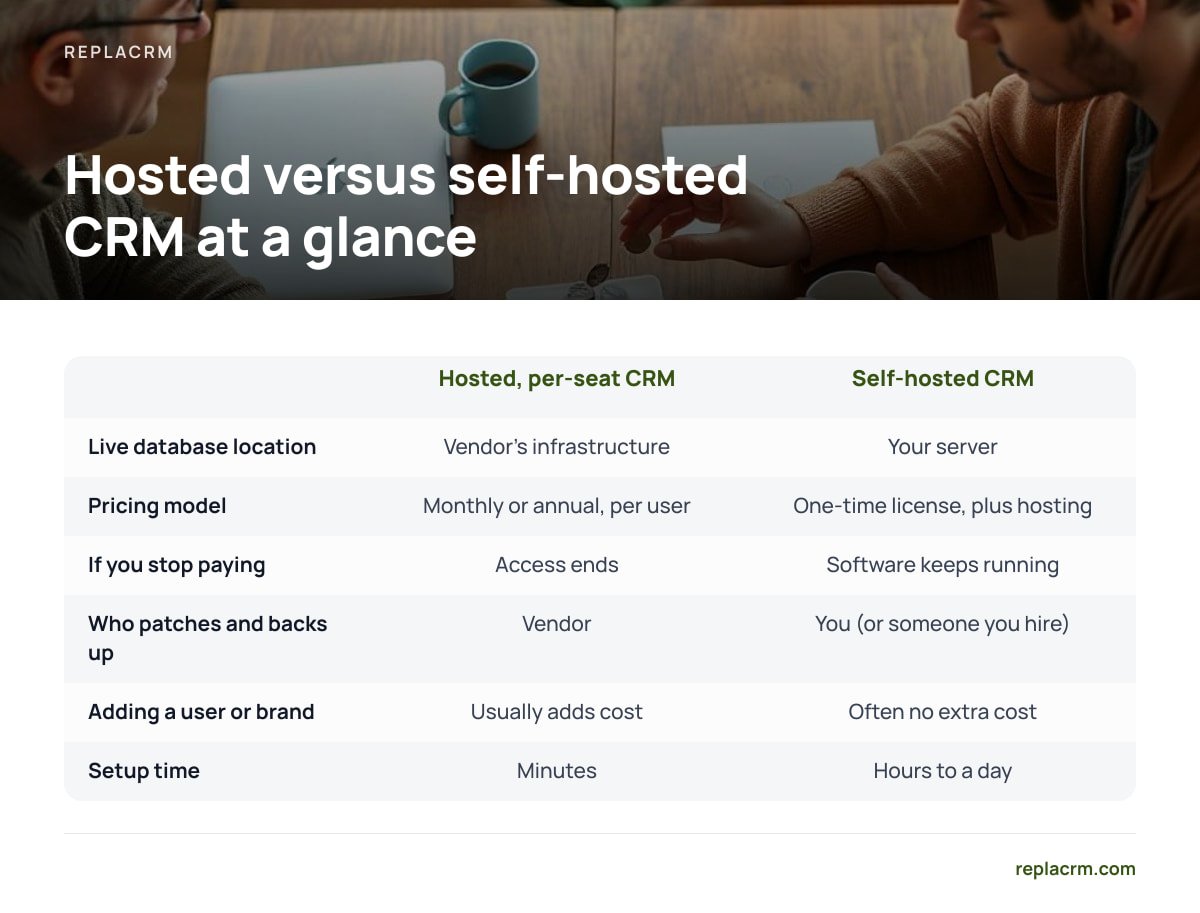
    Question Hosted, per-seat CRM Self-hosted CRM
    Where the live database sits Vendor's infrastructure Your server
    Pricing model Monthly or annual, usually per user Typically a one-time license, plus your hosting
    What happens if you stop paying Access ends; export what you can Software keeps running
    Who patches and backs up Vendor You (or someone you hire)
    Adding a user or a brand Usually adds cost Depends on license; often no extra cost
    Uptime responsibility Vendor You
    Setup time Minutes Hours to a day for a competent admin

    The table cuts both ways. Self-hosting is not free of work. It swaps a recurring bill for a recurring responsibility. Whether that trade suits you depends on two numbers: how many seats you pay for, and how many hours a month you or a contractor can spend on upkeep.

    Hosted versus self-hosted CRM at a glance: Live database location: Vendor's infrastructure / Your server; Pricing model: Monthly or annual, per user / One-time license, plus hosting; If you stop paying: Access ends / Software keeps running; Who patches and backs up: Vendor / You (or someone you hire

    The Seat Math: When Renting Stops Making Sense

    Two people at a wooden table with coins and an open wallet between them, one pushing a stack of coins across.

    Per-seat pricing feels small when you start. It compounds as you grow. Every new salesperson, support agent, or part-time bookkeeper who needs to see a customer record adds to the bill. Owners who run several brands often pay for overlapping tools or higher tiers just to keep each brand's customers apart.

    Run your own numbers with a simple formula:

    • Annual rental cost. Seats × monthly price per seat × 12, plus any add-ons you rely on.
    • Self-hosted first-year cost. License + server rental for 12 months + your admin time at a realistic hourly rate.
    • Self-hosted later years. Server rental + admin time + any optional update or support fees.

    Here is an illustration with round numbers, not any vendor's actual pricing. Ten seats at $50 a month comes to $6,000 a year. A $1,500 license plus a $40-a-month server and two hours of admin a month at $75 an hour comes to about $3,780 in year one. After that it is roughly $2,280 a year. The gap widens with every person you add.

    Rented software costs you again every month you use it. Owned software costs you once, plus the electricity and the attention.

    If you have two or three users and no plans to grow, the math may not favor switching. Be honest about that before you move anything.

    Running It Yourself: The Five Jobs You Take On

    Hands using a screwdriver on an open server chassis, with spare hard drives and cables laid out on a workbench.

    The real price of self-hosting is these five jobs. List them out before you commit, and decide who does each one.

    • Hosting. A small virtual server is enough for most small-business CRMs. Pick a provider in the country where you want the data to live. That choice is your residency answer.
    • Encryption in transit. Every login and record should travel over HTTPS. Let's Encrypt issues free, automatically renewable TLS certificates, so cost is no excuse for skipping it.
    • Patching. Web applications are a common attack target. The OWASP Top 10 lists the most critical web application security risks, and outdated components appear on it. Apply operating system and application updates on a schedule, not when you remember.
    • Backups. Back up the database and any uploaded files every night to a second location. Keep several days of history so a bad import doesn't overwrite your only copy.
    • Access control. Give people the least access they need. Remove ex-staff the day they leave. Turn on two-factor login if the software supports it.

    Pro Tip: A backup you have never restored is a hope, not a backup. Once a quarter, spin up a throwaway server, restore last night's backup to it, and log in. If you can't find a recent deal and its email history in under ten minutes, your backup process has a gap. Find it now, not during an outage.

    Self-hosting also simplifies one compliance question. Under GDPR Article 28, a business that hands personal data to a processor must use one that provides sufficient guarantees, under a written contract. When the CRM runs on your own server, the CRM vendor never handles your customer data. You still need an agreement with your hosting provider if you rent a server, but you have one fewer processor to vet. For a fuller look at the trade-offs, see our guide to on-premise CRM for small business.

    Moving Your Data Out Without Losing the History

    A person sets a hard drive into a padded case on a desk beside a closed laptop and a coiled cable.

    Most migration pain comes from exporting the wrong things, or from exporting in the wrong order. Use this checklist.

    • Export record IDs, not just names. Keep each record's original ID as a field in the new system. It is the only reliable way to rebuild links between contacts, companies, deals, and tickets afterward.
    • Export activity separately. Notes, emails, calls, and meeting logs often export separately from the core records, or not with them at all. The activity is the history your team actually uses.
    • Pull attachments early. Files linked to records may need a separate download. Do this before you change plans, while you still have full access.
    • Map custom fields first. Create matching fields in the new CRM before importing, so nothing lands in a catch-all notes box.
    • Run both systems for two weeks. Import a test batch, check it against the source, and only then do the full move.

    Your own customers have portability rights too. GDPR Article 20 gives individuals the right to receive their personal data in a structured, commonly used, machine-readable format. Requests like that are much easier to answer when the database is yours to query directly.

    Which Option We'd Pick, and When to Stay Put

    Here is our position. If you run one or more brands, pay for five or more seats, and want to keep customer data for years, self-host. The savings are real, the control is real, and the upkeep is manageable once it is routine.

    Stay on a hosted CRM if no one on your team, and no contractor you trust, can own the five jobs above. A neglected self-hosted server is worse than a well-run rented one. Also stay if your marketing depends heavily on built-in automation you have no plan to replace.

    If you are still weighing software options, our breakdown of self-hosted open source CRM explains what you own and what you maintain with free, community-run tools versus licensed ones.

    Own Your Customer Records Outright for a One-Time $1,495

    If the seat math and the control question point you toward self-hosting, Replacrm is built for that move. You pay once, from $1,495, and install it on your own server. There are no per-user fees, and you get unlimited users, brands, and customers. Chats, support tickets, form submissions, email, and calls land on one customer record. Each of your businesses keeps its customers separate under a single login. A sales board tracks deals, customers can book their own appointments, and e-signing and calling or texting are built in. It also connects with ReplaChat and ReplaTicket if you use them.

    The honest caveat: this is self-hosted software, so the five jobs above are yours. Someone has to run the server, apply updates, and test the backups. Check the server requirements on our spec sheet against your hosting plan before you buy, the same way you'd check any vendor's.

    Frequently Asked Questions

    Can HubSpot be installed on my own server?

    No. HubSpot is offered only as a cloud service, and there is no on-premise or self-hosted edition. If you need the CRM and its database on your own server, you need a different product built for self-hosting.

    Does choosing a data-hosting region count as self-hosting?

    No. A hosting region controls where the vendor stores your data, but the vendor still runs the servers and controls access. Self-hosting means the application and database run on a server you control.

    Is a self-hosted CRM cheaper than a per-seat subscription?

    It usually is once you pass a handful of users, because a one-time license does not grow with headcount. You still pay for hosting and for someone's time to patch and back it up. Include both in your comparison before deciding.

    What data should I export before leaving a hosted CRM?

    Export core records with their original IDs, then activity history, custom field definitions, and attachments. Record IDs let you rebuild the links between contacts, deals, and tickets in the new system. Do all of this before you downgrade or cancel.

    Do I need technical skills to self-host a CRM?

    You need someone who can manage a basic Linux server, set up HTTPS, schedule backups, and apply updates. That can be you, a staff member, or a contractor on a small monthly retainer. If no one can own those tasks, a hosted CRM is the safer choice.

    Sources

  • Open Source HubSpot Alternative: What to Actually Compare

    Open Source HubSpot Alternative: What to Actually Compare

    An open source HubSpot alternative gives you the source code to inspect, modify, and host yourself, instead of renting access to a vendor's servers. The distinction that matters most isn't "open source vs. proprietary" — it's who controls the data and who absorbs the hosting work. Some open source CRMs hand you both the code and the server burden; others, like self-hosted but closed-source systems, skip the code access but still let you own the data without per-seat fees.

    TL;DR:

    • "Open source" means you can see and change the code — it doesn't automatically mean cheaper or easier to run.
    • HubSpot's per-seat pricing scales with headcount, not with how much CRM work actually happens.
    • Self-hosting (open source or not) shifts hosting and backups to you, in exchange for owning the data outright.
    • The real buyer question is control over your customer data, not ideology about licensing.
    • A one-time-license self-hosted CRM can deliver HubSpot's core workflow — contacts, inbox, pipeline — without monthly per-user bills.

    Table of Contents

    Open Source, Self-Hosted, or Just Cheaper: Pick the Right Fight

    People searching for an "open source HubSpot alternative" are usually chasing one of three different things, and they're not the same fight. Some want the source code itself — to audit it, fork it, or make sure no vendor can ever lock them out. Others just want off the per-seat invoice and don't care whether the code is public, as long as the data sits on a server they control. A smaller group wants both: open code and self-hosting.

    That distinction matters because open source and self-hosted are not synonyms. A tool can be open source and still require you to host it on a cloud instance you rent monthly. A tool can be fully self-hosted — running entirely on your own server — without publishing a single line of its source code. If what you actually want is to stop paying per user and start owning your customer records, the "open source" label is a means, not the goal.

    Open source tells you who can read the code. Self-hosted tells you who holds the data. They answer different questions.

    What "Open Source" Buys You, and What It Doesn't

    The Open Source Initiative's definition requires that the source code be freely available, modifiable, and redistributable without discriminatory restrictions. That's a licensing guarantee, not a hosting guarantee, and not a feature guarantee.

    • Code transparency. You or a contractor can read exactly how the CRM stores and processes data, instead of trusting a vendor's privacy page.
    • No vendor lock on the code itself. If the project is abandoned, you still have the source to maintain or fork.
    • Not automatically free to run. Most open source CRMs still need a server, a database, backups, and someone to patch security issues — that's ongoing labor, even if the license cost is zero.
    • Not automatically simpler. Community-maintained open source tools often ship with rougher onboarding than a funded commercial product, because documentation and support aren't the product being sold.
    • Not automatically more secure. Open code means more eyes can find bugs, but it also means attackers can read the same code. Security depends on who's patching it, not on the license.

    If your actual goal is avoiding seat-based billing and keeping customer data off a third party's servers, a closed-source but self-hosted CRM can satisfy that goal just as well as an open source one — sometimes with far less setup work. ReplaCRM takes that route deliberately: closed source, but self-hosted on your own server, under a single one-time license.

    Where HubSpot's Per-Seat Model Starts to Hurt

    HubSpot's pricing scales with the number of people who need a login, not with how much actual CRM work your business does. Check HubSpot's own pricing page and you'll see the jump from a small team plan to a mid-size one is driven almost entirely by seat count, with features bundled in tiers you may not need yet.

    This hits a specific kind of business hardest: owners running two, three, or more brands under one roof. Every brand on HubSpot typically means either a separate portal (separate bill) or crammed contact lists inside one portal, with no clean wall between Brand A's customers and Brand B's customers. Add a few seasonal staff or contractors who only need CRM access for a few months, and the per-seat math gets worse every quarter, not better.

    Pro Tip: Before comparing sticker prices, add up what you're paying per contact record touched per month, not per seat. A five-seat HubSpot plan with 200 contacts and a two-seat self-hosted CRM with 20,000 contacts are not competing products — they're solving different problems, and the per-seat number alone will mislead you.

    Comparing the Three Real Options

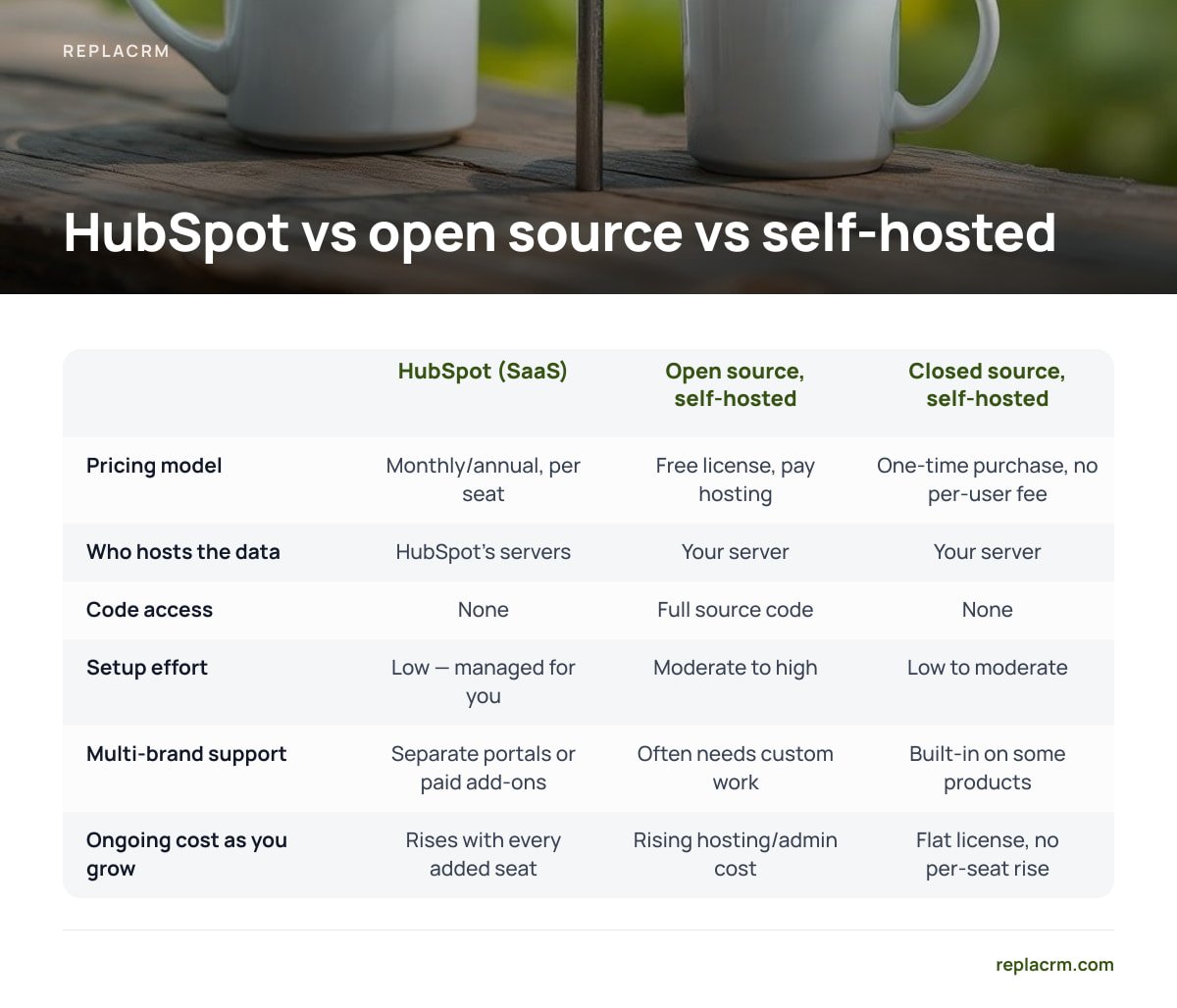
    HubSpot (SaaS) Open source, self-hosted Closed source, self-hosted (one-time license)
    Pricing model Monthly/annual, per seat Free license, you pay for hosting + maintenance One-time purchase, no per-user fee
    Who hosts the data HubSpot's servers Your server Your server
    Code access None Full source code None
    Setup effort Low — managed for you Moderate to high — you manage updates, security patches Low to moderate — vendor builds it, you run it
    Multi-brand support Usually separate portals or paid add-ons Depends on the project; often needs custom work Built-in on some products
    Ongoing cost as you grow Rises with every added seat Flat license, rising hosting/admin cost Flat license, no per-seat rise

    Read this table for what it is: a map of trade-offs, not a verdict. If your team has in-house engineering capacity and wants to modify the CRM's core logic, open source self-hosting is a legitimate, powerful choice. If you want the self-hosting benefits — no per-seat bill, data on your own server — without taking on code maintenance, a closed-source self-hosted product is the shorter path.

    HubSpot vs open source vs self-hosted: Pricing model: Monthly/annual, per seat / Free license, pay hosting / One-time purchase, no per-user fee; Who hosts the data: HubSpot's servers / Your server / Your server; Code access: None / Full source code / None; Setup effort: Low — managed for you / Moder

    The Open Source Route: What You're Signing Up For

    If you go the open source self-hosted path, budget for three ongoing jobs that the license fee doesn't cover.

    • Security patching. Someone has to track CVEs against the CRM and its dependencies (the database, the web server, any plugins) and apply patches promptly. Unpatched open source software is a common entry point for breaches, precisely because the vulnerable code is public.
    • Backups and disaster recovery. Self-hosting means you're the backup team now. A server failure with no tested restore plan can mean losing every customer record you have.
    • Upgrades. Community projects release new versions on their own schedule. Skipping versions for a year or two can turn a routine upgrade into a multi-day migration project.

    None of this is a reason to avoid open source — plenty of businesses run it well. It's a reason to be honest about whether "free license" actually means "free," once you count the hours.

    Questions to Ask Before You Migrate Off HubSpot

    Before signing anything — open source, self-hosted, or otherwise — get specific answers to these, in writing if it's a vendor:

    • Where does the data physically live, and who can access the server? If the answer is "our cloud, trust us," that's a SaaS product with extra steps, not a self-hosted one.
    • What happens to my data if I stop paying or stop using the vendor? With a one-time license, the answer should be: it stays on your server, forever, because there's nothing left to pay.
    • Can I separate customer records by brand under one login? Many CRMs — open source and commercial alike — assume one business per account and bolt on multi-tenancy as an afterthought.
    • Who patches security issues, and on what schedule? Get this in writing for open source projects especially, since "the community" isn't a person you can call.
    • Does it replace my existing stack, or just add to it? A CRM that doesn't pull in chats, forms, and calls just becomes one more tab, which defeats the point of consolidating off HubSpot in the first place.

    For a deeper look at what running your own server actually involves day to day, see our breakdown of what a self-hosted CRM is and why it beats per-seat pricing, and our guide to self-hosted open source CRM options specifically.

    Get a CRM You Own, Not Rent, From $1,495

    ReplaCRM is built for the business owner who wants off the per-seat treadmill without taking on open source code maintenance. It's self-hosted on your own server, sold as a one-time license starting at $1,495, with no per-user fees and no limit on brands, users, or customers. It pulls chats, tickets, forms, email, and calls into one customer record, keeps each brand's customers separate under a single login, and adds a sales board, self-booking, and e-signing on top.

    The honest trade-off: it's closed source, so you're not getting a codebase to fork or audit yourself — you're getting a product someone else maintains, running on hardware you control. If code transparency is the non-negotiable part of "open source alternative" for you, an open source project is the right fit. If what you actually want is to stop the monthly bill and keep the data, check the spec sheet against your brand count and current HubSpot invoice before you decide either way.

    Frequently Asked Questions

    Is there a true open source HubSpot alternative?

    Yes, several open source CRM projects exist with publicly available source code that you can self-host and modify. They typically require you to manage your own server, security patches, and backups, since there's no vendor doing that work for a license fee.

    Is open source always cheaper than HubSpot?

    The license is often free, but hosting, security maintenance, and staff time to run it are not. For a small team without in-house engineering capacity, a paid self-hosted product with a one-time license can end up cheaper overall once labor is counted.

    Can I self-host a CRM without it being open source?

    Yes. Self-hosting describes where the software runs (your server) and open source describes whether the code is public. A CRM can be closed source and still run entirely on your own hardware, with no per-seat subscription.

    What's the biggest hidden cost of open source CRM self-hosting?

    Security patching and upgrades. Someone needs to track vulnerabilities in the CRM and its dependencies and apply fixes promptly, since publicly available code means attackers can study it too.

    Does switching off HubSpot mean losing my contact history?

    Not if you export properly first. Most CRMs, including HubSpot, support CSV exports of contacts, deals, and notes, but confirm field mapping and attachment handling with your new CRM before you cancel the old plan.

    Sources

  • SugarCRM Self Hosted: What You Run, Pay For, and Patch Yourself

    SugarCRM Self Hosted: What You Run, Pay For, and Patch Yourself

    You can run SugarCRM self hosted, but only two routes exist today. One is the old open-source Community Edition, which stopped getting new versions years ago. The other is a paid on-premise license, which still bills per user, every year. The key point is that self-hosting Sugar moves the server work onto you without removing the subscription. If owning your customer data is the goal, check whether you would also own the license.

    TL;DR:

    • Self-hosting SugarCRM means one of two things: the abandoned free Community Edition or a paid on-premise license.
    • The free 6.5-era edition was built for PHP versions that stopped receiving security fixes years ago, so it should not face the internet.
    • Paid on-premise Sugar is still a per-user subscription, and you also take on hosting, patching, backups and search infrastructure.
    • In 2023 a SugarCRM remote code execution flaw (CVE-2023-22952) landed in CISA's Known Exploited Vulnerabilities catalog, and self-hosters had to patch it themselves.
    • If your real goal is no seat fees and full data ownership, compare five-year costs against a self-hosted CRM you license once.

    Table of Contents

    The Three Things "SugarCRM Self Hosted" Can Mean

    When people search for a self-hosted SugarCRM, they usually mean one of three setups. Only two of them involve your own server, and they work very differently.

    Option How you pay Who patches it Still developed? Realistic fit
    Community Edition (6.5 line) Free download You, with no vendor fixes coming No Archive or lab use only
    Licensed on-premise edition Per-user subscription, renewed yearly You apply vendor releases Yes Companies with in-house IT
    Vendor-hosted cloud Per-user subscription The vendor Yes Not self-hosted at all

    The free edition is the one most tutorials describe. It is also the one you should be most careful with. The licensed edition is legitimate and supported, but the word "self-hosted" can make it sound cheaper than it is. You host it yourself and you still pay rent on every seat.

    If you want the wider picture first, our guide on what a self-hosted CRM is and why it beats per-seat pricing covers the basic model. This article stays focused on Sugar.

    Why the Free Community Edition Is a Trap, Not a Bargain

    SugarCRM stopped developing its free Community Edition years ago, and the 6.5 line was its last. The code still circulates on download mirrors and in old hosting one-click installers. That is exactly why it keeps showing up in search results.

    The problem is what it runs on. The 6.5 line was built for the PHP 5 era. According to the PHP project's end-of-life list, every PHP 5 branch is unsupported. No security fixes are being written for them.

    PHP 5.6, the last PHP 5 release, stopped receiving security fixes on December 31, 2018.

    Getting old CRM code to run on a current, supported PHP version means patching it yourself, or relying on community forks you would have to vet. Either way, you become the maintainer of a codebase that holds every customer's name, email, phone number and deal history.

    • No vendor security fixes. If a flaw is found, nobody upstream is obligated to fix it for you.
    • Old dependencies. Bundled libraries age along with the core, and many have their own published vulnerabilities.
    • No migration path forward. The free edition does not upgrade into the current paid product. Moving later means a full data migration.

    Our position is simple. Do not put the old Community Edition on a public-facing server in a new deployment. If you inherited one, keep it read-only behind a VPN for archive lookups, export the data, and plan your exit.

    Licensed On-Premise Sugar: Still Per Seat, Now You Also Run the Server

    The supported way to run Sugar on your own infrastructure is through its paid on-premise licensing. The vendor's newer products are cloud-first. On-premise is still sold as a per-user subscription, so your bill grows with every hire and keeps renewing whether or not you change anything.

    That combination is the part buyers miss. Normally you accept a per-seat subscription because the vendor handles hosting, uptime and patching. With on-premise Sugar, you keep the per-seat subscription and take on those jobs as well. You are paying for software you are not allowed to keep using on your own terms.

    Pro Tip: Before you sign an on-premise contract, ask in writing what happens to your running instance if the subscription lapses. Does it keep running, go read-only, or lose access to updates and support? The answer tells you whether you own a CRM or are renting one that happens to sit on your hardware.

    For a closer look at how on-premise licensing compares with one-time ownership for smaller teams, see on-premise CRM for small business.

    What Running SugarCRM Yourself Actually Involves

    Hands pull a server out of a rack to swap a hard drive, with a screwdriver and a spare drive on a cart nearby.

    Self-hosting is not a single install. It is ongoing operations work. Here is what lands on your desk.

    The Stack You Maintain

    A modern Sugar on-premise install needs more than a web server and a database. Recent versions list a separate search engine among the required components. Each Sugar release supports a specific set of PHP, database and search versions. Check the vendor's supported-platforms documentation for your exact release before you upgrade any single piece. Upgrading PHP on its own can break a CRM that was only certified for the previous version.

    Patching on a Deadline

    When a vulnerability is published, cloud customers wait for the vendor to fix it. Self-hosters have to apply the fix themselves, quickly.

    In 2023, CISA added CVE-2023-22952, a remote code execution flaw in SugarCRM, to its Known Exploited Vulnerabilities catalog, meaning attackers were already using it.

    The NIST National Vulnerability Database entry for CVE-2023-22952 lists the affected versions. The CISA Known Exploited Vulnerabilities catalog is where you track flaws attackers are actively using. If you self-host any CRM, subscribe to both feeds or something equivalent. A patch that waits two weeks for a quiet weekend is a patch that came too late.

    Backups You Have Actually Restored

    Database dumps are not enough. You also need uploaded files, attachments and configuration. Test a full restore to a separate machine at least once a quarter. A backup you have never restored is only a guess.

    Web-Facing Security Basics

    A CRM is a web application full of personal data, so the usual web risks apply. The OWASP Top Ten covers the main ones, including broken access control, injection and vulnerable outdated components. Put the admin interface behind a VPN or IP allowlist, enforce strong authentication, and keep TLS current.

    The Compliance Part Nobody Puts on the Pricing Page

    A person locks a metal server cabinet with a key in a small back-office room.

    Self-hosting changes who is accountable when something goes wrong. If you hold personal data on EU or UK residents, Article 32 of the GDPR requires appropriate technical and organizational measures to secure it. The article names encryption, ongoing confidentiality and availability, the ability to restore data after an incident, and regular testing of your security.

    On a vendor-hosted cloud, much of that work is shared with the vendor under a processing agreement. On your own server, it is yours. That is not a reason to avoid self-hosting. Plenty of small businesses run their own servers responsibly. But "we host it ourselves" only works as a privacy argument if you also patch, encrypt, back up and test.

    Here is what you should be able to show:

    • Encryption. Data is encrypted in transit and at rest.
    • Access control. Each user has the least access they need, and you review it regularly.
    • Restore records. You have notes from your last test restore.
    • Patch log. You have a record of when each security update was applied.

    A Five-Year Cost Check Before You Commit

    Monthly prices hide the real comparison. Run this check over five years, because that is roughly how long a CRM stays in place once your data and habits are built around it.

    Cost line Licensed on-premise Sugar Free Community Edition One-time-license self-hosted CRM
    Software Per user × 12 months × 5 years $0 One payment
    Growth Rises with every new user None None if users are unlimited
    Server and hosting Yours Yours Yours
    Patching labor Yours, against vendor releases Yours, with no vendor releases Yours, against vendor releases
    Risk cost Moderate High: unsupported code Moderate

    Fill in your own numbers. Use your current headcount, your hiring plan and a real hourly rate for whoever maintains the server. Most small businesses find that server and labor costs come out about even across the self-hosted options. The license line is what separates them, and it is the only line that grows with your success.

    If you are weighing open-source routes too, our breakdown of self-hosted open source CRM explains which costs move to you when the software is free.

    Which Option We'd Pick, and When

    Two people talk across a small wooden table with coffee cups and a closed laptop beside them.

    Here are our recommendations, plainly:

    • You have an IT team and already standardized on Sugar. Licensed on-premise is reasonable. Budget for the subscription and a named person who owns patching.
    • You found a free download and want a no-cost CRM. Skip it. Unsupported software holding customer data is a liability, not a saving.
    • You run one or more small brands and want to stop paying per seat. Neither Sugar route solves that. Look for a self-hosted CRM you license once, with unlimited users, so the server you run is matched by a license you own.

    The question to ask is not "can I host it?" Almost anything can be hosted. Ask instead: "When I host it, do I stop paying rent?"

    Own Your CRM Outright, With No Seat Count to Renegotiate

    Replacrm is built for the gap this article describes: you run it on your own server, and you pay once. The license starts at $1,495, with no per-user fees and unlimited users, brands and customers. Chats, support tickets, form submissions, email and calls all land on one customer record. If you run several businesses, each brand's customers stay separate under a single login. You also get a sales board for tracking deals, customer self-booking (see our self-hosted Calendly alternative), and integrations with ReplaChat and ReplaTicket.

    The honest caveat is this. Self-hosting is still self-hosting. Everything in the operations section above applies to Replacrm too: you keep the server patched, back it up and test restores. Check our system requirements against your hosting before you buy, just as you would with any vendor's spec sheet.

    Frequently Asked Questions

    Is SugarCRM still available as a free self-hosted download?

    The old Community Edition still circulates, but SugarCRM stopped developing it years ago, and the 6.5 line was the last. It was built for PHP 5, which no longer receives security fixes. It is not a safe choice for a new, internet-facing deployment.

    Can I run the current version of SugarCRM on my own server?

    Yes, through Sugar's paid on-premise licensing, which is sold as a per-user subscription. You host, patch and back up the system yourself while still paying the yearly per-seat fee. Confirm current terms and supported platforms with the vendor before you commit.

    Is self-hosted SugarCRM cheaper than the cloud version?

    Usually not by much, because on-premise licensing still charges per user. You save little on software and take on hosting, patching and backup costs. Run a five-year comparison using your own headcount and labor rates before deciding.

    What security risks come with self-hosting SugarCRM?

    You are responsible for applying patches quickly, including fixes for actively exploited flaws such as CVE-2023-22952, which CISA added to its Known Exploited Vulnerabilities catalog in 2023. You also need tested backups, access controls and current TLS. Unpatched CRMs are attractive targets because they hold personal data.

    Does self-hosting a CRM make GDPR compliance easier?

    It gives you control over where data lives, but it also makes you responsible for the security measures in GDPR Article 32. These include encryption, the ability to restore data after an incident, and regular testing. Self-hosting helps only if you actually do that work.

    Sources

  • Self-Hosted CRM: What You Own, What You Run, What It Costs

    Self-Hosted CRM: What You Own, What You Run, What It Costs

    A self-hosted CRM is customer relationship software that you install and run on a server you control, so your customer records live on your infrastructure instead of the vendor's. Hosting and pricing are two separate questions. "Self-hosted" tells you who runs the software and holds the data. It does not tell you whether you pay once or pay per seat every month. When you compare options, judge where the data lives and how you pay as two separate decisions.

    TL;DR:

    • A self-hosted CRM runs on a server you control, either your own hardware or a rented VPS, and your customer data stays there.
    • Hosting model and pricing model are separate. Some self-hosted CRMs still charge per seat, so check the license, not just the install method.
    • At around 8 or more users, a one-time license usually costs less than per-seat SaaS within one to three years.
    • Self-hosting moves the work of updates, backups, TLS certificates and access control onto you. Budget for that time or pay someone to do it.
    • Under GDPR you are still responsible for your customer data wherever it sits. Self-hosting gives you more control over it, not less responsibility.

    Table of Contents

    What a Self-Hosted CRM Actually Means, and What It Doesn't

    A self-hosted CRM is software you install on a machine you control. That machine might be a server in your office. More often it is a virtual private server (VPS) you rent from a hosting provider. Either way, you hold the database, you decide when to update, and you decide who gets access.

    Self-hosting does not mean "free." It does not mean "open source," and it does not guarantee you escape per-seat pricing. Some vendors sell self-hosted editions and still bill monthly per user. Others sell a one-time license. Open-source options cost nothing to license but put all of the setup and support on you. If you want the full breakdown of what open source does and doesn't include, see what you own and what you run with a self-hosted open source CRM.

    Physical location is not the point either. A CRM on a rented VPS in a data center is still self-hosted. You have root access, you control the software, and the vendor of the CRM never touches your records. What matters is control of the software and the data. Whose building the server sits in matters much less.

    If you are new to the idea, our overview of what a self-hosted CRM is and why it beats per-seat pricing covers the basics. This article focuses on the trade-offs that decide whether you should do it.

    Self-Hosted vs SaaS CRM: The Trade-Offs Side by Side

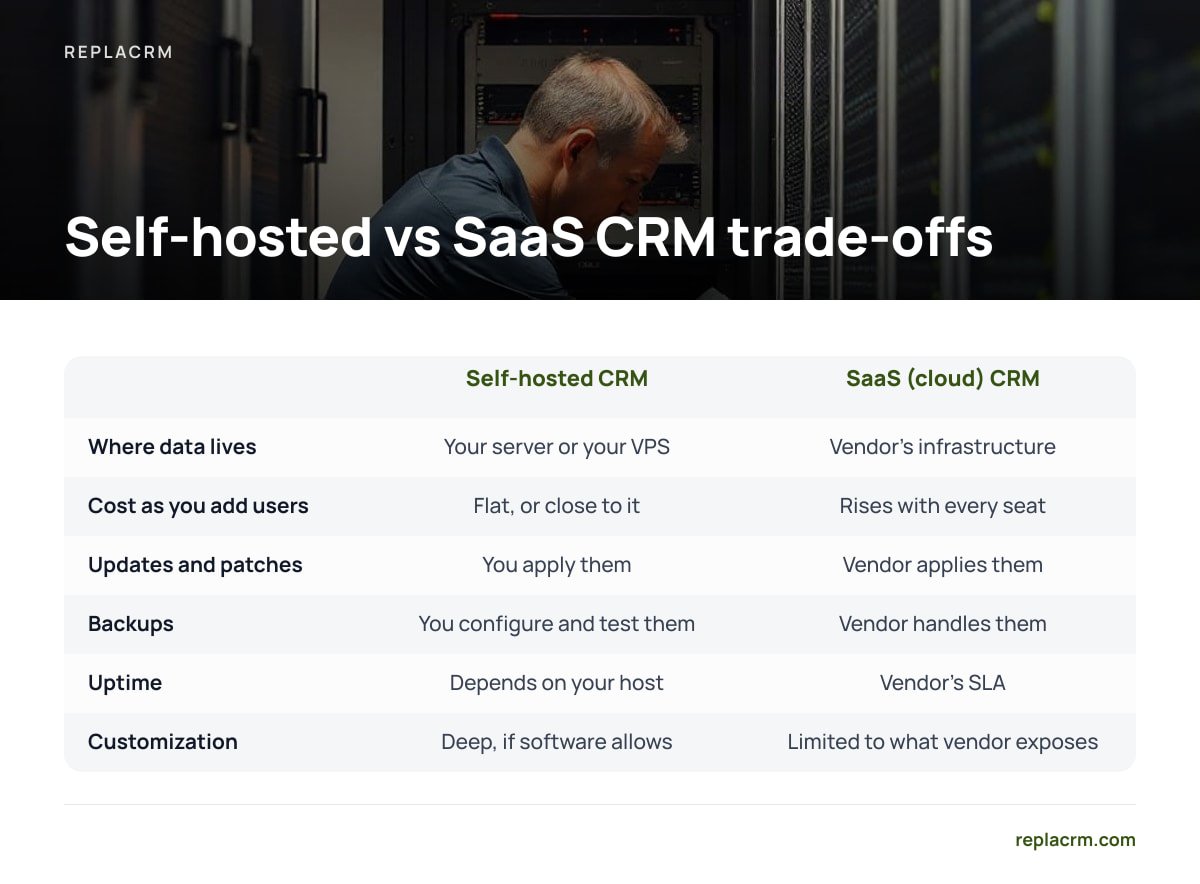
    The choice is not "good vs bad." You are choosing between two sets of responsibilities. Here is how they compare on the things that matter to a small business owner.

    Factor Self-hosted CRM SaaS (cloud) CRM
    Where data lives Your server or your VPS Vendor's infrastructure
    Pricing pattern Often one-time license, sometimes per seat Almost always monthly or annual, per seat
    Cost as you add users Flat, or close to it Rises with every seat
    Updates and patches You apply them Vendor applies them
    Backups You configure and test them Vendor handles them; export options vary
    Uptime Depends on your host and setup Vendor's SLA
    Leaving the product Your data is already in your database Depends on the vendor's export tools
    Customization Deep, if the software allows it Limited to what the vendor exposes

    Our position: if you have fewer than five users, no technical help, and no plans to grow, SaaS is usually the simpler call. If you have a growing team, several brands, or customer data you would rather not rent back from a vendor, self-hosting wins on cost and control, provided you take maintenance seriously.

    Self-hosted vs SaaS CRM trade-offs: Where data lives: Your server or your VPS / Vendor's infrastructure; Cost as you add users: Flat, or close to it / Rises with every seat; Updates and patches: You apply them / Vendor applies them; Backups: You configure and test them / Vendor handles them; Uptime:

    The Cost Math: When a One-Time License Beats Per-Seat Billing

    Per-seat pricing looks cheap at signup and expensive at year three. The math is simple, so run it with your own numbers.

    Take a hypothetical team of 8 users on a SaaS plan at $50 per user per month. That is $400 a month, or $4,800 a year. Over three years you pay $14,400, and you own nothing at the end. Hire two more people and the bill climbs again.

    At $50 a seat, an 8-person team pays $14,400 over three years for a CRM it will never own, and every new hire raises the bill.

    Now set that against a self-hosted CRM with a one-time license. Add the recurring costs you take on:

    • The license. A one-time payment, typically in the low thousands for commercial self-hosted products.
    • Server costs. A small VPS suitable for a small team commonly runs $10–$40 a month, depending on provider and specs.
    • Your time or a contractor's. Updates, backups and monitoring. Budget a few hours a month, or a modest retainer if you outsource it.

    For most teams of 8 or more, the self-hosted total crosses below the SaaS total somewhere between year one and year three. After that the gap widens every year. Below about five users, the savings shrink, and the maintenance burden can outweigh them.

    Pro Tip: When you compare, count seats you will need in 24 months, not seats you need today. Then count every person who needs only occasional access, such as a bookkeeper or a part-time assistant. Per-seat pricing charges full price for light users, and those occasional seats are where SaaS bills quietly inflate.

    What You Take On When You Run Your Own CRM

    A person in a small server closet sliding a server into a rack with small glowing lights.

    Self-hosting moves operational work from the vendor to you. None of it is exotic, but none of it is optional.

    Security updates

    A CRM is a web application that holds names, emails, phone numbers and deal history. That makes it a target. The OWASP Top Ten lists the most common web application risks, including broken access control and injection. A well-built CRM defends against these, but only the version you are running. Apply security updates to the CRM, the operating system and the database promptly. CISA's Known Exploited Vulnerabilities Catalog is a useful reality check. It lists flaws attackers are actively using, and old web server and framework bugs show up there regularly.

    Backups you have actually tested

    Follow the 3-2-1 rule. Keep three copies of your data, on two different types of storage, with one copy off-site. Automate nightly database dumps. Then restore one to a test server at least once a quarter. A backup you have never restored is a guess, not a backup.

    Encryption in transit

    Your CRM should only be reachable over HTTPS. Let's Encrypt issues free TLS certificates that renew automatically. There is no reason for a customer database to travel over plain HTTP.

    Access control

    Use individual accounts for every user. Never share logins. Turn on two-factor authentication if the CRM supports it. Remove access the day someone leaves. Lock SSH to key-based login and close every port you are not using.

    Pro Tip: Don't run your CRM on the same server as your marketing website. A vulnerable website plugin is one of the most common ways small businesses get breached. If the website and CRM share a server, a compromised website plugin can put your entire customer database at risk. A separate small VPS costs little and keeps the two apart.

    Data Ownership, Privacy Law, and Where Your Customer Records Live

    A locked metal server cabinet with a key in the door, standing in a secure storage room.

    Owning your data is the main reason most people self-host. Be clear about what ownership does and doesn't change.

    Under the EU's General Data Protection Regulation, you are the controller of your customers' personal data whether it sits in a SaaS CRM or on your own server. GDPR Article 32 requires "appropriate technical and organisational measures" to secure that data. With a SaaS CRM, the vendor carries much of the technical work under a processing agreement. With a self-hosted CRM, more of it is yours.

    Seventy-two hours. That is how long GDPR Article 33 gives you to notify your supervisory authority after you become aware of a personal data breach, and on a self-hosted CRM, nobody else is watching that clock for you.

    If you rent a VPS, your hosting provider may still count as a processor, because the provider hosts the personal data on your behalf. Check that your provider offers a data processing agreement. Choose the data center region deliberately if your customers are in the EU or another region with data residency expectations.

    For a practical security structure, the NIST Cybersecurity Framework organizes the work into six functions: Govern, Identify, Protect, Detect, Respond and Recover. You don't need to adopt it formally. Walking through those six words once a year is a solid check on whether your CRM setup has gaps.

    The upside is real. Your records sit in a database you can query, export and back up on your own terms. No vendor can change its export policy, raise its prices or shut down and take your customer history with it.

    Who Should Self-Host a CRM, and Who Should Not

    Here is where we land.

    • Self-host if you run more than one brand. Multiple businesses on per-seat SaaS often means multiple subscriptions, or customers from different brands mixed in one account. A self-hosted CRM built for multiple brands keeps them separate under one install.
    • Self-host if your team is growing. Every new hire on SaaS is a new monthly charge. On a flat license, the tenth user costs the same as the second.
    • Self-host if your customer data is sensitive or regulated. Control over location, retention and access is easier to prove when you hold the keys.
    • Stay on SaaS if no one will maintain it. If nobody on your team will apply updates and nobody will pay a contractor to, a self-hosted CRM will slowly become a liability.
    • Stay on SaaS if you are a team of one or two with simple needs. The savings are small and the maintenance is not.

    For a closer look at the small business case specifically, read our guide to on-premise CRM for small business.

    Setting Up a Self-Hosted CRM Without Regretting It

    Two colleagues talking at a wooden table with coffee mugs and a closed laptop between them.

    Most self-hosting regret comes from skipped steps in the first week. Do these before you import a single customer.

    1. Size the server for 2x your current team. Migrating servers later is more painful than paying a few extra dollars a month now.
    2. Point a dedicated subdomain at it, such as crm.yourdomain.com, and secure it with HTTPS from day one.
    3. Set up automated backups before you import data. Then run a test restore.
    4. Create named accounts and roles. Decide who sees which brand, which pipelines and which customers.
    5. Import a small sample first. Check that fields, tags and contact history map correctly before you move everything.
    6. Write down your update routine. Note who checks for updates, how often, and where the rollback backup lives.

    Get a CRM You Pay For Once and Run on Your Own Server

    If the per-seat math above looks like your bill, Replacrm is built for exactly that problem. It is a self-hosted CRM sold for a one-time payment, from $1,495, with no per-user fees and unlimited brands, users and customers. Chats, support tickets, form submissions, email and calls land on a single customer record. Each of your businesses keeps its customers separate under one login. A sales board tracks deals, customers can book their own appointments, and e-signing plus calling and texting are built in. It also connects with ReplaChat and ReplaTicket.

    The honest caveat: self-hosted means you run it. Everything in the maintenance section above still applies, from updates and backups to HTTPS and access control. Before you buy, check what the license includes for updates and support, the same way you would with any vendor. If nobody on your team will maintain a server, budget for someone who will.

    Frequently Asked Questions

    Is a self-hosted CRM the same as an open-source CRM?

    No. Self-hosted describes where the software runs and who controls it. Open source describes the license on the code. Some open-source CRMs are offered as hosted services, and many self-hosted CRMs are commercial products sold under a paid license.

    Can I self-host a CRM on a rented VPS, or do I need my own hardware?

    A rented VPS counts as self-hosting, and it is the most common setup for small businesses. You get root access and full control of the software and database without buying or maintaining physical hardware. Choose a provider that offers a data processing agreement if you hold EU customer data.

    How much does it cost to run a self-hosted CRM?

    Expect a license cost, which may be one-time or recurring depending on the vendor, plus server costs that commonly run $10–$40 a month for a small team. Add time for updates and backups, or a contractor's fee. For teams of around eight or more users, this usually costs less than per-seat SaaS within one to three years.

    Is a self-hosted CRM less secure than a cloud CRM?

    It depends on how well you maintain it. A patched, backed-up, HTTPS-only server with individual accounts and two-factor authentication can be very secure. An unpatched one sharing a server with a vulnerable website is a real risk, so security comes down to maintenance, not the hosting model itself.

    Does self-hosting my CRM make me GDPR compliant?

    Not on its own. You remain the controller of your customers' personal data either way, and GDPR Article 32 still requires appropriate security measures. Self-hosting gives you more direct control over location, access and retention, which can make compliance easier to demonstrate.

    Sources

  • Self-Hosted Calendly Alternative: Own Your Bookings, Skip Seats

    Self-Hosted Calendly Alternative: Own Your Bookings, Skip Seats

    A self-hosted Calendly alternative is a booking tool you run on your own server. Your appointments, customer details and calendar links stay in a database you control, not a vendor's. The choice that matters most is not open source versus paid. It is whether bookings land in a separate tool or on the same customer record as your emails, chats and deals. A standalone scheduler gives you another silo to sync. Booking built into a self-hosted CRM removes that silo.

    TL;DR:

    • Self-hosting a booking tool moves your appointment data onto your server and makes you responsible for its security, backups and updates.
    • There are three kinds of self-hosted scheduler: a standalone app, a website plugin, and booking built into a self-hosted CRM.
    • If you sell or support customers, pick booking inside your CRM, because a booking that lives in a separate database is a customer record you have to reconcile later.
    • Calendar sync runs on open standards (iCalendar and CalDAV), so check which ones a tool supports before you trust it with live appointments.
    • Running several brands means you need separate booking pages, availability and customer lists per brand, and most standalone schedulers handle that poorly.

    Table of Contents

    What "Self-Hosted" Means for a Booking Tool, and What It Doesn't

    Self-hosted means the software and its database run on a server you control. That could be a rented virtual machine, a box in your office, or a managed host where you hold the root password. The booking page your customers see may look the same as a hosted one. The difference is where every name, email, phone number and appointment note ends up.

    Self-hosted does not mean free, and it does not mean open source. Some self-hosted tools carry a license fee. Some open-source tools are mostly sold as a hosted subscription. The one property worth paying attention to is this: can you take the database, move it to a new server, and keep running without asking anyone's permission?

    Self-hosted also means the work moves to you. Uptime, TLS certificates, operating system patches, backups and app updates are now your job or your contractor's job. For a booking page that's acceptable, because a scheduler is a light workload. For a team with no technical help at all, budget a few hours a month or a small managed-hosting fee. If you're weighing that trade-off across your whole stack, what a self-hosted CRM is and why it beats per-seat pricing covers the same question at a larger scale.

    Three Kinds of Self-Hosted Calendly Alternative, and Which One to Pick

    Every self-hosted scheduler falls into one of three architectures. The architecture decides more about your daily life than any feature list does.

    Standalone open-source scheduler

    This is a dedicated booking app with its own database, its own user accounts and its own admin panel. It's usually the most polished option for scheduling alone: routing forms, team round-robin, payment collection. The cost is that it knows nothing about your customers beyond what they typed into the form. Every booking creates a contact you then have to match, by hand or by integration, to the person already in your CRM.

    Website or CMS plugin

    This is a booking module that installs into the content management system already running your website. It's cheap and quick to set up if you have one site and one brand. It inherits your CMS's security posture, though, including every other plugin on that install. It also tends to fall apart when you need separate availability and staff for a second brand on a second domain.

    Booking built into a self-hosted CRM

    Here the booking page writes straight to the customer record. When someone books, you see their past emails, open support tickets and current deal stage on the same screen as the appointment. The scheduling features may be leaner than a dedicated app's. In exchange, you never run a sync job or merge duplicates.

    Standalone scheduler CMS plugin Built into self-hosted CRM
    Where booking data lives Its own database Your website database Your CRM database
    Links to customer history Only via integration Rarely Native, same record
    Multi-brand handling Varies; often one workspace per brand Usually one per site Separate brands under one login, if the CRM supports it
    Extra things to patch The app and its dependencies Every plugin on the site Nothing beyond the CRM
    Best for Booking-only teams with dev help One small site, one brand Teams that sell or support after the booking

    My recommendation: if a booking is the start of a sales conversation or a support case, choose booking inside your CRM. A standalone scheduler is the right pick only when booking is the whole job, as with a meeting-room tool or a clinic front desk that hands off to another system.

    The Real Cost: Seats, Servers and Your Time

    Hosted schedulers usually charge per seat per month. The math is simple and it compounds. Take an illustrative $15 per seat. A ten-person team pays $1,800 a year, every year, and the bill rises each time you hire. Self-hosting swaps that recurring fee for three different costs:

    • Server. A small virtual server is enough to run a scheduler or CRM for most small businesses. It's a fixed monthly cost that doesn't change with headcount.
    • License. This is zero for open-source tools and a one-time fee for commercial self-hosted software. Check whether "one-time" includes updates, or whether updates are sold yearly.
    • Time. Updates, backups and the occasional broken calendar sync take real hours. Price them honestly at your own or a contractor's hourly rate.

    The cost that teams forget is the integration layer. If your scheduler and CRM are separate, you'll pay for an automation service or developer time to keep them in step. Either can cost more over three years than the scheduler itself.

    Pro Tip: Before you compare prices, export three months of bookings from your current tool and count how many came from people already in your CRM. If it's more than half, a standalone scheduler will create duplicates on most bookings. That number alone usually settles the decision.

    Calendar Sync Without a Cloud Middleman: iCalendar and CalDAV

    A booking tool is only useful if it reads your real availability and writes confirmed appointments back to the calendar your staff actually check. Two open standards do most of this work.

    • iCalendar (.ics). IETF RFC 5545 defines the iCalendar format, including events and recurrence rules. It's what an "add to calendar" attachment in a confirmation email uses. Nearly every calendar app can read it.
    • CalDAV. IETF RFC 4791 defines CalDAV, an extension of WebDAV that lets a client read and write events on a calendar server. CalDAV is what gives you true two-way sync with a self-hosted calendar server, rather than a one-way feed.

    Many teams still keep their main calendars with a large hosted provider. In that case, your self-hosted booking tool will talk to that provider's own API rather than CalDAV. That's fine. Just know that one connection still runs through a third party, and that an expired authorization token is the most common reason a "fully booked" calendar suddenly shows open slots.

    Time zones break more booking tools than anything else. Most systems rely on the IANA Time Zone Database, which is updated whenever governments change daylight-saving rules. If you self-host, keep your server's tz data current. A stale copy can shift appointments by an hour for customers in an affected region.

    The Privacy and Security Duties You Take On When You Self-Host

    When bookings live on your server, you're no longer handing customer data to a scheduling vendor. If you serve people in the EU, that matters. The GDPR requires a written contract with any processor handling personal data for you under Article 28. Removing a processor removes one contract and one party that could leak your data.

    It does not remove your own obligations. You are still the controller. Storage limitation under Article 5 means you shouldn't keep old booking records forever, so set a retention period and delete on schedule. Breach notification still applies to you.

    72 hours. That's how long GDPR Article 33 gives you to notify your supervisory authority after becoming aware of a personal data breach, and self-hosting means nobody else is watching the logs for you.

    A public booking page is an internet-facing form, and it gets probed like one. Check it against the OWASP Top Ten, the standard reference list of web application risks. In practice, focus on four things:

    • Access control. One customer must never be able to view or change another customer's booking by editing a URL.
    • Rate limiting. Bots will try to fill your calendar with fake appointments.
    • TLS everywhere. Every page that collects personal data needs HTTPS.
    • Fast patching. Apply security updates as soon as they're released.

    What Multi-Brand Owners Should Demand From a Booking Tool

    If you run two or three businesses, most schedulers will make you choose between one messy shared account and several separate accounts you pay for separately. Neither works well. Look for these five things:

    • Per-brand booking pages. Each brand gets its own domain or path, logo, colors and confirmation emails. A customer booking a dental cleaning should never see your landscaping company's name.
    • Shared staff, separate availability. The same person may take calls for two brands. Their availability needs to block across both, while customers only ever see the brand they booked.
    • Separate customer lists. A booking for Brand A must not create or merge into a contact owned by Brand B. Keeping brands apart is a data-hygiene rule, and in some industries a compliance one.
    • Buffers and minimum notice per service. A 15-minute call and a 2-hour site visit need different gaps and different lead times.
    • One login for you. You should be able to see all brands' bookings in one place without logging out and back in.

    The tool type matters most here. Plugins usually fail the multi-brand test, and standalone schedulers often pass it only with workarounds. A CRM built around brand separation handles it by default. For more on how running your own stack plays out for a small team, see on-premise CRM for small business.

    How to Switch Booking Tools Without Losing a Single Appointment

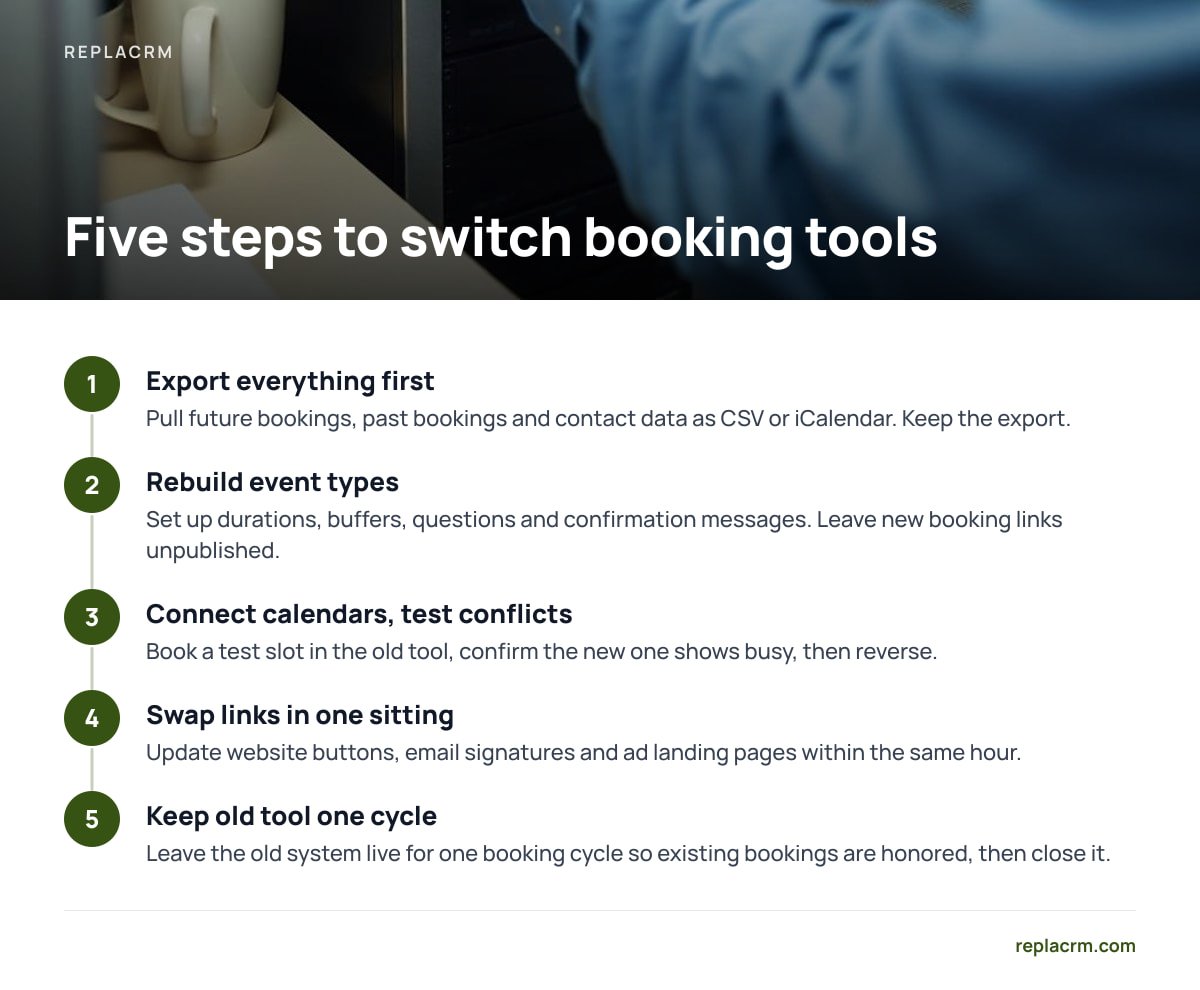
    Switching schedulers is low-risk if you overlap the two systems instead of cutting over in one step.

    1. Export everything first. Pull future bookings, past bookings and contact data as CSV or iCalendar. Keep the export even after you've migrated.
    2. Rebuild event types in the new tool. Set up durations, buffers, questions and confirmation messages. Leave the new booking links unpublished for now.
    3. Connect calendars and test conflicts. Book a test slot in the old tool and confirm the new one shows it as busy. Then reverse the test.
    4. Swap links in one sitting. Update website buttons, email signatures and ad landing pages within the same hour.
    5. Leave the old tool running for one booking cycle. If customers usually book two weeks out, keep the old system live for two weeks so existing bookings are honored, then close it.

    If you're moving off an open-source scheduler specifically, check what the license lets you keep and modify first. Self-hosted open source CRM: what you own and what you run walks through that distinction.

    Five steps to switch booking tools: 1. Export everything first; 2. Rebuild event types; 3. Connect calendars, test conflicts; 4. Swap links in one sitting; 5. Keep old tool one cycle

    Get Bookings That Land on the Customer Record, Paid For Once

    ReplaCRM puts customer self-booking inside the same self-hosted CRM that already holds each customer's chats, support tickets, form submissions, email and calls. When someone books, the appointment appears on their record next to their deal on the sales board. There's no sync job and no duplicate contact. Each brand keeps its own customers separate, and you see all of them under one login. It integrates with ReplaChat and ReplaTicket, and adds e-signing and calling/texting, so a booked call can end in a signed agreement in the same system.

    It's a one-time license from $1,495, with no per-user fees and unlimited brands, users and customers. The honest limit: you run it on your own server, so updates and backups are yours to handle. If you need routing logic as deep as a dedicated scheduler's, or a specific calendar provider's two-way sync, check our spec sheet before you cancel anything.

    Frequently Asked Questions

    Is a self-hosted booking tool more secure than a hosted one?

    Not automatically. Self-hosting removes a third party from your data flow, but the security of your server, patches and backups becomes your job. A well-maintained self-hosted tool is very secure, while a neglected one is a liability.

    Can a self-hosted scheduler sync with my existing calendar?

    Usually yes. Most self-hosted tools support iCalendar files for confirmations and either CalDAV or a calendar provider's API for two-way availability sync. Check exactly which providers a tool supports before relying on it for live bookings.

    Do I still need GDPR compliance if I self-host my booking tool?

    Yes. Self-hosting means one fewer processor contract under Article 28, but you remain the data controller. Storage limitation, security and the 72-hour breach notification rule all still apply to you.

    What server do I need to run a self-hosted booking tool?

    A small virtual server is enough for most small businesses, because booking is a light workload. What matters more is that the server is patched, backed up and running HTTPS. A managed host is a sensible option if you have no technical staff.

    Should I use a standalone scheduler or booking built into my CRM?

    If bookings lead to sales conversations or support cases, booking inside your CRM is the better choice, because it avoids duplicate contacts and sync jobs. A standalone scheduler makes sense only when booking is the entire workflow and nothing happens to the customer afterward.

    Sources

  • On-Premise CRM for Small Business: Own Your Data, Skip Seat Fees

    On-Premise CRM for Small Business: Own Your Data, Skip Seat Fees

    An on-premise CRM for small business is customer software you install on a server you control, usually paid for once instead of rented per user each month. What matters most is who holds the data and who controls the bill. Where the hardware sits matters less. A server in your back office and a cloud server you rent both count, and for most small firms the rented server is the better choice. You stop paying seat fees, and you take on patching and backups.

    TL;DR:

    • "On-premise" now covers two setups, a box in your office or a cloud server you rent and control. The rented server is the better pick for most small businesses.
    • At eight users and $50 a seat, a per-seat CRM costs about $24,000 over five years. A one-time license plus hosting costs a fraction of that.
    • Running your own CRM means you own patching, backups, TLS certificates and uptime. Budget a few hours a month or pay someone to do it.
    • Hosting the CRM yourself does not make you compliant. You still have to secure the data and be able to restore it, under GDPR Article 32 and similar laws.
    • If you run several brands, check that the CRM keeps each brand's customers separate under one login before you check anything else.

    Table of Contents

    On-Premise CRM for Small Business: What the Term Means Now

    Hands placing coins into an open leather wallet on a wooden desk beside a closed laptop.

    The phrase used to mean a beige tower in a supply closet. Today it usually means any CRM you install and run yourself. The vendor does not host it for you. The software sits on a server whose login, data and billing belong to you.

    That gives you two practical setups:

    • In-office hardware. You buy a physical server or small appliance, put it on your premises, and run the CRM on it. Your data never leaves the building. Power, cooling, internet, hardware failure and remote access also become your problem.
    • A rented server you control. You rent a virtual private server from a hosting provider and install the CRM on it. The provider handles the physical machine. You hold the root login, the database and the backups. This is often called self-hosted, and the full breakdown of what self-hosted CRM means covers it in more depth.

    Both setups end the per-seat subscription. The software license is paid once, and adding a user costs nothing. That difference is why most small business owners start looking.

    Our position: unless a regulator or a client contract requires data to stay on your premises, rent the server. A $40-a-month virtual server in a professional data center gets better power, cooling and network redundancy than you can afford to build in an office. It is also reachable from anywhere without punching holes in your office firewall.

    The Real Cost Math: Per-Seat Rent vs. a One-Time License

    Per-seat CRM pricing looks cheap in month one. The cost grows with every hire and never stops. Commercial SaaS CRMs commonly charge somewhere between $25 and over $100 per user per month, and the useful features tend to sit in the upper tiers.

    Here is a five-year comparison for a small team of eight users. The figures are illustrative, so swap in your own quotes.

    Cost item (5 years, 8 users) Per-seat SaaS CRM at $50/user/month Self-hosted CRM, one-time license
    Software $24,000 $1,495 (one-time)
    Server hosting Included ~$2,400 (at ~$40/month)
    Adding a 9th and 10th user +$6,000 over 5 years $0
    Admin time (updates, backups) Minimal ~2–4 hours/month, yours or paid
    Data export if you leave Depends on vendor's export tools You already hold the database
    Approximate total $24,000–$30,000 ~$3,900 plus admin time

    Eight users at $50 a seat is $4,800 a year. In year five you are still paying it, and you still do not own a single row of the data.

    The admin time is the honest catch. If you value your own hours at $75 and spend three a month on upkeep, that adds about $13,500 over five years. The self-hosted option still costs less in that case, but the gap is smaller than the license prices suggest. You can cut that time sharply by paying a freelance sysadmin a small monthly retainer, or by choosing a CRM with simple, scripted updates.

    Multi-brand owners see the biggest gap. Many per-seat tools charge separately for each workspace or account. If you run three brands with overlapping staff, you can end up paying for the same person three times.

    What You Take On When You Run the CRM Yourself

    A person kneeling by an open server tower, sliding a hard drive into one of its bays.

    Owning the server means owning its upkeep. None of this is exotic, but none of it is optional. The NIST Guide to General Server Security (SP 800-123) is old but still a sound baseline. It boils server security down to planning, hardening the operating system, patching, removing services you don't need, logging and backups.

    Patching the operating system and the CRM

    Unpatched software is the most common way small business servers get breached. Turn on automatic security updates for the operating system. Check for CRM updates at least monthly. Read the release notes before you apply them.

    Backups you have actually restored

    A backup you have never restored is a hope, not a backup. CISA's #StopRansomware guidance recommends keeping offline, encrypted backups of critical data and testing them regularly. For a CRM, that means nightly database dumps copied to a separate provider or account. Ransomware that reaches your server should not be able to reach the backup too.

    Encryption in transit

    Your CRM login page must run over HTTPS. Let's Encrypt issues free TLS certificates that renew automatically. Cost is no longer a reason to skip encryption.

    Application security

    Customer records are a target. The OWASP Top Ten lists the most critical web application security risks, including broken access control and injection. Ask any CRM vendor how their software handles these. Then do your part: enforce strong passwords, enable two-factor authentication if it's offered, and remove accounts the day someone leaves.

    Pro Tip: Register the hosting account, the domain and the backup storage under a business email address you control. Do not use the address of the developer or freelancer who set things up. More small businesses lose access to their own self-hosted systems through a departed contractor than through hackers. Also store the root password and backup encryption key in a password manager that at least two owners can open.

    Office Box or Rented Server: Where Your CRM Should Live

    A small server tower and a router on the floor of an office closet, joined by neatly tied cables.

    The choice comes down to who handles the physical risks and who needs access.

    Factor Server in your office Rented virtual server
    Upfront cost Hardware purchase ($1,000+) None
    Monthly cost Power, internet, eventual replacement ~$20–$80 typical
    Power and cooling redundancy Only what you buy Data-center grade
    Remote access for staff Needs VPN or exposed ports Built-in over HTTPS
    Data physically on your premises Yes No
    Hardware failure Your problem, often your weekend Provider replaces it
    Best for Strict on-site data requirements Almost everyone else

    Pick the office box only if a contract, regulator or industry rule says customer data must stay on your premises. Otherwise, the rented server wins on reliability, access and cost. It also gives you the thing you were actually after: your data, under your control, with no seat fees.

    If you plan to run open-source software rather than a commercial self-hosted product, the trade-offs change again. That route usually means more setup and fewer finished features. Our guide to self-hosted open source CRM explains what you own and what you run in that case.

    Compliance and Data Ownership: What Self-Hosting Fixes and What It Doesn't

    Self-hosting gives you control. It does not give you compliance. If you hold personal data about people in the EU, Article 32 of the GDPR requires "appropriate technical and organisational measures" to secure it. That includes encryption where appropriate and regular testing of your safeguards.

    GDPR Article 32 explicitly requires the ability to restore the availability and access to personal data in a timely manner after a physical or technical incident. An untested backup does not meet that bar.

    What self-hosting does fix:

    • Fewer third parties. No CRM vendor stores or processes your customer data on its own servers. If you rent a server, the hosting provider is still a processor, so you still need a data processing agreement with them.
    • Your choice of location. You decide which country or region the server sits in. That matters if your customers or contracts require data to stay in a specific jurisdiction.
    • Exit on your terms. You already hold the database. Leaving never depends on a vendor's export tool or a cancellation window.

    What it doesn't fix: you still need consent records, retention rules, access controls and a process for deletion requests. Similar duties apply under other privacy laws worldwide. Self-hosting makes these easier to enforce because you control the database, but you still have to enforce them.

    What to Check Before You Buy: A Shortlist for Multi-Brand Owners

    Most CRM buying guides assume one company and one brand. If you run several, check these points first.

    • True brand separation. Each brand's customers, pipelines and messages should stay apart under one login. A support agent for Brand A should not see Brand B's customers unless you allow it.
    • One record per customer, all channels. Chats, support tickets, form submissions, email and calls should land on a single customer timeline. Otherwise you are paying to store fragments.
    • Licensing that ignores headcount. Confirm in writing that there are no per-user, per-brand or per-contact fees. Some "self-hosted" products still meter usage.
    • Plain server requirements. Ask for the exact operating system, database and memory needed. If the vendor can't give a clear spec sheet, setup will be painful.
    • A documented update process. Find out how updates are delivered and how long they take. Updating should be a routine job, not a project.
    • Built-in sales tools. A deal board, customer self-booking and e-signing remove the need for separate subscriptions. Every add-on you cut is one less monthly bill.

    When You Should Stay on a Per-Seat SaaS CRM

    Self-hosting isn't right for everyone. Stay on a hosted subscription if:

    • Nobody on your team will own the server. If there is no one to apply updates or check backups, and you won't pay someone to, a hosted tool is safer.
    • You have one or two users and no growth plans. At two seats, subscription costs stay modest, and the admin overhead may not pay off for years.
    • You need a deep library of third-party plug-ins. Large hosted ecosystems offer connectors that a self-hosted product may not match.

    If none of those apply, and especially if you run more than one brand or expect to hire, the math and the control both favor owning your CRM.

    Pay Once, Own Your Customer Records, and Run Every Brand From One Login

    ReplaCRM is built for the problem this article describes: small business owners paying monthly rent per seat for customer data they don't control. You pay once, from $1,495, and run it on your own server. There are no per-user fees and no limits on brands, users or customers. Chats, support tickets, form submissions, email and calls all land on one customer record. Each of your businesses keeps its customers separate under a single login. A sales board, customer self-booking, e-signing, calling and texting are included, and it connects to ReplaChat and ReplaTicket.

    The honest limit: you are running a server. Someone needs to handle updates and confirm that backups actually restore, as described above. Read the server requirements on our spec sheet before you buy, and the same goes for any other CRM. If nobody on your team can own that work, budget for a sysadmin first.

    Frequently Asked Questions

    Is an on-premise CRM the same as a self-hosted CRM?

    In everyday use, mostly yes. Both mean you install and run the CRM yourself instead of renting it from a vendor. Strictly, "on-premise" means hardware in your own building, while "self-hosted" also covers a cloud server you rent and control.

    How much does an on-premise CRM cost for a small business?

    The software is often a one-time license, usually in the low thousands of dollars. Hosting on a rented virtual server typically runs about $20 to $80 a month. Also budget for a few hours of admin time each month or a small retainer for a sysadmin.

    Do I need an IT person to run a self-hosted CRM?

    You need someone who can apply updates, manage HTTPS certificates and test backup restores. That can be a technical owner, an employee or a freelance sysadmin on a small monthly retainer. What matters is that one named person is responsible for it.

    Is a self-hosted CRM more secure than a cloud CRM?

    It isn't automatically more secure. It is more under your control. A patched, backed-up, HTTPS-only server with strong access controls is a strong setup, but a neglected one is a liability.

    Does hosting my CRM myself make me GDPR compliant?

    No. GDPR Article 32 still requires appropriate security measures and the ability to restore personal data after an incident. Self-hosting reduces the number of third parties involved, but you still need consent records, retention rules and a processing agreement with your hosting provider.

    Sources

  • Self-Hosted Open Source CRM: What You Own and What You Run

    Self-Hosted Open Source CRM: What You Own and What You Run

    A self-hosted open source CRM is customer relationship software that meets two conditions. Its source code is published under an open license, and you install it on a server you control. Those are separate choices. Open source describes your rights to the code, and self-hosted describes where your customer data lives. Most small business owners care more about the second, which means owning the server and the records, than about being able to edit the code.

    TL;DR:

    • "Open source" is a license question, and "self-hosted" is a location question. You can have either one without the other.
    • If your main goal is owning your customer data and ending per-seat bills, self-hosting matters more than an open license.
    • Many open source CRMs are "open core." The free edition often leaves out the features small teams need, such as calling, e-signing or multi-brand separation.
    • Self-hosting moves security and compliance onto you. That includes patching, backups, and GDPR's 72-hour breach notification duty if you handle EU residents' data.
    • For an owner who isn't a developer, a self-hosted CRM with a one-time license is usually the safer pick than assembling an open source stack.

    Table of Contents

    Self-Hosted Open Source CRM: Two Separate Decisions in One Phrase

    When people search for a self-hosted open source CRM, they usually want two things at once. They want to stop renting their customer list, and they want to stop paying every month for each person who logs in. The phrase bundles those goals together, but the two words behind it mean different things.

    "Open source" is a legal term about the license. The Open Source Definition published by the Open Source Initiative sets out ten criteria a license must meet. They include free redistribution, access to source code, permission to create derived works, and no discrimination against people, groups or fields of use. A CRM is open source because of its license. Where it runs has nothing to do with it.

    "Self-hosted" describes deployment. The software runs on a server you rent or own, such as a VPS, a machine in your office, or your own cloud account. The database holding your contacts, deals and conversations sits on that server rather than on a vendor's shared platform.

    You can have one without the other. Some open source CRMs are mostly used through the publisher's paid cloud. Some proprietary CRMs are licensed for you to install on your own hardware. Treat these as two dials, and decide on each one separately.

    The Four Combinations, and Which One Fits a Small Business

    Once you separate the license from the location, every CRM falls into one of four boxes. Each box gives you a different deal on cost, control and responsibility.

    Setup Who holds your data Typical pricing Who patches it Best fit
    Hosted, proprietary (standard SaaS) The vendor Per user, per month Vendor Teams that want zero server work and accept rising seat costs
    Hosted, open source (publisher's cloud) The vendor Per user, per month Vendor Teams that want an exit route but not a server
    Self-hosted, open source You Free license, paid add-ons or support You Teams with in-house technical skill who want to modify code
    Self-hosted, proprietary license You One-time or annual license You, with vendor updates Owners who want data ownership without building their own stack

    The box that disappoints most small businesses is "hosted, open source." The license is open, but you are still renting seats on someone else's server. That is the subscription model you were trying to leave.

    If you run a business, not a development shop, the real choice is between the bottom two rows. The deciding question is simple: do you plan to change the code yourself?

    If you will never edit the source code, an open source license gives you very little that a self-hosted license with full data export doesn't.

    What an Open Source License Actually Gives You, and What It Doesn't

    An open license is valuable for specific reasons. You can read the code to see exactly what it does with your data. You can fix a bug without waiting on a vendor. And if the project is abandoned, you or a contractor can keep running it. Those are real protections.

    The license also comes with obligations. Some CRMs use the GNU Affero General Public License (AGPL). Its Section 13 requires that, if you modify the software and let users interact with it over a network, you must offer those users the corresponding source code. That rarely matters for an internal CRM. It does matter if you build a customer-facing portal on top of one.

    "Free" also often means "free edition." Many open source CRMs follow an open core model. The community version is open, while features like advanced reporting, telephony, e-signatures or multi-company support sit in a paid tier under a different license. Before you commit, check which features are in the edition you will actually run.

    • Modification rights. Useful only if you, or someone you pay, can write and maintain code in that project's language and framework.
    • Auditability. You can inspect how data is stored and transmitted, which helps when a client or regulator asks.
    • Continuity. If the publisher disappears, the code doesn't. You can fork it or keep running the last release.
    • Feature gaps. Community editions often lack the multi-channel inbox and multi-brand separation that owners of several businesses need most.

    The Real Cost of Running a CRM on Your Own Server

    Hands slide a hard drive into an open server on a workbench, with a screwdriver lying nearby.

    Self-hosting replaces a subscription with a smaller set of costs you control. They don't disappear. Expect a server bill, a domain and TLS certificate (often free through automated certificate services), offsite backup storage, and someone's time for updates.

    The comparison that matters is total cost over three years. Take a ten-person team on a per-seat CRM at $50 per user per month. That team pays $6,000 a year, or $18,000 over three years, before any price increase or add-on. A self-hosted CRM on a $40-a-month server costs $1,440 in hosting over the same period, plus the license and maintenance time.

    Cost line (10 users, 3 years) Per-seat SaaS at $50/user/month Self-hosted
    Software $18,000 License: $0 (open source) to a one-time fee
    Hosting Included About $1,440 at $40/month
    Maintenance time Minimal 1–3 hours a month for updates and checks
    Cost of adding a 5th brand or 20 more users Rises with every seat Usually unchanged

    Maintenance time is the cost people underestimate. An open source CRM assembled from a core plus plugins needs each piece updated in a compatible order. A single packaged product usually needs one update. That gap can mean the difference between an hour a month and an afternoon.

    Pro Tip: Before you choose any self-hosted CRM, open the project's release history for the last 12 months. Look at how often security fixes shipped and whether upgrades between major versions needed a manual database migration. A project that ships small, regular patches costs you far less time than one that ships rarely and breaks things when it does.

    Security and Compliance Become Your Job the Day You Self-Host

    A person locks the mesh door of a small server cabinet with a key.

    When you host your own CRM, nobody else patches the operating system, the web server or the application. That is the trade-off for owning the data. It is manageable, but it has to be on someone's calendar.

    If you hold personal data on people in the EU, the General Data Protection Regulation applies wherever your server sits. Article 32 of the GDPR requires "appropriate technical and organisational measures," such as encryption and the ability to restore access to data after an incident. Article 33 requires you to notify the supervisory authority of a personal data breach within 72 hours of becoming aware of it, unless the breach is unlikely to put people's rights at risk.

    72 hours. That is how long GDPR Article 33 gives you to report a personal data breach to your supervisory authority, and on a self-hosted CRM, you are the one who has to notice it.

    Two free public resources make patching practical. The OWASP Top 10 lists the most critical web application security risks, and it is a sensible checklist for configuring any browser-based CRM. The CISA Known Exploited Vulnerabilities catalog lists flaws attackers are actively using. If your server software appears there, patch it first.

    • Automatic OS updates. Turn on unattended security updates for the operating system. Most server compromises start with a known, already-fixed flaw.
    • Restricted admin access. Put the admin panel behind a VPN or IP allowlist, and require two-factor login for every user.
    • Offsite, tested backups. Keep at least one backup copy off the server, and restore from it into a test environment at least once a quarter. A backup you have never restored is a guess.
    • Encrypted connections. Serve the CRM only over HTTPS, and encrypt backups before they leave the machine.

    What to Check Before You Install Any Self-Hosted CRM

    Most CRM regret comes from discovering a missing feature six months in, after the data has moved. Run through these checks before you migrate a single contact.

    Data ownership in practice

    Confirm that you can export every record, including notes, attachments, conversation history and deal stages, in an open format such as CSV or SQL. Owning the server means little if the data sits in a structure only the vendor's tools can read.

    Separation between brands

    If you run more than one business, check whether customers, pipelines and inboxes can be kept apart under one login. Many CRMs treat this as "multi-tenant" and charge for it, or don't support it at all. Some owners fall back on separate installs, which doubles the maintenance work.

    Channels on one record

    Count the places customers actually reach you: live chat, support tickets, web forms, email and phone calls. A CRM that shows only email and deals leaves you switching tabs. The value of a single customer record comes from having every channel on it.

    Upgrade and support terms

    Find out what an upgrade involves, who you call when it fails, and whether security updates are included in what you pay. For open source, check whether paid support exists at all. For a licensed product, read exactly what the one-time fee covers.

    Which Option We Would Pick, and Why

    Two colleagues talk across an office table with coffee mugs and a closed laptop between them.

    Pick a self-hosted open source CRM if you have a developer on staff or on retainer and want to change how the software works. The license protects that investment, and the community edition may cover everything a single-brand business needs.

    Pick a self-hosted CRM with a one-time license if you are an owner who wants your customer data on your own server, no per-seat bills, and features that work on day one. That covers most operators of two, three or five brands. For them, the extra features of a packaged product usually save more time than modification rights would.

    Avoid the hosted open source tier unless you are using it as a short trial before moving to your own server. It keeps the monthly per-seat cost you set out to escape.

    Put Every Brand's Customers on a Server You Own, for One Payment

    Replacrm is built for the owner this article describes: someone running one or more brands who wants the customer data on their own server and the monthly seat bill gone. You pay once, from $1,495, and run it on your server with unlimited brands, users and customers. Chats, support tickets, form submissions, email and calls land on a single customer record. Each business's customers stay separate under one login. A sales board, customer self-booking, e-signing, and calling and texting are included, and it connects with ReplaChat and ReplaTicket.

    One honest limit: ReplaCRM is self-hosted but not open source. You get your data and your server, but not the right to modify and redistribute the core code. You still need a server and someone to keep it patched. Read the spec sheet, including ours, to confirm it covers every channel you use before you migrate.

    Frequently Asked Questions

    Is a self-hosted CRM the same as an open source CRM?

    No. "Self-hosted" means the software runs on a server you control. "Open source" means the code is released under a license meeting the Open Source Initiative's definition. A CRM can be either one, both or neither.

    Is a self-hosted open source CRM really free?

    The license is usually free, but running the CRM is not. You pay for a server, backups and the time to apply updates. Many projects also charge for features such as telephony, advanced reporting or multi-company support.

    Does GDPR still apply if I host my CRM on my own server?

    Yes. GDPR applies to personal data of people in the EU regardless of where the server is located. Self-hosting makes you directly responsible for the security measures in Article 32. It also makes you responsible for reporting a breach to your supervisory authority within 72 hours under Article 33.

    How much technical skill do I need to self-host a CRM?

    You need to be comfortable managing a basic Linux server, or have someone who is. That means installing updates, configuring HTTPS and restoring backups. Plan for one to three hours a month for a packaged product, and more for an open source stack built from several plugins.

    Can one self-hosted CRM handle several separate businesses?

    Some can, but many can't, or they charge extra for it. Look for a CRM that keeps each brand's customers, pipelines and inboxes separate under a single login. Otherwise you may end up maintaining several installations.

    Sources

  • What a Self-Hosted CRM Is — and Why It Beats Per-Seat Pricing

    What a Self-Hosted CRM Is — and Why It Beats Per-Seat Pricing

    A self-hosted CRM is customer relationship software you install and run on your own server, instead of logging into a vendor's cloud platform. The difference that matters isn't features — it's who controls the data and who sends the bill. A cloud CRM charges per seat every month and keeps your records on its servers. A self-hosted CRM is usually a one-time purchase, and your customer data never leaves infrastructure you control.

    TL;DR:

    • A self-hosted CRM runs on your own server; a cloud CRM runs on the vendor's, with per-seat fees that never stop.
    • Data residency and compliance questions get simpler when customer records stay on infrastructure you control.
    • Past 5–10 users, a one-time license often costs less over three years than a monthly per-seat subscription.
    • Self-hosting shifts backups, patching, and uptime onto you or your IT provider — budget time and money for that.
    • If you run more than one brand, pick a self-hosted CRM built to keep each brand's customers separate under one login.

    Table of Contents

    Self-Hosted CRM vs. Cloud CRM: The Difference That Actually Matters

    A compact server unit sits on a desk beside a closed laptop, connected by cables.

    A self-hosted CRM and a cloud CRM can look identical on a demo call. Both track contacts, log deals, and store support tickets. The split shows up later — when the vendor raises prices, changes a feature you depend on, or has an outage during your busiest week. With a cloud CRM, you're renting access and accepting whatever terms the vendor sets next quarter. With a self-hosted CRM, the software is yours, installed on a server you control, and nobody can change the deal on you.

    This is also why the comparison isn't really about features. Most CRMs, hosted or not, do roughly the same job of organizing customers and conversations. The real question is who holds the data, who sets the price going forward, and what happens if the vendor shuts down, gets acquired, or decides your plan no longer exists.

    Where Your Customer Data Actually Lives, and Who Can See It

    A person holds a set of keys in front of a locked server rack cabinet in a server room.

    With a cloud CRM, your customer list, call logs, and support history sit on a vendor's servers, subject to that vendor's security practices, breach history, and legal jurisdiction. With a self-hosted CRM, the same data sits on a server you chose, in a location you chose, under rules you set. For businesses handling EU customer data, that distinction has teeth: under GDPR, fines for mishandling personal data can reach €20 million or 4% of global annual turnover, whichever figure is larger, and where that data physically lives affects how exposed you are.

    GDPR fines can reach €20 million or 4% of global annual turnover — whichever number is larger.

    This doesn't mean cloud CRMs are inherently unsafe. Major vendors invest heavily in security. But every additional company holding a copy of your customer data is another company that can be breached, subpoenaed, or acquired by someone with different data practices. A self-hosted CRM removes one link from that chain — not all of them, but one you otherwise have no control over.

    The Real Cost Math: One-Time License vs. Per-Seat Subscription

    A single large coin rests next to a tall stack of smaller coins on a wooden desk.

    Per-seat pricing feels small monthly and large over time. A $40-per-seat plan for ten people isn't $40 — it's $400 a month, every month, for as long as the business runs the software. A one-time license front-loads the cost and then goes flat except for hosting, which typically runs far less than a subscription.

    Self-Hosted CRM (one-time license) Typical Cloud CRM (per seat)
    Pricing model Pay once, from $1,495 Monthly fee per user, indefinitely
    Cost, 10 users, Year 1 $1,495 total, plus low-cost hosting $3,000–$9,600 (at $25–$80/seat/month)
    Cost, 10 users, Year 3 $1,495 total, plus hosting (roughly $120–$360/year) $9,000–$28,800
    Users and brands Unlimited, no extra per-seat charge Often capped, or billed per brand/workspace
    Who controls pricing going forward You The vendor

    The crossover point varies by vendor, but for most small operations with five or more users, a one-time license pays for itself within the first year and keeps saving money every year after that. The math gets more lopsided the more brands or users you add, since per-seat pricing scales with headcount and self-hosted licensing often doesn't.

    Self-hosted license vs. per-seat cloud costs: Pricing model: Pay once, from $1,495 / Monthly fee per user; 10 users, Year 1: $1,495 plus low-cost hosting / $3,000–$9,600; 10 users, Year 3: $1,495 plus hosting / $9,000–$28,800; Hosting per year: roughly $120–$360/year / Included in subscription; User

    What You Give Up, and What You Gain, by Hosting It Yourself

    Self-hosting isn't free in the sense of effort — you trade a monthly bill for a short list of ongoing responsibilities. Knowing what those are before you switch is the difference between a smooth setup and a frustrating one.

    • Patching is on you. Cloud vendors push security updates silently. With a self-hosted CRM, someone has to apply updates — usually a quick, infrequent task, but a real one.
    • Backups aren't automatic unless you make them automatic. Most self-hosted CRMs support scheduled backups to external storage, but you have to set the schedule; nobody does it for you by default.
    • Uptime is your responsibility, not an SLA. A cloud vendor guarantees uptime and eats the cost of outages. On your own server, downtime is yours to prevent and yours to fix.
    • No forced feature changes or surprise price increases. The CRM you install is the CRM you keep. A vendor can't deprecate a feature you rely on or push you onto a pricier tier.

    Security Responsibility Shifts to You — Here's What That Means Day to Day

    Running your own CRM means you own the attack surface, not a vendor's security team. That's manageable, but it's not nothing. Baseline practices from the OWASP Foundation — keeping the server patched, restricting admin access, using strong authentication, and logging access attempts — apply directly to a self-hosted CRM the same way they'd apply to any server-hosted application.

    Encrypting traffic to and from the CRM is non-negotiable, and it's also free. Let's Encrypt issues no-cost TLS certificates that renew automatically, so there's no excuse for running a customer database over an unencrypted connection.

    Pro Tip: Put the CRM on its own subdomain and its own virtual server or container, separate from any other software you run. If that one application is ever compromised, the blast radius stops at the CRM instead of spreading to your website, email server, or anything else sharing the same box.

    Picking the Right Self-Hosted CRM When You Run More Than One Brand

    Not every self-hosted CRM is built for operators juggling multiple businesses. Before you commit, check for a few specific things:

    • Multi-brand separation under one login. You should be able to log in once and switch between brands without each one seeing the other's customers.
    • A single inbox for every channel. Chats, support tickets, form submissions, email, and calls should land on one customer record, not five disconnected tools.
    • A sales board you actually use. If deal tracking lives in a spreadsheet next to the CRM, the CRM isn't doing its job.
    • Booking and e-signing built in, not bolted on. Fewer third-party subscriptions stacked on top of your "one-time" purchase means the cost math in the table above actually holds.

    Get a Self-Hosted CRM Built for Owners Running More Than One Brand

    ReplaCRM is a self-hosted CRM sold for a one-time payment starting at $1,495 — no per-user fees, unlimited brands, unlimited customers. It pulls chats, tickets, form submissions, email, and calls onto one customer record, keeps each brand's customers walled off under a single login, and adds a sales board, self-booking, and e-signing without a stack of separate subscriptions. It also connects with ReplaChat and ReplaTicket if you're already running those.

    The honest caveat: you still need a server to install it on and someone willing to handle backups and occasional updates. If that sounds like overhead rather than freedom, a managed cloud CRM may suit you better. If you're tired of per-seat bills climbing every time you hire or launch another brand, check the spec sheet and see if ReplaCRM fits.

    Frequently Asked Questions

    What's the main difference between a self-hosted CRM and a cloud CRM?

    A self-hosted CRM runs on a server you control and is typically a one-time purchase. A cloud CRM runs on the vendor's servers and charges a recurring fee per user, for as long as you use it.

    Is a self-hosted CRM harder to maintain than a cloud CRM?

    It requires some ongoing attention — applying updates, scheduling backups, and watching uptime — that a cloud vendor otherwise handles for you. For most small teams this amounts to occasional, not constant, work.

    Does a self-hosted CRM save money compared to a subscription?

    Usually, once you pass a handful of users. A one-time license cost stays flat while per-seat subscriptions keep billing every month, so the savings grow the longer you use the software and the more people you add.

    Is self-hosting a CRM more secure than using a cloud CRM?

    It removes one link in the chain — a third-party vendor holding a copy of your data — but it shifts security responsibility onto you. Following basic practices like those from OWASP and encrypting traffic with a free certificate from Let's Encrypt covers most of the risk.

    Can a self-hosted CRM handle more than one business or brand?

    Some can, but not all are built for it. Look specifically for multi-brand separation under one login rather than assuming any self-hosted CRM supports running several businesses side by side.

    Sources